Beware that this post is related to an SDK in maintenance mode
More Info: Consider nRF Connect SDK for new designs

DFU secure_bootloader example on nRF52DK doesn't advertise

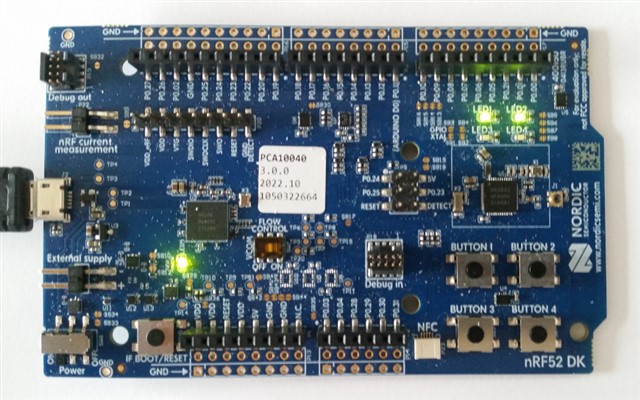
I have an nRF52DK board (PCA10040 3.0.0) and try to run the pre-built secure_bootloader examples from nRF5 SDK 17.1.0 (ddde560). What can possibly go wrong? Slight smile

From the folder nRF5_SDK_17.1.0_ddde560/examples/dfu/secure_dfu_test_images/ble/nrf52832 I have programmed the softdevice* softdevice_s132.hex (using nrfjprog --family nrf52 --verify --program) and then the hrs_application_s132.hex example app. After reset, this works fine, I can connect to the HRS app, so it seems that the hardware is OK. But after programming the bootloader bootloader_secure_ble_debug_without_bonds_s132.hex (and reset) there is no bootloader advertising. LED1 and LED2 are constantly lit.

Same goes, after a --recover, installing only the softdevice and bootloader (without app).

I also tried building myself the examples/dfu/secure_bootloader (make -C pca10040_s132_ble_debug/armgcc). Using the debug build, I can see that it enters DFU mode (and prints "Advertising..." on the RTT debug channel), but I don't see it advertise (using nRF Connect mobile app). Every few minutes the debugger says "external reset detected".

Can anyone confirm that these examples have been tested and work on a nRF52DK board?

Tormod

*) I also tried the components/softdevice/s132/hex/s132_nrf52_7.2.0_softdevice.hex - it differs by two bytes (0101 instead of cafe) at one place in the hex files.

Debug log:

<info> app: Inside main
<debug> app: In nrf_bootloader_init
<debug> nrf_dfu_settings: Calling nrf_dfu_settings_init()...
<debug> nrf_dfu_flash: Initializing nrf_fstorage_nvmc backend.
<debug> nrf_dfu_settings: Using settings page.
<debug> nrf_dfu_settings: Copying forbidden parts from backup page.
<debug> nrf_dfu_settings: Destination settings are identical to source, write not needed. Skipping.
<info> nrf_dfu_settings: Backing up settings page to address 0x7E000.
<debug> nrf_dfu_settings: Destination settings are identical to source, write not needed. Skipping.
<debug> app: Enter nrf_bootloader_fw_activate
<info> app: No firmware to activate.
<info> app: Boot validation failed. No valid app to boot.
<debug> app: DFU mode because app is not valid.
<info> nrf_bootloader_wdt: WDT is not enabled
<debug> app: in weak nrf_dfu_init_user
<debug> app: timer_stop (0x20005974)
<debug> app: timer_activate (0x20005974)
<info> app: Entering DFU mode.
<debug> app: Initializing transports (found: 1)
<debug> nrf_dfu_ble: Initializing BLE DFU transport
<debug> nrf_dfu_ble: Setting up vector table: 0x00071000
<debug> nrf_dfu_ble: Enabling SoftDevice.
<debug> nrf_dfu_ble: Configuring BLE stack.
<debug> nrf_dfu_ble: Enabling the BLE stack.
<debug> nrf_dfu_ble: No advertising name found
<debug> nrf_dfu_ble: Using default advertising name
<debug> nrf_dfu_ble: Advertising...
<debug> nrf_dfu_ble: BLE DFU transport initialized.
<debug> nrf_dfu_flash: Initializing nrf_fstorage_sd backend.
<debug> app: Enter main loop

Parents Reply
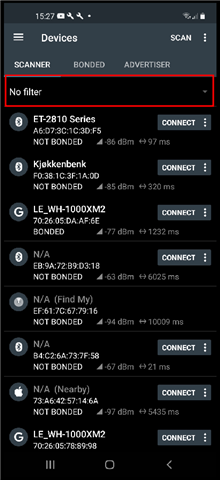
  • I'll be d*mned, I think you are onto something. Instead scanning with hcitool lescan on my laptop I see there is a "DfuTest" that I don't see on the phone. And on another phone (with 4.24.1) it shows up... There is a dozen of devices on both phones, just "DfuTest" missing on the one I had been using all this time.

    EDIT: I downgraded to 4.24.1 on the "bad" phone, but it didn't help. It seems as if it has a built-in "DfuTest" filter... Why should it see "HRS" and "buttonless" with the same softdevice, but not "DfuTest"?

Children
  • I do not recall having seen anything like this before. There is no default built-in filter in the nRF connect app, at least not that I am aware of. Only place where filters are configured in the app is here:

  • Yes, it is weird. I deleted the app and reinstalled the latest version again, to no avail. I know about the filter settings, I have been using them and pay attention to them. I sometimes use the "Exclude" options but they were also off in this case (IIUC they won't filter nRF bootloaders anyway). I also compared Settings between the two phones.

  • I agree, it is weird. Could you try another third-party BLE app to see if it results in the same problem? It will help us narrow down the problem at least. 

    Here is an app I found which may work for this purpose:

    https://play.google.com/store/apps/details?id=uk.co.alt236.btlescan&hl=en&gl=US&pli=1 

  • I tried Bluetooth LE Scanner on both phones, and the advertising bootloader shows up on the "good" phone and not on the "bad" phone. So it seems it is the phone or its Android that is allergic to the nRF52 bootloaders (while seeing the nRF51 bootloaders fine). Note the bootloader in this last trial is my own adaption of the SDK 14.2.0 bootloader to a custom nRF52810 board. This is what I originally was trying to get working, but getting stuck and therefore turning to the DK board (both "native" and nRF52810 emulation) with the "known good" bootloaders in the SDK 17.1.0 and ended up here. I might have more interesting debugging awaiting me to get this one to work properly, but at least now I can see that it is advertising!

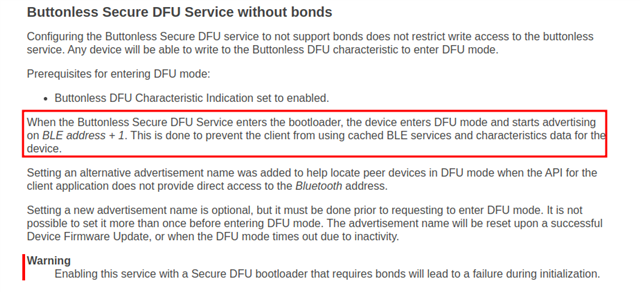
  • Thanks for the update. So, it sounds like the issue must be at a lower layer than the app. If you want to debug this further, you could try to temporarily disable the address change in the bootloader and see if that makes any difference if the bootloader is advertising with the same address.

    nrf_dfu_ble.c

    static uint32_t gap_params_init(void)
    {
        uint32_t                err_code;
        ble_gap_conn_sec_mode_t sec_mode;
        uint8_t const *         device_name;
        uint32_t                name_len;
    
        BLE_GAP_CONN_SEC_MODE_SET_OPEN(&sec_mode);
    
    #if (!NRF_DFU_BLE_REQUIRES_BONDS)
    
        #warning "Address change is disabled. 
        //err_code = gap_address_change();
        //VERIFY_SUCCESS(err_code);
    
        if ((m_flags & DFU_BLE_FLAG_USE_ADV_NAME) != 0)
        {
            NRF_LOG_DEBUG("Setting adv name: %s, length: %d", m_adv_name.name, m_adv_name.len);
            device_name = m_adv_name.name;
            name_len    = m_adv_name.len;
        }
        else
    #endif
        {
            NRF_LOG_DEBUG("Using default advertising name");
            device_name = (uint8_t const *)(NRF_DFU_BLE_ADV_NAME);
            name_len    = strlen(NRF_DFU_BLE_ADV_NAME);
        }
    
        err_code = sd_ble_gap_device_name_set(&sec_mode, device_name, name_len);
        VERIFY_SUCCESS(err_code);
    
        err_code = sd_ble_gap_ppcp_set(&m_gap_conn_params);
        return err_code;
    }

Related