

My "Locals" window in my VS Code debugger is missing a couple of columns. Here's what it looks like in the MS tutorial (https://learn.microsoft.com/en-us/visualstudio/debugger/getting-started-with-the-debugger-cpp?view=vs-2022)
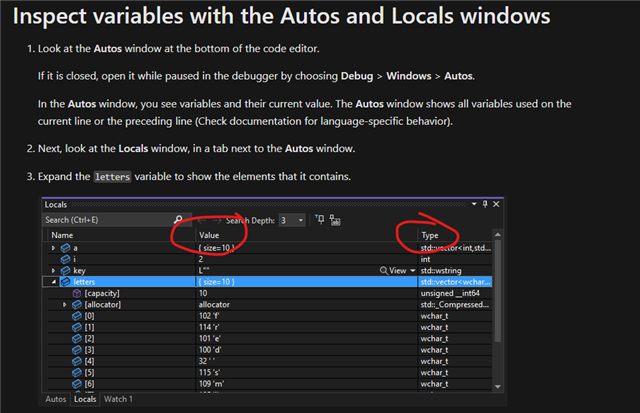
Note the Value and Type columns.
Here's what it looks like in my VS Code SDK:
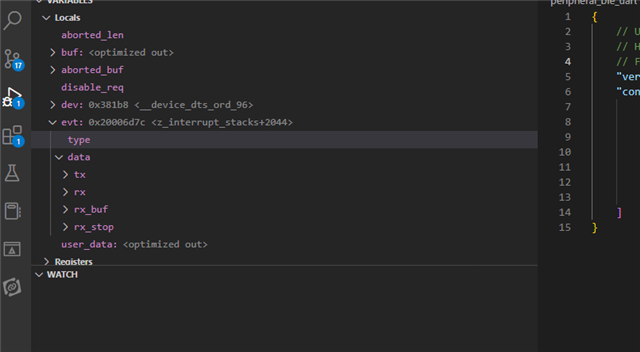
Note the missing columns. I guess it has something to do with my launch.json file, but that's a complicated beast. Does anyone know how I should edit the debugger config to get the missing Value and Type columns?
Here's my launch.json file:
{
    // Use IntelliSense to learn about possible attributes.
    // Hover to view descriptions of existing attributes.
    // For more information, visit: https://go.microsoft.com/fwlink/?linkid=830387
    "version": "0.2.0",
    "configurations": [
        {
            "type": "nrf-connect",
            "request": "launch",
            "name": "Launch active build configuration",
            "config": "${activeConfig}",
            "runToEntryPoint": "main"
        }
    ]
}
I'm using SDK
Here's the "about" screen from VS Code:
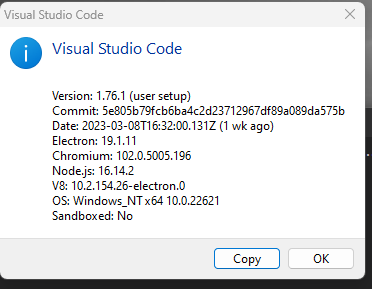
I'm using toolchain v2.3.0

