Unable to parse MCUBoot image file

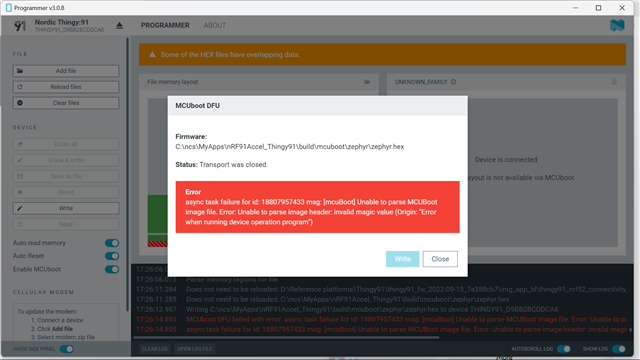
I am trying to flash an application image in nRF9160 on Thingy91. Thingy91 is in MCUBoot mode, and the selector switch is on nRF91 position. I get an error as below if I try to flash the image. I have enabled MCUBoot thru Guiconfig and not added configuration setting CONFIG_MCUBOOT in project configuration file. If I add CONFIG_MCUBOOT=y in project configuration file then I get errors while building the app.
Parents
  • Hi Amanda

    I continue to get the same error even after following the steps mentioned in  How to add DFU support to your Thingy:91 project Please note that I am getting same error even if I try to flash prebuilt asset tracker application. nRF91Accel.zip

  • Hi, 

    Please program with the app_signed.hex as the guide indicated.

    -Amanda H.

  • I tried to add DFU support to my Thingy:91 project. I tested this with both:

    1. The default Asset Tracker v2 code

    2. A modified version of Asset Tracker v2

    In both cases, the build process succeeded, but flashing the merged image fails.


    Steps Taken:

    1. Followed the official Nordic guide for adding DFU support to Thingy:91.

    2. Built the project successfully using west build.

    3. Tried flashing via:

      • nRF Programmer (USB)

      • SWD (Segger J-Link)

    4. Both attempts resulted in the same error.

      Error: One or more batch tasks failed:
      * : Device error: Emulator error: Failed to connect to device: Feature is not supported (Generic)

      FATAL ERROR: command exited with status 1: nrfutil --json device x-execute-batch --batch-path 'C:\Users\Dell\workspace_2\project\app\build\generated_nrfutil_batch.json' --serial-number 
      (Erros in vs code)

       C:\Users\Dell\workspace_2\project\app\build\merged.hex
      Error: Failed with exit code 1. One or more program tasks failed: * THINGY91_: Unable to parse the MCUBoot image file. Unable to parse image header: invalid magic value (FileOpenFailed). Message: Failed, Unable to parse the MCUBoot image file. Unable to parse image header: invalid magic value.(nrf prgrammer)
      i tried everything but it is giving the same error and additionally there is an bug in the nrf programmer of versions 4.61 and 4.6.2 when initial board setup downloaded this thingy91_mfw-1.3.6_sdk-2.7.0 file and extracted the file in that while tried to upload the modem firmware it was successful and when i tried to upload the sample applications it did not let me when i downgraded that application built successfully now facing problems to upload my hex files.
       
Reply
  • I tried to add DFU support to my Thingy:91 project. I tested this with both:

    1. The default Asset Tracker v2 code

    2. A modified version of Asset Tracker v2

    In both cases, the build process succeeded, but flashing the merged image fails.


    Steps Taken:

    1. Followed the official Nordic guide for adding DFU support to Thingy:91.

    2. Built the project successfully using west build.

    3. Tried flashing via:

      • nRF Programmer (USB)

      • SWD (Segger J-Link)

    4. Both attempts resulted in the same error.

      Error: One or more batch tasks failed:
      * : Device error: Emulator error: Failed to connect to device: Feature is not supported (Generic)

      FATAL ERROR: command exited with status 1: nrfutil --json device x-execute-batch --batch-path 'C:\Users\Dell\workspace_2\project\app\build\generated_nrfutil_batch.json' --serial-number 
      (Erros in vs code)

       C:\Users\Dell\workspace_2\project\app\build\merged.hex
      Error: Failed with exit code 1. One or more program tasks failed: * THINGY91_: Unable to parse the MCUBoot image file. Unable to parse image header: invalid magic value (FileOpenFailed). Message: Failed, Unable to parse the MCUBoot image file. Unable to parse image header: invalid magic value.(nrf prgrammer)
      i tried everything but it is giving the same error and additionally there is an bug in the nrf programmer of versions 4.61 and 4.6.2 when initial board setup downloaded this thingy91_mfw-1.3.6_sdk-2.7.0 file and extracted the file in that while tried to upload the modem firmware it was successful and when i tried to upload the sample applications it did not let me when i downgraded that application built successfully now facing problems to upload my hex files.
       
Children
Related