NRF Connect VS Code extension build error

Building remote_id_bt5
west build --build-dir d:\Expressif\remote_id_bt5\build d:\Expressif\remote_id_bt5

Microsoft (R) Build Engine version 15.9.21+g9802d43bc3 for .NET Framework
Copyright (C) Microsoft Corporation. All rights reserved.

Generating misc/generated/syscalls.json, misc/generated/struct_tags.json
cl : Command line error D8021: invalid numeric argument '/Wno-parentheses' [D:\Expressif\remote_id_bt5\build\zephyr\offsets.vcxproj]
FATAL ERROR: command exited with status 1: 'c:\ncs\toolchains\v2.2.0\opt\bin\cmake.EXE' --build 'd:\Expressif\remote_id_bt5\build'

I found the project offsets.vcxproj but I have no idea of how to fix. It seems that this is part of the tool chain. Please advise how to fix

  • Hello, 

    You will need to provide more information on what is causing this message. What project are you building? And for what Nordic device? 

    Thanks. 

    Kind regards, 
    Øyvind

  • The project is using the Nordic Nrf528040 dongle and it's main purpose is to use the BLE functions.

    Konfig:

    config USB_DEVICE_PID
        default USB_PID_CONSOLE_SAMPLE

    source "Kconfig.zephyr"
    build:
    @ECHO off

    mkdir build
    cd build

    c:\ncs\toolchains\v2.2.0\opt\bin\cmake -GNinja ..
    c:\ncs\toolchains\v2.2.0\opt\bin\ninja.exe

    REM  copy zephyr\zephyr.hex ..\remote_id.hex

    # Flash the program
    flash: default
      @echo Flashing: $(OUTPUT_DIRECTORY)/nrf52840_xxaa.hex
     
      nrfutil pkg generate --hw-version 52 --sd-req 0x00 --application-version 1 --application $(OUTPUT_DIRECTORY)/nrf52840_xxaa.hex  $(OUTPUT_DIRECTORY)/dfu.zip
      nrfutil pkg display $(OUTPUT_DIRECTORY)/dfu.zip
      nrfutil dfu usb-serial -pkg $(OUTPUT_DIRECTORY)/dfu.zip -p com8 -b 115200
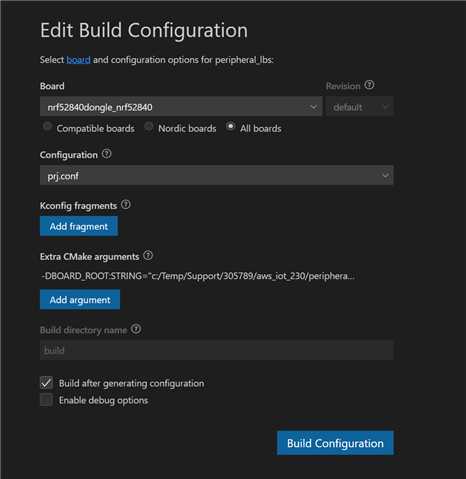
  • I'm a little confused. Are you using the nRF Connect for VS Code extension to build your project?

    How have you configured the Build Configuration?


    Here is the output from running the build command in the extension:

    Executing task: nRF Connect: Generate config nrf52840dongle_nrf52840 for c:\Temp\Support\305789\aws_iot_230\peripheral_lbs 
    
    Building peripheral_lbs
    west build --build-dir c:\Temp\Support\305789\aws_iot_230\peripheral_lbs\build c:\Temp\Support\305789\aws_iot_230\peripheral_lbs --pristine --board nrf52840dongle_nrf52840 -- -DNCS_TOOLCHAIN_VERSION:STRING="NONE" -DBOARD_ROOT:STRING="c:/Temp/Support/305789/aws_iot_230/peripheral_lbs"
    
    -- west build: generating a build system
    Loading Zephyr default modules (Zephyr base).
    -- Application: C:/Temp/Support/305789/aws_iot_230/peripheral_lbs
    -- Found Python3: C:/NordicSemi/toolchains/v2.2.0/opt/bin/python.exe (found suitable exact version "3.8.2") found components: Interpreter 

    What version of VS Code are you running? And what version of the extension?

Related