Beware that this post is related to an SDK in maintenance mode
More Info: Consider nRF Connect SDK for new designs

FDS reads data wrong with no errors

Hi 

I have a project that writes configuration struct to FDS and in case of reset finds config in flash storage and loads it up. I sucessfully write data to the fds.
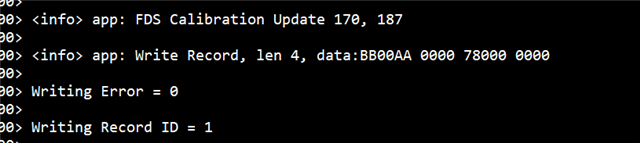
After a second i try to read data out of the record and i get this.
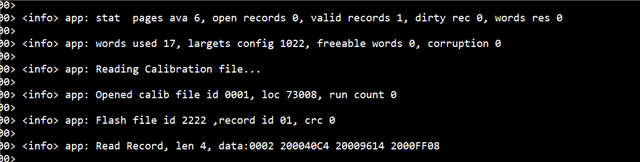
Output buffer is different as input one, and its always the same on every read, but it changes wtih different compiled project so i think i might be accessing some  wrong part of the memory.
Just to confirm, I am using same record ID and key for reading so i am definetly reading the right one. 

I copied code for reading and writing to standalone project and it works there.

I then confirmed that I am using same settings in sdk_config file, except the project that  is not working has more FDS_VIRTUAL_PAGES (6 instead of 3)
SDK version is the same. 

None of the other functions that use fds for storing data are storing data correctly in this specific project but they work in others. 
I am a bit without ideas, so suggestions are appreciated. 

Parents
  • Hi,

    It is hard to tell without more information to go from, but here are some general suggestions / ideas:

    • When writing data, are you ensuring that the buffer is kept long enough for actually getting the data written to flash?
    • When reading data, are you waiting until after you have received the event from FDS signalling a successful write? Remember that FDS API calls only queue the actions, and you must wait for a later event signalling the completion of e.g. a write.
    • Depending on the application, you may sometimes risk that the data was not written after all, for instance if there is too much BLE activity for the SoftDevice scheduler to actually be able to schedule a flash write or erase event. In that case you can read it from the corresponding FDS event.
    • Another error source is if garbage collection is needed for providing enough contiguous flash space for storing the new record.
    • Do you have a DFU bootloader that might need a setting for number of pages used for application data?
    • Do you use application data pages for other things than FDS, that might overlap?

    For more specific feedback, please share the parts of code responsible for writing and reading the FDS records. If you cannot share that in a public ticket, then please create a private ticket for sharing and refer to this one.

    Regards,
    Terje

  • Hi tesc, thanks for advice

    • data in buffer is kept long enough, i even tried with changing it from local to global variable and its same problem
    • yes, during read i wait fort Success then I display data, but its not correct 
    • Considering BLE activity, shouldnt be a problem as im trying this with asvertisements set to 1s interval and no connection established
    • before very write im waiting for FDS_ERR_NO_SPACE_IN_FLASH and handeling it if it appears
    • I am using DFU bootloader but i dont need more pages, also increasing amount in config doesnt solve the problem
    • i dont think I use data pages for anything else

    I am attaching my read and update functions:

    #define CALIB_FILE_ID 0x2222
    #define REC_KEY_CALIB 0x0002
    
    static ret_code_t fds_calibration_read()
    {
    	fds_record_desc_t record_desc;
    	fds_find_token_t ftok;
    	fds_flash_record_t flash_record;
    	uint32_t err_code;
    	static calibration_data calib_temp;
    
    	memset(&ftok, 0x00, sizeof(fds_find_token_t));
    
    	NRF_LOG_INFO("Reading Calibration file...");
    
    	// Loop and find records with same ID and rec key -> read
    	if (fds_record_find(CALIB_FILE_ID, REC_KEY_CALIB, &record_desc, &ftok) == NRF_SUCCESS)
    	{
    		err_code = fds_record_open(&record_desc, &flash_record);
    		if (err_code == NRF_SUCCESS)
    		{
    			NRF_LOG_INFO("Opened calib file id %04X, loc %04X, run count %d", record_desc.record_id, record_desc.p_record, record_desc.gc_run_count);
    			NRF_LOG_INFO("Flash file id %02x ,record id %02X, crc %d", flash_record.p_header->file_id, flash_record.p_header->record_id, flash_record.p_header->crc16);
    			NRF_LOG_INFO("Read Record, len %d, data:%04X %04X %04X %04X", flash_record.p_header->length_words, ((uint32_t *)flash_record.p_data)[0], ((uint32_t *)flash_record.p_data)[1], ((uint32_t *)flash_record.p_data)[2], ((uint32_t *)flash_record.p_data)[3]);
    
    			
    			NRF_LOG_INFO("memcpy len %d", sizeof(calib_temp));
    			memcpy(&calib_temp, flash_record.p_data, sizeof(calibration_data));
    
    			NRF_LOG_INFO("Calib read unload %d, %d, %d,%d", calib_temp.calibration_min, calib_temp.calibration_max, calib_temp.calibration_status, calib_temp.calibration_time);
    			// Load data to global variable
    			calibration_t = calib_temp;
    			// Close the record when done.
    			err_code = fds_record_close(&record_desc);
    			if (err_code != NRF_SUCCESS)
    			{
    				return err_code;
    			}
    		}
    		else
    		{
    			NRF_LOG_INFO("FDS Calibration file open error = %d", err_code);
    		}
    	}
    	else
    	{
    		NRF_LOG_INFO("Calibration file not found.");
    		calibration_t.calibration_status = 0; // None
    	}
    	return NRF_SUCCESS;
    }
    
    static ret_code_t fds_calibration_update(calibration_data p_calib_data)
    {
    
    	NRF_LOG_INFO("FDS Calibration Update %d, %d", p_calib_data.calibration_min, p_calib_data.calibration_max);
    	fds_record_desc_t record_desc;
    	fds_record_t record;
    	fds_find_token_t ftok;
    
    	memset(&ftok, 0x00, sizeof(fds_find_token_t));
    
    	// Loop and find records with same ID and rec key -> read
    	if (fds_record_find(CALIB_FILE_ID, REC_KEY_CALIB, &record_desc, &ftok) == NRF_SUCCESS)
    	{
    
    		if (fds_record_delete(&record_desc) == NRF_SUCCESS)
    		{
    			NRF_LOG_INFO("FDS Calibration File deleted");
    		}
    	}
    
    	// Set up record.
    	record.file_id = CALIB_FILE_ID;
    	record.key = REC_KEY_CALIB;
    	record.data.p_data = &p_calib_data;
    	record.data.length_words = 4;
    	NRF_LOG_INFO("Write Record, len %d, data:%04X %04X %04X %04X", record.data.length_words, ((uint32_t *)record.data.p_data)[0], ((uint32_t *)record.data.p_data)[1], ((uint32_t *)record.data.p_data)[2], ((uint32_t *)record.data.p_data)[3]);
    
    	write_flag = 0;
    	ret_code_t ret = fds_record_write(&record_desc, &record);
    	if (ret == FDS_ERR_NO_SPACE_IN_FLASH)
    	{
    		ret = fds_gc();
    		if (ret != NRF_SUCCESS)
    		{
    			return ret;
    		}
    		while (gc_flag == 0)
    			;
    		write_flag = 0;
    		ret = fds_record_write(&record_desc, &record);
    	}
    
    	NRF_LOG_RAW_INFO("Writing Error = %x \r\n", ret);
    	if (ret != NRF_SUCCESS)
    	{
    		return ret;
    	}
    	NRF_LOG_RAW_INFO("Writing Record ID = %d \r\n", record_desc.record_id);
    
    	return NRF_SUCCESS;
    }
    

    I also copied these same functions to the other project where i am using same bootloader and they work perfectly over there.

  • I managed to solve the problem. 

    While calling fds_calibration_update reference to the source of p_calib_data inputed was lost before write operation was completed and after i already logget it to rtt, so changin that function takes iinput as a pointer solved isuue.

Reply Children
Related