BLE with sdk on a nrf52832

Hi, I'm trying to start developing an application on a nrf52832 (using a chinese module "E73-TBB"). But I can't get any BLE example to work. I can compile and upload, but when I try to scan for bluetooth devices, can't find any.

I've already tested the hardware, and seems to be working fine, I loaded a .hex that I extracted from a chinese beacon and it worked fine on my board, so the bluetooth part is working.

 The example I am focused is the "ble_app_beacon" from the SDK 17.1.0, should it work right away or should I change something? 

I'm using Keil IDE and in order to work I changed the programming algorithm to only "nRF52xxx SoftDevice Erase" (at least the other non ble examples worked this way).

This is the path of the example I used: "nRF5_SDK_17.1.0_ddde560\examples\ble_peripheral\ble_app_beacon\pca10040\s132\arm5_no_packs".

  • Hello Gabriel,

    I took a look at the datasheet on the module you are using.  The module seems to be lacking the necessary 32KHz crystal option that is necessary to run the BLE samples in nRF5 SDK 17.1.  Nor does it seen to have the ability to add one. The necessary GPIOs are not available on this module.  Those would be P0.00/XL1 and P0.01/XL2 on the nRF52832.

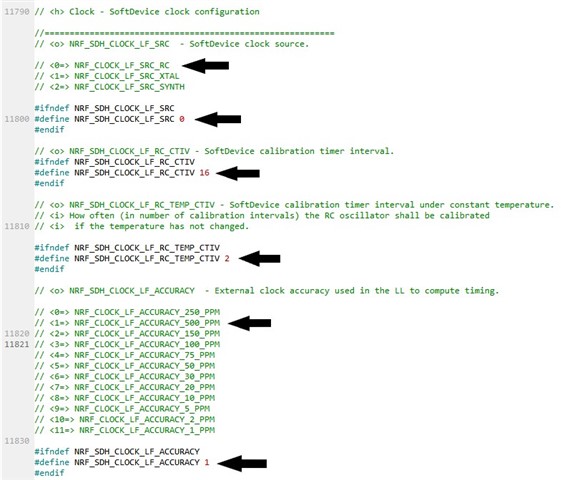
    However there is an internal 32Khz RC oscillator that can be used instead. This feature needs to be configured in firmware.   This may be found in the sdk_config.h file under "Clock  -  Softdevice clock configuration".

    You can read more about this here:

    https://infocenter.nordicsemi.com/topic/com.nordic.infocenter.s130.api.v2.0.0/structnrf__clock__lf__cfg__t.html

    Go to the sdk_config.h file and change the code as follows:

    Your line numbers may be different but close.

    Do not use anything under 500ppm for the clock accuracy. If you do you may have issues.

    Try that and see if your device starts to advertise.

    Side note.  Using the 32Khz RC Osc will cause the device to draw a bit more power.  You can use the online power profiler here in the dev zone to do a side by side on the difference. 

    Best regards

    Jay Tyzzer

  • Thanks for the quick and detailed reply, Jay.

    But I just found out that the problem I having might be simpler.

    I'm new to using soft devices and I didn't knew how it works.

    Probably the problem I'm having is that I was erasing the soft device every time, and the ble examples need it to run.

    I tested the compiled hex file that nordic provides in the sdk, and it works flawlessly.

    Now I'm trying to figure out how should I flash the software device and the application, since when I try to flash the application (without changing the programming algorithm to "nRF52xxx SoftDevice Erase" which now I see it obviosly doesn't make sense) it returns an "Error: Flash Download failed - "Cortex-M4".

    How do I "merge" the soft device and the application to generate one single hex file that contains all the uC needs?

  • Hi Gabriel,

    I did not see the Low Freq clock mentioned in the datasheet.  

    You can use a program called mergehex.exe to merge the Softdevice with the application.

    infocenter.nordicsemi.com/.../nrf_mergehex.html

    It is part of the nRF Command Line Tool utilities.

    infocenter.nordicsemi.com/.../nrf_command_line_tools_lpage.html

    You can download here: 

    www.nordicsemi.com/.../download

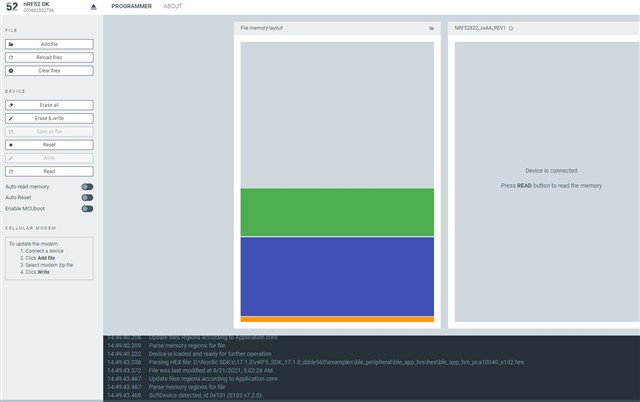
    You can also use the programmer utility found in the nRF Connect for Desktop.  It will allow you to program the Softdevice and the application all at once. 

    You can also read back and then click on  "save as file" which will output one merged hex file.

    Best regards,

    Jay Tyzzer

  • Thanks a lot, Jay! I think I'm on the right track now! 

    Now I understand how it works.

Related