



The future of IoT is being powered by Wi-Fi® 6. This latest generation of Wi-Fi is transforming embedded applications with its combination of speed, scalability, and infrastructure readiness. It delivers native IP connectivity for seamless integration with cloud services, high throughput for demanding use cases such as video and real-time analytics, and widespread availability across homes, enterprises, and public spaces.
Nordic Semiconductor’s nRF70 Series offers a compelling way to add low-power dual-band Wi-Fi 6 to any host microcontroller unit (MCU). While Nordic’s wireless SoCs are a natural fit, many developers want to retain their existing MCU platforms - whether for performance, memory, or open-source software support and simply complement their design with Wi-Fi connectivity.
In this blog post, we will introduce a practical showcase of how to integrate the nRF7002 with third-party MCUs using Zephyr RTOS, leveraging Nordic’s upstream software architecture. We’ll walk through a proof-of-concept project that demonstrates how Nordic’s Wi-Fi solution can be enabled on STM32 and NXP boards.
Table of Contents
Why combine the nRF70 Series with third-party MCUs?
Wi-Fi® 6 has become an essential feature in modern embedded IoT applications due to its unique combination of performance, scalability, and infrastructure readiness. Wi-Fi offers:
- Native IP connectivity: Devices can seamlessly integrate with IP-based networks and cloud services, simplifying development and deployment.
- High on-demand throughput: Wi-Fi 6 supports applications requiring large data transfers, such as video streaming, firmware updates, and real-time analytics.
- Universal infrastructure: Wi-Fi networks are ubiquitous in homes, enterprises, and public spaces, enabling IoT devices to connect without requiring new infrastructure, while adding features such as Target Wake Time (TWT) for enabling battery-powered devices.
- Reliable & secure networking: Built-in support for advanced security protocols and robust connection management ensures reliable performance in mission-critical environments.
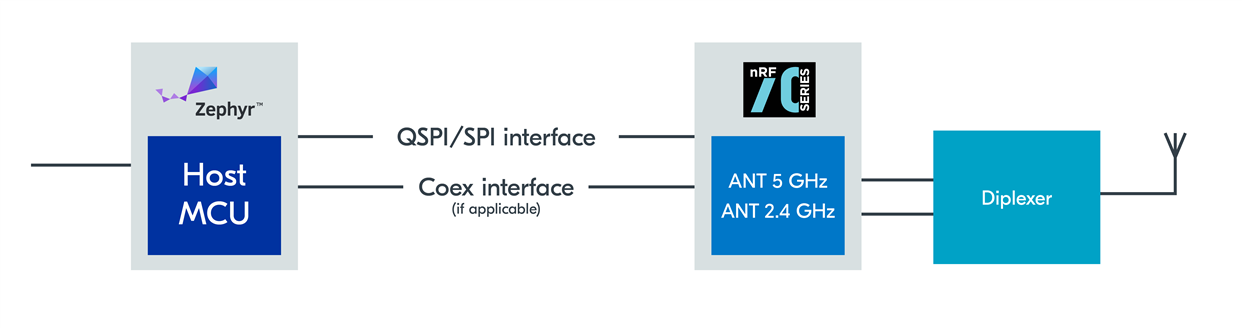 Functional block diagram with a generic host MCU
There are several reasons why you may want to pair nRF70 Series Wi-Fi companion ICs with non-Nordic MCUs.
- Broader MCU selection: Your application may already use MCUs from vendors such as STMicroelectronics or NXP due to specific application or product development needs.
- Performance and memory: Some applications require more internal RAM, on-chip NVM, peripherals or processing power than Nordic SoCs offer.
- Wi-Fi add-on: You may want to retain your existing application MCU and simply add multi-band Wi-Fi 6 connectivity without redesigning your system architecture.
- Lowest power applications: For specific peripheral features, you can add ultra-low power connectivity while maintaining all the benefits of your chosen host MCU. You can estimate the nRF7002 power consumption using our Online Power Profiler for Wi-Fi.
- Hardware flexibility: Nordic’s module partners offer nRF7002 modules to provide pre-certified connectivity to accelerate time-to-market and simplify integration.
By enabling nRF70 Series integration with third-party MCUs, Nordic empowers you to expand your product capabilities while maintaining seamless integration.
Requirements for third-party host MCUs
To integrate nRF70 Series ICs, a third-party MCU must support:
- SPI or QSPI interface with clock speeds compatible with nRF70 series (8/16/24/32 MHz)
- Zephyr RTOS support
- Security features (e.g. Hardware support for WPA2/3 cryptography, certificate storage, application layer security)
- Sufficient RAM/NVM (for reference Memory Requirements summarizes the NVM and RAM requirements for the Wi-Fi stack running on Nordic nRF host platforms)
- GPIOs for IRQ, control, and co-existence (where other wireless protocols are included)
These are standard features found in many Zephyr RTOS-supported MCUs, making integration broadly accessible.
How Zephyr RTOS enables fast integration
Nordic’s decision to upstream the nRF70 host stack and drivers within Zephyr RTOS is a significant advancement. The architecture includes:
- Open-source TCP/IP stack in Zephyr RTOS
- Broad protocol support (CoAP, MQTT, HTTP and more)
- TCP/IP has broad compatibility with existing infrastructure
- Wi-Fi networking layers
- Wi-Fi Supplicant: Hardware-agnostic library implementing core Wi-Fi functionality.
- Wi-Fi Network Management API: Integrates control of Wi-Fi devices within Zephyr RTOS.
- Wi-Fi Driver: Shim layer exposing Wi-Fi devices as native Layer-2 interfaces on Zephyr RTOS IP stack. nRF Wi-Fi Driver: Implements Zephyr RTOS standard Wi-Fi driver model; currently supports nRF70 Series devices.
These components are host-hardware agnostic, meaning they can run on any Zephyr RTOS-supported MCU with sufficient resources. This fully open source architecture brings significant benefits, including:
- Native support and open-source transparency
One API: The nRF70 appears as a standard Zephyr Wi‑Fi Layer-2 interface and is controlled via Zephyr’s Wi-Fi Management API and POSIX-like sockets. Your application uses the same Zephyr APIs regardless of whether the Wi-Fi hardware is nRF70 or something else.
First-class Zephyr integration: Kconfig options, Devicetree bindings, and driver sources are in the Zephyr tree. You enable the driver via Kconfig, configure in Devicetree (SPI/QSPI, GPIOs), and it works seamlessly with Zephyr networking (DHCPv4/6, DNS, sockets, CoAP/MQTT/HTTP clients).
Transparent host code: The host-side driver is open, making it clear how frames, management events, power save, and firmware loading are handled. You can read and modify the same code that Nordic and Zephyr developers use.
Clear separation of binary firmware: Any closed device firmware that runs on the nRF70 is versioned and loaded by the open host driver. That boundary is explicit in the codebase, aiding audits and updates.
- Easier debugging and community contributions
Unified logging and shell: The nRF70 driver uses Zephyr’s logging subsystem, so you can dial log levels up/down per module and stream logs via RTT/USB/UART. The Wi‑Fi shell/net shell commands let you scan, connect, view link stats, and toggle power-save without writing custom code.
Standard event model: Connection, disconnection, scan, and IP acquisition events come through Zephyr’s Network Management API, so you can attach the same callbacks for nRF70 as for any other Wi‑Fi device. This makes app-level debugging portable.
Reproducible bug reports: Because everything is in-tree, you can share a west manifest revision, a known sample (e.g., sockets/echo_client, mqtt_publisher, http_client, wifi shell), and a small overlay config to reproduce issues. CI in Zephyr (Twister) also builds and exercises drivers across boards, catching regressions early.
Lower barrier to patches: Fixes and features can be proposed directly to Zephyr. They benefit all users of the driver, get peer review from the broader community, and are tested by Zephyr’s CI.
- Seamless integration with custom IDEs and build systems
Zephyr’s CMake + west flow means the nRF70 driver builds the same way in VS Code, Eclipse, headless CI, or Nordic’s own VS Code extension for nRF Connect SDK. No vendor-specific build steps.
Connect nRF70 to any Zephyr-supported MCU via Devicetree (SPI/QSPI, COEX GPIOs) and enable the driver in Kconfig. The rest comes from Zephyr modules you select.
The same application can be compiled for different boards (nRF5340 DK, STM32, NXP, etc.) with only Devicetree/Kconfig modifications. That accelerates platform evaluation and migration.
Protocol stacks (CoAP, MQTT, HTTP), TLS (mbedTLS), supplicant, and Wi‑Fi driver are all pulled via the same west manifest and versioned together.
- Security assurance
By hosting the stack in Zephyr RTOS, developers benefit from community-reviewed code, upstream patches, and consistent updates that help maintain secure connectivity features.
System architecture overview
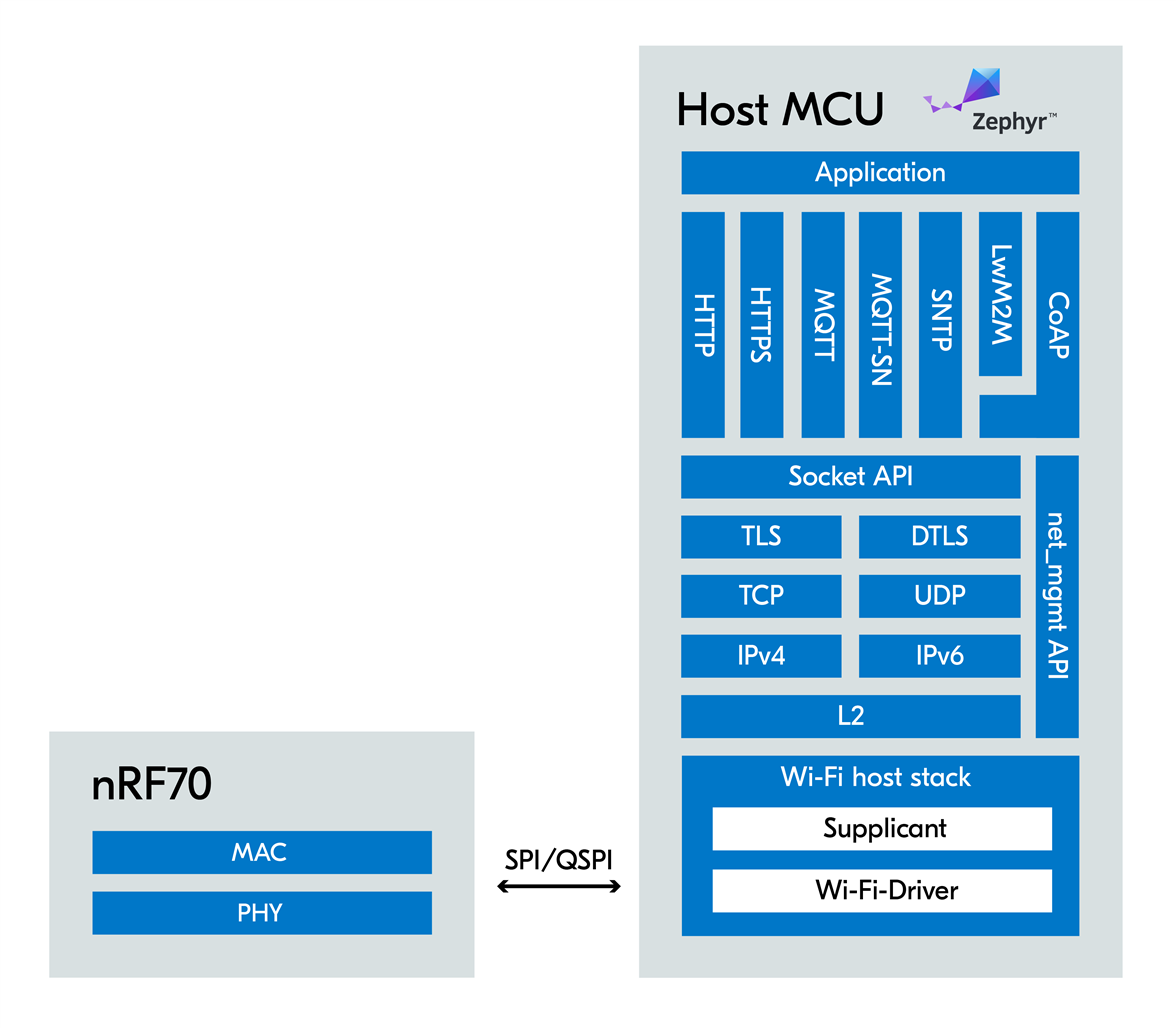
This diagram illustrates how the nRF70 connects to a host MCU via SPI or QSPI, with Zephyr RTOS managing the networking stack and application logic. The nRF70 handles all Wi-Fi MAC layer operations, freeing the MCU from time-critical tasks.
Reference application code
A working example for integrating third-party host MCUs is available at the following GitHub project: Run Zephyr Wi-Fi samples using nRF7002EK with STM32/NXP chips as host.
Development hardware support
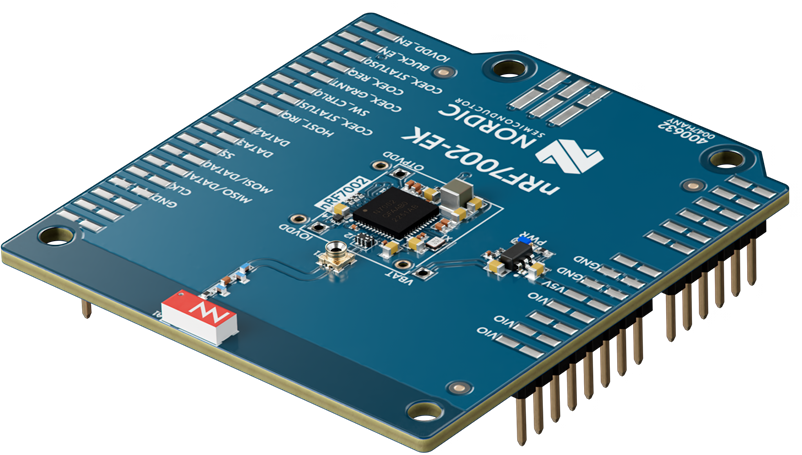
nRF7002 Evaluation Kit
- nRF7002 EK: Evaluation kit for prototyping. Arduino-compatible.
- STM32 Nucleo H723ZG - STM32H723ZG
- 550 MHz ARM Cortex-M7 core
- 1MB Flash, 564k total RAM
- STM32H723ZG MCU
- Arduino Header
- NXP MIMXRT1160-EVK - i.MX RT1166
- ARM Cortex-M7 @ 600 MHz + ARM Cortex-M4 @ 240 MHz
- 1 MB Total Internal RAM, 512 Mbit SDRAM memory
- i.MX RT1166
- 512 Mbit Octal Flash, 128 Mbit QSPI Flash
- Arduino Header
- J-Link debugger: Recommended for flashing NXP boards
Sample Wi-Fi applications
- Wi-Fi Shell - Enables Wi-Fi shell for scan, connect, disconnect, and more.
- MQTT Publisher - Enables MQTT for publish/subscribe messaging
- HTTP GET using plain sockets - Develop a sockets application
- SNTP Client - Retrieve current time
- zperf - Network performance testing
Configuration requirements
- Since the nRF7002 EK has an Arduino header, a compatible kit can be selected.
- If an Arduino-compatible pin definition is available in Zephyr board support, no other pin configuration is needed.
- Alternatively, users can define the pin configuration using a devicetree overlay.
- For MIMXRT1160-EVK, the user can use this devicetree file nRF7002EK Overlay
- The GitHub repository example already provides the Kconfig files required to enable Wi-Fi. The user can modify these according to their needs.
Example build instructions
Note: Prior to the initial build, nRF70 binary libraries must be fetched with west.
Example command below:
west blobs fetch nrf-wifi
STM32:
west build -p -b nucleo_h723zg -- -DSHIELD=nrf7002ek -DCONFIG_NET_IF_MAX_IPV4_COUNT=2
NXP:
west build -p -b mimxrt1160_evk/mimxrt1166/cm7 -- -DDTC_OVERLAY_FILE=mimxrt1160_evk_spi_nrf7002ek.overlay -DCONFIG_NET_IF_MAX_IPV4_COUNT=2
Log extracts: Successful integration
Here is an example of logs demonstrating a successful implementation:
[00:00:00.051,000] <inf> phy_mii: PHY (0) ID 7C131
[00:00:00.053,000] <inf> wifi_nrf_bus: SPIM spi@40013000: freq = 8 MHz
[00:00:00.053,000] <inf> wifi_nrf_bus: SPIM spi@40013000: latency = 0
[00:00:00.310,000] <inf> wifi_nrf: Management buffer offload enabled
*** Booting Zephyr OS build v4.1.0-2-g08b9cc57c223 ***
[00:00:00.438,000] <inf> net_config: Initializing network
[00:00:00.438,000] <inf> net_config: Waiting interface 1 (0x24001908) to be up...
[00:00:00.438,000] <inf> net_config: Running dhcpv4 client...
[00:00:00.438,000] <inf> wifi_supplicant: wpa_supplicant initialized
uart:~$ help
Please press the <Tab> button to see all available commands.
You can also use the <Tab> button to prompt or auto-complete all commands or its subcommands.
You can try to call commands with <-h> or <--help> parameter for more information.
Shell supports following meta-keys:
  Ctrl + (a key from: abcdefklnpuw)
  Alt  + (a key from: bf)
Please refer to shell documentation for more details.
Available commands:
  clear    : Clear screen.
  date     : Date commands
  device   : Device commands
  devmem   : Read/write physical memory
             Usage:
             Read memory at address with optional width:
             devmem <address> [<width>]
             Write memory at address with mandatory width and value:
             devmem <address> <width> <value>
  help     : Prints the help message.
  history  : Command history.
  kernel   : Kernel commands
  net      : Networking commands
  rem      : Ignore lines beginning with 'rem '
  retval   : Print return value of most recent command
  shell    : Useful, not Unix-like shell commands.
  wifi     : Wi-Fi commands
  zperf    : Zperf commands
uart:~$ wifi
wifi - Wi-Fi commands
Subcommands:
  11k                   : Configure 11k or get 11k status.
                          [enable/disable]
  11k_neighbor_request  : Send Neighbor Report Request frame.
                          [ssid <ssid>]
  11v_btm_query         : <query_reason: The reason code for a BSS transition
                          management query>.
  ap                    : Access Point mode commands.
  channel               : wifi channel setting
                          This command is used to set the channel when
                          monitor or TX-Injection mode is enabled
                          Currently 20 MHz is only supported and no BW parameter
                          is provided
                          [-i, --if-index <idx>] : Interface index
                          [-c, --channel <chan>] : Set a specific channel number
                          to the lower layer
                          [-g, --get] : Get current set channel number from the
                          lower layer
                          [-h, --help] : Help
                          Usage: Get operation example for interface index 1
                          wifi channel -g -i1
                          Set operation example for interface index 1 (setting
                          channel 5)
                          wifi -i1 -c5.
  connect               : Connect to a Wi-Fi AP
                          <-s --ssid "<SSID>">: SSID.
                          [-c --channel]: Channel that needs to be scanned for
                          connection. 0:any channel.
                          [-b, --band] 0: any band (2:2.4GHz, 5:5GHz, 6:6GHz]
                          [-p, --psk]: Passphrase (valid only for secure SSIDs)
                          [-k, --key-mgmt]: Key Management type (valid only for
                          secure SSIDs)
                          0:None, 1:WPA2-PSK, 2:WPA2-PSK-256, 3:SAE-HNP,
                          4:SAE-H2E, 5:SAE-AUTO, 6:WAPI,7:EAP-TLS, 8:WEP, 9:
                          WPA-PSK, 10: WPA-Auto-Personal, 11: DPP
                          12: EAP-PEAP-MSCHAPv2, 13: EAP-PEAP-GTC, 14:
                          EAP-TTLS-MSCHAPv2,
                          15: EAP-PEAP-TLS, 20: SAE-EXT-KEY
                          [-w, --ieee-80211w]: MFP (optional: needs security
                          type to be specified)
                          : 0:Disable, 1:Optional, 2:Required.
                          [-m, --bssid]: MAC address of the AP (BSSID).
                          [-t, --timeout]: Timeout for the connection attempt
                          (in seconds).
                          [-a, --anon-id]: Anonymous identity for enterprise
                          mode.
                          [-K, --key1-pwd for eap phase1 or --key2-pwd for eap
                          phase2]:
                          Private key passwd for enterprise mode. Default no
                          password for private key.
                          [-S, --wpa3-enterprise]: WPA3 enterprise mode:
                          Default 0: Not WPA3 enterprise mode.
                          1:Suite-b mode, 2:Suite-b-192-bit mode,
                          3:WPA3-enterprise-only mode.
                          [-T, --TLS-cipher]: 0:TLS-NONE, 1:TLS-ECC-P384,
                          2:TLS-RSA-3K.
                          [-A, --verify-peer-cert]: apply for EAP-PEAP-MSCHAPv2
                          and EAP-TTLS-MSCHAPv2
                          Default 0. 0:not use CA to verify peer, 1:use CA to
                          verify peer.
                          [-V, --eap-version]: 0 or 1. Default 1: eap version 1.
                          [-I, --eap-id1]: Client Identity. Default no eap
                          identity.
                          [-P, --eap-pwd1]: Client Password.
                          Default no password for eap user.
                          [-R, --ieee-80211r]: Use IEEE80211R fast BSS
                          transition connect.[-h, --help]: Print out the help
                          for the connect command.
  disconnect            : Disconnect from the Wi-Fi AP.
  mode                  : mode operational setting
                          This command may be used to set the Wi-Fi device into
                          a specific mode of operation
                          [-i, --if-index <idx>] : Interface index
                          [-s, --sta] : Station mode
                          [-m, --monitor] : Monitor mode
                          [-a, --ap] : AP mode
                          [-k, --softap] : Softap mode
                          [-h, --help] : Help
                          [-g, --get] : Get current mode for a specific
                          interface index
                          Usage: Get operation example for interface index 1
                          wifi mode -g -i1
                          Set operation example for interface index 1 - set
                          station+promiscuous
                          wifi mode -i1 -sp.
  packet_filter         : mode filter setting
                          This command is used to set packet filter setting when
                          monitor, TX-Injection and promiscuous mode is enabled
                          The different packet filter modes are control,
                          management, data and enable all filters
                          [-i, --if-index <idx>] : Interface index
                          [-a, --all] : Enable all packet filter modes
                          [-m, --mgmt] : Enable management packets to allowed up
                          the stack
                          [-c, --ctrl] : Enable control packets to be allowed up
                          the stack
                          [-d, --data] : Enable Data packets to be allowed up
                          the stack
                          [-g, --get] : Get current filter settings for a
                          specific interface index
                          [-b, --capture-len <len>] : Capture length buffer size
                          for each packet to be captured
                          [-h, --help] : Help
                          Usage: Get operation example for interface index 1
                          wifi packet_filter -g -i1
                          Set operation example for interface index 1 - set
                          data+management frame filter
                          wifi packet_filter -i1 -md.
  pmksa_flush           : Flush PMKSA cache entries.
  ps                    : Configure or display Wi-Fi power save state.
                          [on/off]
  ps_exit_strategy      : <tim> : Set PS exit strategy to Every TIM
                          <custom> : Set PS exit strategy to Custom
  ps_listen_interval    : <val> - Listen interval in the range of <0-65535>.
  ps_mode               : <mode: legacy/WMM>.
  ps_timeout            : <val> - PS inactivity timer(in ms).
  ps_wakeup_mode        : <wakeup_mode: DTIM/Listen Interval>.
  reg_domain            : Set or Get Wi-Fi regulatory domain
                          [ISO/IEC 3166-1 alpha2]: Regulatory domain
                          [-f]: Force to use this regulatory hint over any other
                          regulatory hints
                          Note1: The behavior of this command is dependent on
                          the Wi-Fi driver/chipset implementation
                          Note2: This may cause regulatory compliance issues,
                          use it at your own risk.
                          [-v]: Verbose, display the per-channel regulatory
                          information
  rts_threshold         : <rts_threshold: rts threshold/off>.
  scan                  : Scan for Wi-Fi APs
                          [-t, --type <active/passive>] : Preferred mode of
                          scan. The actual mode of scan can depend on factors
                          such as the Wi-Fi chip implementation, regulatory
                          domain restrictions. Default type is active
                          [-b, --bands <Comma separated list of band values
                          (2/5/6)>] : Bands to be scanned where 2: 2.4 GHz, 5: 5
                          GHz, 6: 6 GHz
                          [-a, --dwell_time_active <val_in_ms>] : Active scan
                          dwell time (in ms) on a channel. Range 5 ms to 1000 ms
                          [-p, --dwell_time_passive <val_in_ms>] : Passive scan
                          dwell time (in ms) on a channel. Range 10 ms to 1000
                          ms
                          [-s, --ssid] : SSID to scan for. Can be provided
                          multiple times
                          [-m, --max_bss <val>] : Maximum BSSes to scan for.
                          Range 1 - 65535
                          [-c, --chans <Comma separated list of channel ranges>]
                          : Channels to be scanned. The channels must be
                          specified in the form
                          band1:chan1,chan2_band2:chan3,..etc. band1, band2 must
                          be valid band values and chan1, chan2, chan3 must be
                          specified as a list of comma separated values where
                          each value is either a single channel or a channel
                          range specified as chan_start-chan_end. Each band
                          channel set has to be separated by a _. For example, a
                          valid channel specification can be 2:1,6_5:36 or
                          2:1,6-11,14_5:36,163-177,52. Care should be taken to
                          ensure that configured channels don't exceed
                          CONFIG_WIFI_MGMT_SCAN_CHAN_MAX_MANUAL
                          [-h, --help] : Print out the help for the scan
                          command.
  statistics            : Wi-Fi interface statistics.
                          [reset] : Reset Wi-Fi interface statistics
                          [help] :  Print out the help for the statistics
                          command.
  status                : Status of the Wi-Fi interface.
  twt                   : Manage TWT flows.
  version               : Print Wi-Fi Driver and Firmware versions
  wps_pbc               : Start a WPS PBC connection.
  wps_pin               : Set and get WPS pin.
                          [pin] Only applicable for set.
uart:~$ zperf
zperf - Zperf commands
Subcommands:
  connectap  : Connect to AP
  setip      : Set IP address
               <my ip> <prefix len>
               Example setip 2001:db8::2 64
               Example setip 192.0.2.2
  tcp        : Upload/Download TCP data
  udp        : Upload/Download UDP data
  version    : Zperf version
Closing
This blog post demonstrates how Nordic’s nRF70 Series companion ICs can be integrated with third-party MCUs using Zephyr RTOS. By leveraging upstream software architecture and open-source tools, you can add low-power Wi-Fi 6 connectivity to a wide range of applications without being limited to Nordic MCUs.
Whether you’re building smart home devices, industrial sensors, or wearables, this integration path offers flexibility, scalability, and performance.
References / further reading
- GitHub - chshzh/nrf7002ek-diff-hosts: Run Zephyr Wi-Fi samples using nRF7002EK with STM32/NXP chips as host.
- nRF70 Product Specification
- Zephyr Project Documentation
- nRF70 Developer Guide
- Throughput Estimates
- Reference Throughput Tests with nRF5340
- Supported Modulation Schemes
- Online Power Profiler for Wi-Fi
- Memory Requirements

Top Comments