Nrf connect SDK: Debugging not working for VS Code

Hi,

I am developing using latest version of nrf connect SDK (v2.4.0) and latest nrf command line tool and jlink software on Windows 11 (64-bit latest version). The code builds and flashes fine. When I try to run debug session, it fails with following error:
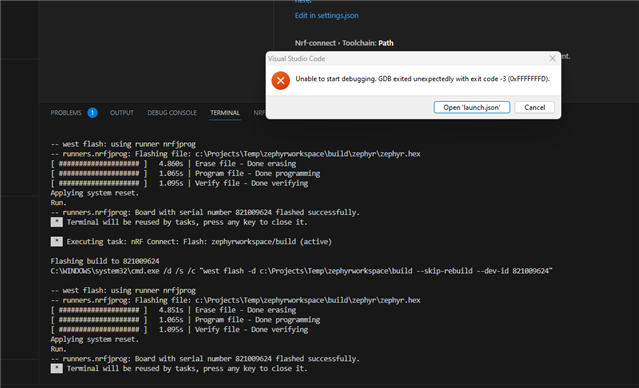
If I uninstall and re-install everything, it runs OK and I can start debug session on first launch. From second time onwards, it always fails with this error. I completely removed nrf connect sdk, vs code including their workspace and setting folders.

Additional remark: With earlier version of tools (ncs 2.3, and older version of toolchain manger), I was able to select cortex-debug instead of nrf-debug as debugging option. And that worked without any issues. Recently, i am unable to find this setting in the vs code extension settings. Now only default debugger nrf-debug is there which is not work as described above.

Where can i start looking and how can we get back the option to select cortex-debug ?

Thanks for the support

Parents
  • Hi,

    Could you please specify the versions of:
    - NCS
    - nRF Connect for Desktop
    - Toolchain Manager
    - nRF Command Line Tools
    - jLink
    - VS Code extension
    which you used in both working and non-working case?

    Best regards,
    Dejan

  • Hi,

    Below is the version information


    - NCS -> V2.4.0 (C:\ncs\toolchains\31f4403e35)

    - nRF Connect for Desktop -> v4.1.2 
    - Toolchain Manager -> v1.2.5
    - nRF Command Line Tools -> 10.22.1 
    - jLink -> 7.88l
    - VS Code extension -> v2023.6.345

    We found a workaround to get cortex-debug working by creating a launch.json with following configuration:

            {
                "name": "Cortex Debug Windows",
                "type": "cortex-debug",
                "request": "launch",
                "executable": "${workspaceFolder}/build/zephyr/zephyr.elf",
                "cwd": "${workspaceFolder}",
                "servertype": "jlink",
                "device":"nRF52840_xxAA",
                "interface": "swd",
                "gdbPath": "C:/ncs/toolchains/31f4403e35/opt/zephyr-sdk/arm-zephyr-eabi/bin/arm-zephyr-eabi-gdb.exe",
                "serverpath": "C:/Program Files/SEGGER/JLink/JLinkGDBServerCL.exe",
                "runToEntryPoint": "main",
                "rtos": "C:/Program Files/SEGGER/JLink/GDBServer/RTOSPlugin_Zephyr.dll",
                "serverArgs": [
                    "-speed",
                    "4000"
                ]
            }      
    And used "Bind to Launch Configuration" from 'Debug' command option. And with this debugger seems to start. I could not yet get 'nrf-connect' debug type working (if it has some advantages over cortex-debug)
    Regards,
    Amir
Reply
  • Hi,

    Below is the version information


    - NCS -> V2.4.0 (C:\ncs\toolchains\31f4403e35)

    - nRF Connect for Desktop -> v4.1.2 
    - Toolchain Manager -> v1.2.5
    - nRF Command Line Tools -> 10.22.1 
    - jLink -> 7.88l
    - VS Code extension -> v2023.6.345

    We found a workaround to get cortex-debug working by creating a launch.json with following configuration:

            {
                "name": "Cortex Debug Windows",
                "type": "cortex-debug",
                "request": "launch",
                "executable": "${workspaceFolder}/build/zephyr/zephyr.elf",
                "cwd": "${workspaceFolder}",
                "servertype": "jlink",
                "device":"nRF52840_xxAA",
                "interface": "swd",
                "gdbPath": "C:/ncs/toolchains/31f4403e35/opt/zephyr-sdk/arm-zephyr-eabi/bin/arm-zephyr-eabi-gdb.exe",
                "serverpath": "C:/Program Files/SEGGER/JLink/JLinkGDBServerCL.exe",
                "runToEntryPoint": "main",
                "rtos": "C:/Program Files/SEGGER/JLink/GDBServer/RTOSPlugin_Zephyr.dll",
                "serverArgs": [
                    "-speed",
                    "4000"
                ]
            }      
    And used "Bind to Launch Configuration" from 'Debug' command option. And with this debugger seems to start. I could not yet get 'nrf-connect' debug type working (if it has some advantages over cortex-debug)
    Regards,
    Amir
Children
Related