Thingy 91 SPI driver for ADXL362

Hello. I want to write my own driver for the SPI accelerometer (ADXL362).

Sadly, there is barely any information regarding the SPI, at least it is not easily available. I have gone through various documentation regarding SPI:

https://docs.zephyrproject.org/latest/hardware/peripherals/spi.html

About my setup:

  1. Development board used: Thingy 91
  2. Logic Analyzer used: Salae logic pro 8
  3. External programmer/debugger used: Segger J-Link compact plus

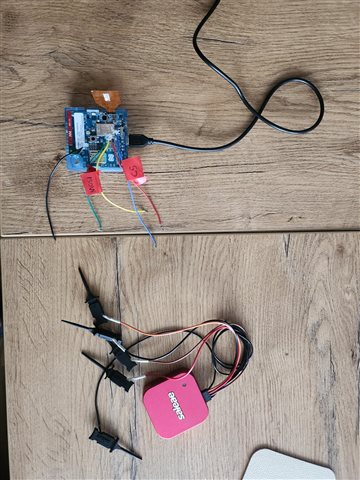
See image of my setup (I know it looks a bit chaotic):
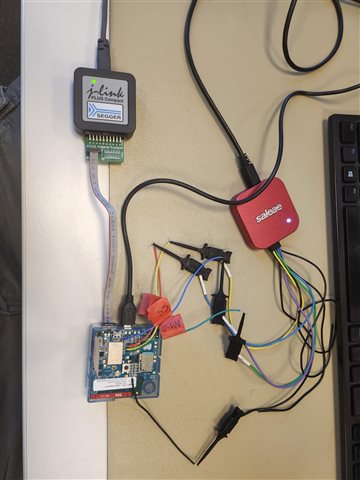
As you can see from image above, I have soldered wires on the CS, MOSI, MISO and CLK and GND testpoints so I can connect logic analyzer.

Currently I am practising using spi_write.

See my code below:

#include <stdio.h>
#include <stdlib.h>
#include <zephyr/kernel.h>
#include <zephyr/drivers/spi.h>
#include <zephyr/drivers/sensor.h>
#include <zephyr/drivers/gpio.h>
#include <zephyr/device.h>


#define LOG_LEVEL CONFIG_LOG_DEFAULT_LEVEL
#include <zephyr/logging/log.h>
LOG_MODULE_REGISTER(main);


#define SPI_MESSAGE 0xA5


#define DEFAULT_ADXL362_NODE DT_ALIAS(adxl362)
BUILD_ASSERT(DT_NODE_HAS_STATUS(DEFAULT_ADXL362_NODE, okay),
			 "ADXL362 not specified in DT");

//DEVICE TREE STRUCTURE
const struct device *const adxl1362_sens = DEVICE_DT_GET(DEFAULT_ADXL362_NODE);

//CHIP SELECT CONTROL
struct spi_cs_control ctrl = SPI_CS_CONTROL_INIT(DT_NODELABEL(adxl362), 2);

//SPI CONFIG
static const struct spi_config spi_cfg = {
	.operation = SPI_WORD_SET(8) | SPI_TRANSFER_MSB,
	.frequency = 4000000, // 8 mhz
	.slave = 0,
    .cs = &ctrl,
};

int main(void)
{
	int ret;
	if (!device_is_ready(adxl1362_sens))
	{
		LOG_INF("sensor: device %s not ready.\n", adxl1362_sens->name);
		return 0;
	}
	uint8_t cmd = SPI_MESSAGE;
	struct spi_buf tx_buf = {.buf = &cmd, .len = 1};
	struct spi_buf_set tx_bufs = {.buffers = &tx_buf, .count = 1};
	while (1) {
		LOG_INF("SPI writing test data \n");
		spi_write(adxl1362_sens, &spi_cfg, &tx_bufs);
		k_sleep(K_MSEC(1000));
	}
	
	return 0;
}


As you can see from the code above, I am expecting to send a simple SPI message periodically (every 1 second). But when I monitor signal using logic analyzer, it looks really weird:
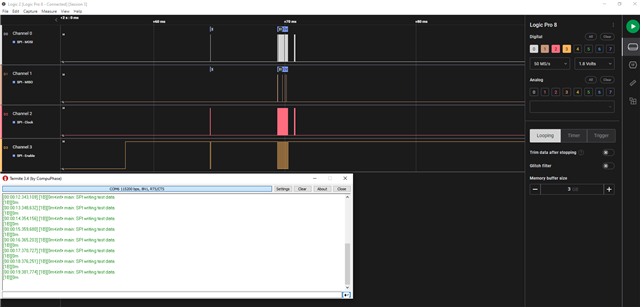
It sends some garbage once and then never again so it does not work as expected. I believe it has to do something with the chip select as it stays HIGH.

Is below correct way to initialize spi_config with chip select? How does  SPI_CS_CONTROL_INIT(DT_NODELABEL(adxl362), 2); know which CS gpio to select because there are 2 chip selects declared for the SPI3 in the device tree? How does it select whether gpio0 7 or gpio0 8 is used?

struct spi_cs_control ctrl = SPI_CS_CONTROL_INIT(DT_NODELABEL(adxl362), 2);

//SPI CONFIG
static const struct spi_config spi_cfg = {
	.operation = SPI_WORD_SET(8) | SPI_TRANSFER_MSB,
	.frequency = 4000000, // 8 mhz
	.slave = 0,
    .cs = &ctrl,
};

In the nrf/boards/arm/thingy91_nrf9160/thingy91_nrf9160_common.dts the following is declared:

&spi3 {
	compatible = "nordic,nrf-spim";
	status = "okay";
	cs-gpios = <&gpio0 8 GPIO_ACTIVE_LOW>, <&gpio0 7 GPIO_ACTIVE_LOW>;

	pinctrl-0 = <&spi3_default>;
	pinctrl-1 = <&spi3_sleep>;
	pinctrl-names = "default", "sleep";
	adxl362: adxl362@0 {
		compatible = "adi,adxl362";
		spi-max-frequency = <8000000>;
		reg = <0>;
		int1-gpios = <&gpio0 9 0>;
	};

	adxl372: adxl372@1 {
		compatible = "adi,adxl372";
		spi-max-frequency = <8000000>;
		reg = <1>;
		int1-gpios = <&gpio0 6 0>;
	};
};


I am attaching Salae capture file below:

8311.adxl362_log3.sal


I would very much appreciate if someone could point me in the right direction. Perhaps you can spot an issue in my code? Why simple spi_write would not work ?

If you think I have missed some information or I need to clarify something, do not hesitate to ask me.

UPDATE

I have added some additional logs :

		err = spi_write(adxl1362_sens, &spi_cfg, &tx_bufs);
		if (err) {
			LOG_ERR("SPI write failed with error %d\n", err);
			return err;
		}

The logs:
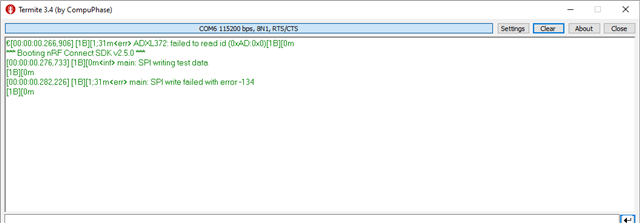


What is also very interesting, is that the device is spitting the log <err> ADXL372: failed to read id (0xAD:0x0)[1B][0m

which is very strange. In my code, I do nothing related to ADXL372. I only use ADXL362. Why would it print this error related to ADXL372?

Also, I have looked at zephyr errno documentation:

https://docs.zephyrproject.org/apidoc/latest/errno_8h.html

I have discovered that error -134 corresponds to ENOTSUP

but sadly that does not provide any useful information for me.

So to summarise everything up:

1. What is the correct way to configure  spi_cs_control? Is method that I used correct? 

2. Why I am getting SPI write failed with error -134? Could that be related to the Chip select?

3. Why I am getting the following printed on the console:
[00:00:00.266,723] [1B][1;31m<err> ADXL372: failed to read id (0xAD:0x0)[1B][0m.
As you have seen from my code that I posted above, it has nothing to do with ADXL372

Parents
  • UPDATE

    I still havent figured out what could be an issue regarding SPI communication on the Thingy 91.

    For testing purposes, I have created a project that you can clone from github:

    https://github.com/krupis/thingy91_spi_test

    Steps to reproduce the issue:

    1. Clone the project from github
    2. Solder wires on the THINGY 91 testpoints (MOSI, MISO,CS, CLK and GND)
    3. Connect wires (MOSI, MISO CS, CLK and GND) to logic analyzer or osciloscope
    4. Flash the device
    5. Monitor the serial logs and logic analyzer signals

    Additionally, I have figured something out regarding below issue:

    . Why I am getting the following printed on the console:
    [00:00:00.266,723] [1B][1;31m<err> ADXL372: failed to read id (0xAD:0x0)[1B][0m.
    As you have seen from my code that I posted above, it has nothing to do with ADXL372
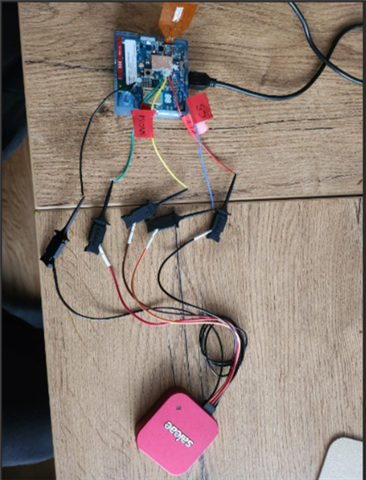
    The <err> ADXL372: failed to read id (0xAD:0x0) only happens when I got SPI wires connected to the logic analyzer. See image below:


    However, if I disconnect the logic analyzer as shown below:

    and reset the board, I will no longer get the error about adxl372.

    Could that be related that when I connect to the logic analyzer, CHIP select is pulled up and it does not fails to detect ADXL372 device? But it is quite strange why would it do that because in my code I dont have anything to do with ADXL372. Unless the zephyr automatically tries to detect whatever is defined in the device tree without any user code. Could that be the case?

    Anyways, my questions from the initial post remain unresolved. I hope to receive any clarifications. Thanks in advance!


  • UPDATE

    I have been working on this for quite a while now. I honestly think I have tried almost everything I could at this point:

    1. I have tried to use seperate spi_write and spi_read functions
    2. I have tried to use spi_trasnceive function
    3. I have tried to manually control chip select line
    4. I have tried to use automatic chip select line control via spi_cs_control

    I have also tried to run accell_polling sample project just to confirm whether my HW is not damaged and it is working and it is. I am able to read the sensor data without any issue but I am not interested in that. I just want to learn about SPI and how to write my own low level drivers.

    The latest source code can be found here:

    https://github.com/krupis/thingy91_spi_test

    I will also paste the source code here:

    #include <stdio.h>
    #include <stdlib.h>
    #include <zephyr/kernel.h>
    #include <zephyr/drivers/spi.h>
    #include <zephyr/device.h>
    #include <zephyr/drivers/gpio.h>
    
    #define LOG_LEVEL CONFIG_LOG_DEFAULT_LEVEL
    #include <zephyr/logging/log.h>
    LOG_MODULE_REGISTER(main);
    
    #define ADXL362_WRITE_REG 0x0A
    #define ADXL362_READ_REG 0x0B
    #define ADXL362_READ_FIFO 0x0D
    
    #define ADXL362_REG_DEVID_AD 0x00
    #define ADXL362_REG_DEVID_MST 0x01
    #define ADXL362_REG_PARTID 0x02
    
    
    static int readRegister(uint8_t reg, uint8_t *values, uint8_t size);
    
    #define DEFAULT_ADXL362_NODE DT_ALIAS(adxl362)
    BUILD_ASSERT(DT_NODE_HAS_STATUS(DEFAULT_ADXL362_NODE, okay),
    			 "ADXL362 not specified in DT");
    
    // DEVICE TREE STRUCTURE
    const struct device *adxl1362_sens = DEVICE_DT_GET(DEFAULT_ADXL362_NODE);
    
    // CS CONTROL
    struct spi_cs_control ctrl = {
            .gpio = SPI_CS_GPIOS_DT_SPEC_GET(DT_NODELABEL(adxl362)),
            .delay = 0,
    };
    
    // SPI CONFIG
    static const struct spi_config spi_cfg = {
    	.operation = SPI_WORD_SET(8) | SPI_TRANSFER_MSB,
    	.frequency = 1000000, // 1 mhz
    	.slave = 0,
    	.cs = &ctrl,
    };
    
    int main(void)
    {
    	int err;
    	printk("Program started \n");
    	uint8_t values[1];
    	while (1)
    	{
    		int ret = readRegister(ADXL362_REG_DEVID_AD, values, 1);
    		if (ret == 0)
    		{
    			printk("Read chip ID failed \n");
    			k_msleep(1000);
    		}
    		else
    		{
    			printk("Register chip ID: %d\n", values[0]);
    			k_msleep(1000);
    		}
    	}
    	return 0;
    }
    
    
    //According to the ADXL362 datasheet (https://www.analog.com/media/en/technical-documentation/data-sheets/adxl362.pdf)
    //Figure 36, we follow multi byte structure where first byte is ADXL362_READ_REG and second byte is the register address
    static int readRegister(uint8_t reg, uint8_t *values, uint8_t size)
    {
    	int err;
    	uint8_t tx_buffer[2];
    	tx_buffer[0] = ADXL362_READ_REG;
    	tx_buffer[1] = reg;
    
    	struct spi_buf tx_spi_buf = {
    		.buf = tx_buffer,
    		.len = sizeof(tx_buffer)};
    
    	struct spi_buf_set spi_tx_buffer_set = {
    		.buffers = &tx_spi_buf,
    		.count = 1};
    
    	struct spi_buf rx_spi_buf = {
    		.buf = values,
    		.len = size};
    
    	struct spi_buf_set spi_rx_buffer_set = {
    		.buffers = &rx_spi_buf,
    		.count = 1};
    
    	err = spi_transceive(adxl1362_sens, &spi_cfg, &spi_tx_buffer_set, &spi_rx_buffer_set);
    	if (err)
    	{
    		printk("SPI error: %d\n", err);
    	}
    	else
    	{
    		/* Connect MISO to MOSI for loopback */
    		printk("TX sent: %x\n", tx_buffer[0]);
    		printk("RX recv: %x\n", values[0]);
    		tx_buffer[0]++;
    	}
    }

    I cannot wrap my head around why would the most simple spi_transceive would not work and why would I be getting error -134 when trying to request sensor ID.

  • Hi, I am looking into your questions here, and will let you know as I have answers.

    The first thing I can answer is that yes, if you enable the node with a compatible that matched a driver, the driver for that sensor will automatically be included in the build. Most drivers will also try to initialize the sensor and confirm that the sensor is responsive. This is what is causing the ADXL372 errors.

    If you do not want to use the Zephyr included drivers for these sensors, I suggest you disable them with the configs:

    CONFIG_ADXL362=n
    CONFIG_ADXL372=n

Reply
  • Hi, I am looking into your questions here, and will let you know as I have answers.

    The first thing I can answer is that yes, if you enable the node with a compatible that matched a driver, the driver for that sensor will automatically be included in the build. Most drivers will also try to initialize the sensor and confirm that the sensor is responsive. This is what is causing the ADXL372 errors.

    If you do not want to use the Zephyr included drivers for these sensors, I suggest you disable them with the configs:

    CONFIG_ADXL362=n
    CONFIG_ADXL372=n

Children
No Data
Related