

Hi All
I'm devolving the product by using nRF5340. I found a problem when I needed to disable the J-Link Port by enabling APPPROTECT, SECUREAPPROTECT and ERASEPROTECT.
This is my source for testing that feature.
/*
 * Copyright (c) 2012-2014 Wind River Systems, Inc.
 *
 * SPDX-License-Identifier: Apache-2.0
 */

#include <zephyr/kernel.h>
#include <zephyr/drivers/gpio.h>

#define GPIO_DEV     gpio0
#define BUTTON_A_PIN 23
#define BUTTON_B_PIN 24
#define LED_PIN      30
#define UNLOCK_KEY   0xDEADBEEF

static const struct device *gpio_dev;
int main(void)
{
    k_msleep(3000);
    printk("Start Program %s\n", CONFIG_BOARD);
    k_msleep(1000);

    NRF_NVMC->CONFIG = ( (NVMC_CONFIG_WEN_Wen  ) << NVMC_CONFIG_WEN_Pos);
    while (NRF_NVMC->READY == NVMC_READY_READY_Busy)
    { }
    NRF_UICR->APPROTECT = 0x00000000;
    while (NRF_NVMC->READY == NVMC_READY_READY_Busy)
    { }

    NRF_UICR->SECUREAPPROTECT = 0x00000000;
    while (NRF_NVMC->READY == NVMC_READY_READY_Busy)
    { }

    NRF_UICR->ERASEPROTECT = 0x00000000;
    while (NRF_NVMC->READY == NVMC_READY_READY_Busy)
    { }

    NRF_NVMC->CONFIG = ( (NVMC_CONFIG_WEN_Ren  ) << NVMC_CONFIG_WEN_Pos);
    while (NRF_NVMC->READY == NVMC_READY_READY_Busy)
    { }

    gpio_dev = DEVICE_DT_GET(DT_NODELABEL(GPIO_DEV));
    if (NULL == gpio_dev)
    {
        printk("gpio_dev is null\r\n");
        k_msleep(1000);
    }
    else
    {
        gpio_pin_configure(gpio_dev, BUTTON_A_PIN, GPIO_INPUT | GPIO_PULL_UP);
        gpio_pin_configure(gpio_dev, BUTTON_B_PIN, GPIO_INPUT | GPIO_PULL_UP);

        while (1)
        {
            if (0 == gpio_pin_get_raw(gpio_dev, BUTTON_A_PIN))
            {
                k_msleep(50);
                if (0 == gpio_pin_get_raw(gpio_dev, BUTTON_A_PIN))
                {
                    printk("Button A has been pushed\r\n");
                    printk("Unlock nRF5340 with key: %X\r\n", UNLOCK_KEY);
                    NRF_CTRLAP->ERASEPROTECT.DISABLE = UNLOCK_KEY;
                    NRF_CTRLAP->APPROTECT.DISABLE    = UNLOCK_KEY;
                }
                while (0 == gpio_pin_get_raw(gpio_dev, BUTTON_A_PIN))
                {
                    k_msleep(10);
                }
            }

            if (0 == gpio_pin_get_raw(gpio_dev, BUTTON_B_PIN))
            {
                k_msleep(50);
                if (0 == gpio_pin_get_raw(gpio_dev, BUTTON_B_PIN))
                {
                    printk("Button B has been pushed\r\n");
                    printk("NRF_CTRLAP->ERASEPROTECT.DISABLE: %X\r\n", NRF_CTRLAP->ERASEPROTECT.DISABLE);
                    printk("NRF_CTRLAP->APPROTECT.DISABLE   : %X\r\n", NRF_CTRLAP->APPROTECT.DISABLE);
                }
                while (0 == gpio_pin_get_raw(gpio_dev, BUTTON_B_PIN))
                {
                    k_msleep(10);
                }
            }
        }
    }

    return 0;
} /* main */
And this is my project configuration.
# nothing here
CONFIG_GPIO=y
However, after I uploaded my firmware to the nRF5340DK board, I powered off and powered on the DK board again.
Next step, I try to read "ERASEPROTECT.STATUS 0x018" by using the script below.
SWDSelect // Activate SWD
SWDWriteDP 1 0x50000000
SWDWriteDP 2 0x02000010
SWDReadAP 2
SWDReadAP 2
exit
The result of this script is shown below.
JLink.exe -commandfile 00F_Get_EraseProtect_Status.jlink
SEGGER J-Link Commander V7.88j (Compiled Jun 28 2023 13:40:51)
DLL version V7.88j, compiled Jun 28 2023 13:39:15
J-Link Command File read successfully.
Processing script file...
J-Link>SWDSelect // Activate SWD
J-Link connection not established yet but required for command.
Connecting to J-Link via USB...O.K.
Firmware: J-Link OB-nRF5340-NordicSemi compiled Aug 8 2023 16:16:56
Hardware version: V1.00
J-Link uptime (since boot): 0d 00h 00m 06s
S/N: 1050074579
License(s): RDI, FlashBP, FlashDL, JFlash, GDB
USB speed mode: Full speed (12 MBit/s)
VTref=3.300V
Select SWD by sending SWD switching sequence.
Found SWD-DP with ID 0x6BA02477
J-Link>SWDWriteDP 1 0x50000000
Write DP register 1 = 0x50000000
J-Link>SWDWriteDP 2 0x02000010
Write DP register 2 = 0x02000010
J-Link>SWDReadAP 2
Read AP register 2 = 0x00000000
J-Link>SWDReadAP 2
Read AP register 2 = 0x00000000
J-Link>exit
Script processing completed.
From that result, I believe I have successfully enabled ERASEPROTECT.
However, when I try to re-program the nRF5340, it takes around 2 – 3 times. The process allowed us to upload the new firmware, as shown below.
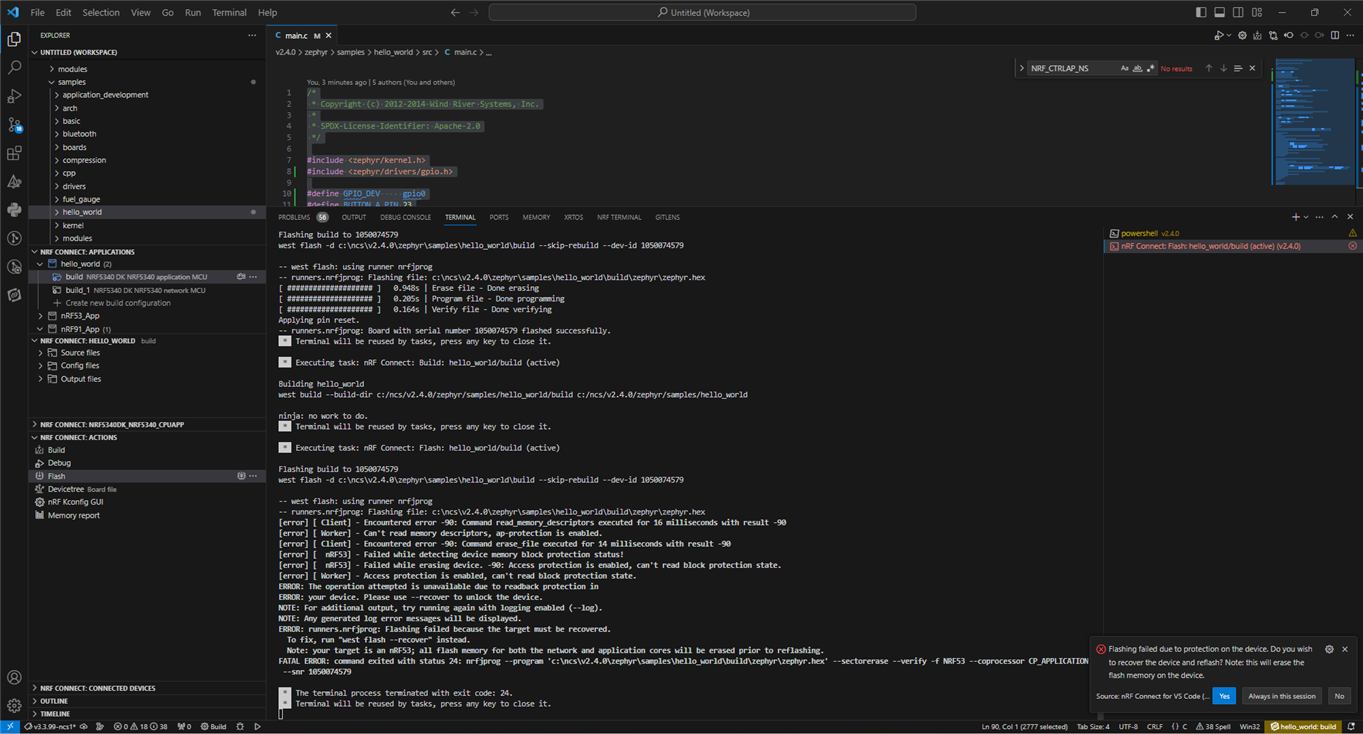
(I click yes)
Flashing build to 1050074579
west flash -d c:\ncs\v2.4.0\zephyr\samples\hello_world\build --skip-rebuild --dev-id 1050074579
-- west flash: using runner nrfjprog
-- runners.nrfjprog: Flashing file: c:\ncs\v2.4.0\zephyr\samples\hello_world\build\zephyr\zephyr.hex
[ #################### ] 0.948s | Erase file - Done erasing
[ #################### ] 0.205s | Program file - Done programming
[ #################### ] 0.164s | Verify file - Done verifying
Applying pin reset.
-- runners.nrfjprog: Board with serial number 1050074579 flashed successfully.
* Terminal will be reused by tasks, press any key to close it.
* Executing task: nRF Connect: Build: hello_world/build (active)
Building hello_world
west build --build-dir c:/ncs/v2.4.0/zephyr/samples/hello_world/build c:/ncs/v2.4.0/zephyr/samples/hello_world
ninja: no work to do.
* Terminal will be reused by tasks, press any key to close it.
* Executing task: nRF Connect: Flash: hello_world/build (active)
Flashing build to 1050074579
west flash -d c:\ncs\v2.4.0\zephyr\samples\hello_world\build --skip-rebuild --dev-id 1050074579
-- west flash: using runner nrfjprog
-- runners.nrfjprog: Flashing file: c:\ncs\v2.4.0\zephyr\samples\hello_world\build\zephyr\zephyr.hex
[error] [ Client] - Encountered error -90: Command read_memory_descriptors executed for 16 milliseconds with result -90
[error] [ Worker] - Can't read memory descriptors, ap-protection is enabled.
[error] [ Client] - Encountered error -90: Command erase_file executed for 14 milliseconds with result -90
[error] [ nRF53] - Failed while detecting device memory block protection status!
[error] [ nRF53] - Failed while erasing device. -90: Access protection is enabled, can't read block protection state.
[error] [ Worker] - Access protection is enabled, can't read block protection state.
ERROR: The operation attempted is unavailable due to readback protection in
ERROR: your device. Please use --recover to unlock the device.
NOTE: For additional output, try running again with logging enabled (--log).
NOTE: Any generated log error messages will be displayed.
ERROR: runners.nrfjprog: Flashing failed because the target must be recovered.
To fix, run "west flash --recover" instead.
Note: your target is an nRF53; all flash memory for both the network and application cores will be erased prior to reflashing.
FATAL ERROR: command exited with status 24: nrfjprog --program 'c:\ncs\v2.4.0\zephyr\samples\hello_world\build\zephyr\zephyr.hex' --sectorerase --verify -f NRF53 --coprocessor CP_APPLICATION --snr 1050074579
* The terminal process terminated with exit code: 24.
* Terminal will be reused by tasks, press any key to close it.
* Executing task: nRF Connect: Flash: hello_world/build (active)
Flashing build to 1050074579
west flash -d c:\ncs\v2.4.0\zephyr\samples\hello_world\build --skip-rebuild --dev-id 1050074579 --recover
-- west flash: using runner nrfjprog
-- runners.nrfjprog: Recovering and erasing flash memory for both the network and application cores.
[error] [ Client] - Encountered error -90: Command enable_coprocessor executed for 6 milliseconds with result -90
Recovering device. This operation might take 30s.
[error] [ Worker] - Application core access protection is enabled, can't enable coprocessor.
[error] [ Client] - Encountered error -21: Command recover executed for 1038 milliseconds with result -21
[error] [ nRF53] - Application core access protection is enabled, can't enable coprocessor.
[error] [ Worker] - Encountered error during recovery cleanup, -90: Exception encountered while enabling coprocessor
ERROR: Recover failed. Please make sure that the correct device family is given
ERROR: and try again.
NOTE: For additional output, try running again with logging enabled (--log).
NOTE: Any generated log error messages will be displayed.
FATAL ERROR: command exited with status 62: nrfjprog --recover -f NRF53 --coprocessor CP_NETWORK --snr 1050074579
* The terminal process terminated with exit code: 62.
* Terminal will be reused by tasks, press any key to close it.
* Executing task: nRF Connect: Build: hello_world/build (active)
Building hello_world
west build --build-dir c:/ncs/v2.4.0/zephyr/samples/hello_world/build c:/ncs/v2.4.0/zephyr/samples/hello_world
ninja: no work to do.
* Terminal will be reused by tasks, press any key to close it.
* Executing task: nRF Connect: Flash: hello_world/build (active)
Flashing build to 1050074579
west flash -d c:\ncs\v2.4.0\zephyr\samples\hello_world\build --skip-rebuild --dev-id 1050074579
-- west flash: using runner nrfjprog
-- runners.nrfjprog: Flashing file: c:\ncs\v2.4.0\zephyr\samples\hello_world\build\zephyr\zephyr.hex
[ #################### ] 0.914s | Erase file - Done erasing
[ #################### ] 0.203s | Program file - Done programming
[ #################### ] 0.164s | Verify file - Done verifying
Applying pin reset.
-- runners.nrfjprog: Board with serial number 1050074579 flashed successfully.
* Terminal will be reused by tasks, press any key to close it.
What is wrong with my code?
Do you have any suggestions for my problem?
Wasan

