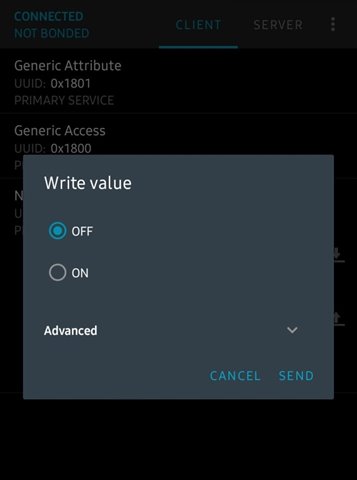
Configure 'WRITE' property in Mobile Application to control (ON/OFF) the device.

Hello Nordic Team,

I am currently working with the nRF Connect SDK v2.4.0 to develop applications for custom boards based on the nRF52840 microcontroller. I have included custom GATT Services and Characteristics which include controlling the sensor (ON/OFF). From the below link and few other sources.

https://academy.nordicsemi.com/courses/bluetooth-low-energy-fundamentals/lessons/lesson-4-bluetooth-le-data-exchange/topic/blefund-lesson-4-exercise-1

As I click on 'WRITE' icon after flashing the code. This is the output I get,
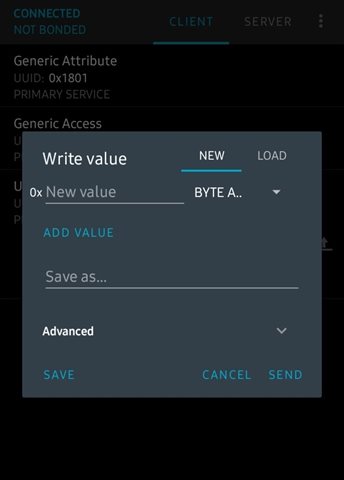
instead of this as given in the link above.
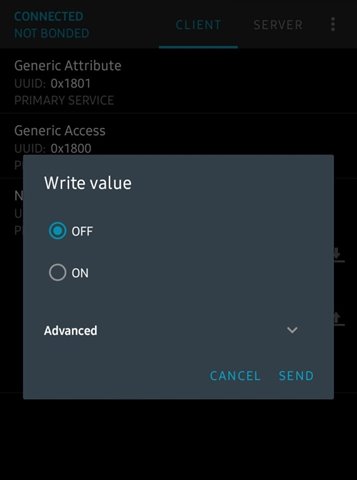
I have added the write functionality as mentioned in the above link.

static ssize_t temp_toggle(struct bt_conn *conn,
			 const struct bt_gatt_attr *attr,
			 const void *buf,
			 uint16_t len, uint16_t offset, uint8_t flags)
{
	LOG_DBG("Attribute write, handle: %u, conn: %p", attr->handle, (void *)conn);
	if (len != 1U) {
		LOG_DBG("Write led: Incorrect data length");
		return BT_GATT_ERR(BT_ATT_ERR_INVALID_ATTRIBUTE_LEN);
	}
	if (offset != 0) {
		LOG_DBG("Write led: Incorrect data offset");
		return BT_GATT_ERR(BT_ATT_ERR_INVALID_OFFSET);
	}
	if (scs_cb.temp_wrt_cb) {
		//Read the received value 
		uint8_t val = *((uint8_t *)buf);
		if (val == 0x00 || val == 0x01) {
			//Call the application callback function to update the LED state
			scs_cb.temp_wrt_cb(val ? true : false);
		} else {
			LOG_DBG("Write led: Incorrect value");
			return BT_GATT_ERR(BT_ATT_ERR_VALUE_NOT_ALLOWED);
		}
	}
	return len;
}

Can you provide insights into what might be causing this problem and what changes should I make? Please provide your feedback on the above points at earliest.

Thanks and Regards,

Anmol.

Parents
  • Hi,

    instead of this as given in the link above.

    The nRF Connect mobile desktop app will display Nordic Semi owns services a bit different than other general services. It's not something that you can or need to "fix".

    regards

    Jared

  • Hello Jared,

    Thankyou for your reply.

    My question was: how can I change the GUI for WRITE property as ON/ OFF for my custom UUID?

    As in Nordic Semi Service, the LED is switched ON and OFF, Same I wanna do with my sensor i.e. switch it ON/OFF. So what changes are required to make to do so. I'm using same code as mentioned above.

    I'm getting this but want ON/OFF GUI same as mentioned in your reply


    What does this GUI says and how to convert this into ON/OFF interface?

    Thanks & Regards,

    Anmol.

Reply
  • Hello Jared,

    Thankyou for your reply.

    My question was: how can I change the GUI for WRITE property as ON/ OFF for my custom UUID?

    As in Nordic Semi Service, the LED is switched ON and OFF, Same I wanna do with my sensor i.e. switch it ON/OFF. So what changes are required to make to do so. I'm using same code as mentioned above.

    I'm getting this but want ON/OFF GUI same as mentioned in your reply


    What does this GUI says and how to convert this into ON/OFF interface?

    Thanks & Regards,

    Anmol.

Children
Related