NRF Connect

I have installed the NRF Connect app on my Windows 10 PC, using "Run as Administrator" and keep getting the following error message whenever I try to install any of the products using the INSTALL buttons in the NRF Connect app:
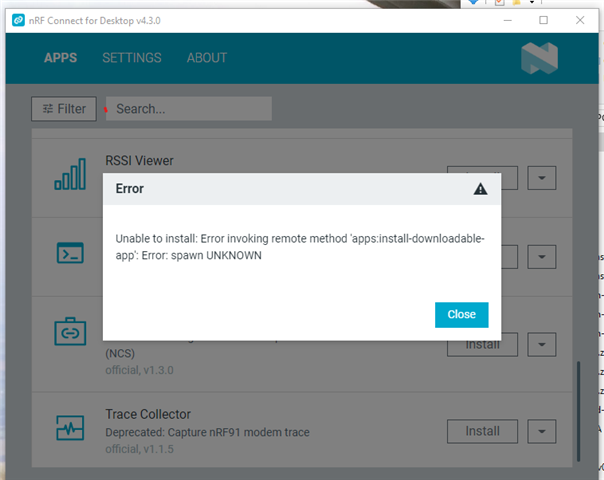
The Error says: Unable to install:  Error invoking remote method 'apps:install-downloadable-app': Error: spawn UNKNOWN

Most computer settings are managed by IT for all sorts of corporate security.  I'm sure we are behind firewalls, etc. I was advised to use run as administrator to allow it to install (the command line tools seems to have installed using this method).     I have tried uninstalling and reinstalling, and also tried rebooting several times. 

Any ideas?

Parents
  • Hi

    So there are no further issues at the moment, right? Let me know if you need anything else from our end.

    Best regards,

    Simon

  • It would be great to have Nordic MOVE the data directory out from under the AppData directory so that the program wouldn't be blocked by more IT departments group policy.  Admittedly this can be a "cat and mouse" game as eventually it seems that IT group policy may eventually block that as well...but for now it works.

    As others have noted the solution to add to the end of the shortcut Target: has worked as desired.  "djh" is my user name so each user would have to replace the "djh" with their user name.

    shortcut Target:

    "C:\Users\djh\AppData\Local\Programs\nrfconnect\nRF Connect for Desktop.exe" --user-data-dir "C:\users\djh\NRF"

Reply
  • It would be great to have Nordic MOVE the data directory out from under the AppData directory so that the program wouldn't be blocked by more IT departments group policy.  Admittedly this can be a "cat and mouse" game as eventually it seems that IT group policy may eventually block that as well...but for now it works.

    As others have noted the solution to add to the end of the shortcut Target: has worked as desired.  "djh" is my user name so each user would have to replace the "djh" with their user name.

    shortcut Target:

    "C:\Users\djh\AppData\Local\Programs\nrfconnect\nRF Connect for Desktop.exe" --user-data-dir "C:\users\djh\NRF"

Children
Related