VS-CODE: build hangs: "Found GnuLd: ld.bfd..."

I am having a recurring problem with NFC-CONNECT: build action. It hangs when building. Gets stuck with the following message in lower-right hand corner of screen:
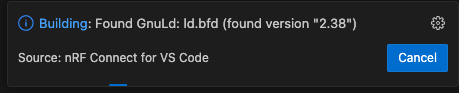
The procedure I've found to get around this is to cancel the build, and then open a shell in the app directory and do the following:

% rm -rf build*
% export ZEPHYR_BASE=/opt/nordic/ncs/v2.6.0/zephyr
% west build -b nrf52840dk_nrf52840 -p

I can then use the build & build pristine actions.

It might be my environment is not fully supported. The `app` is stand-alone. There is an out-of-the tree module with source i reference with the following CMakeLists.txt fragment:

cmake_minimum_required(VERSION 3.20.0)

set(my-module "${CMAKE_CURRENT_SOURCE_DIR}/../my-module")
set(EXTRA_ZEPHYR_MODULES ${my-module})

find_package(Zephyr REQUIRED HINTS $ENV{ZEPHYR_BASE})

This module includes (via settings) board_root, dts_root, & soc_root,  as well as source, library, and include trees picked up from cmake + kconfig variables.

The build environment: Apple M1 Mac, MacOS: 12.6.7 (Monterey), VS-Code: v1.88.1, NRF-Connect: v2024.3.25

The Welcome tab shows SDK + Toolchain: v2.6.0. (I also use stock Zephyr to compile for non-Nordic boards, but am selecting proper SDK + toolchain, and have even removed `.west` directory for stock zephyr installation). 

Sorry to keep complaining about a great tool, but it's frustrating when it stops working.

Thanks. Kent

Parents Reply Children
  • Hey Matt,
    We had this issue for a few months but it eventually went away because VSCode and NCS toolchain got updates.

    1. The first thing to check is that your Mac, VSCode and NCS are all on the latest version. Update everything. 
    2. For a while we even had 2 installs of VSCode just to test versions against each other to ensure the issue was really resolved.
    3. *Note* that for the latest NCS and toolchain, you will NOT be using nRF Connect for Desktop to do the install anymore. In case you missed that changeover you might be stuck a few versions behind. The new install process is directly within VSCode using the "nFR Connect for VSCode" plugin.
    4. Also to check --- in some cases the tool (or the user) accidentally installed the Intel (x64) toolchain on Arm based Macs (arm64) or vice-versa. Just double check that all your tools are for the correct architecture that you are using.

    ~R

  • Hi Simon,

    I have had this just happen to me, I was modifying code, then hitting debug over and over, eventually it stalled trying to erase, I closed out vscode, reopened and tried again... then ran into this issue after I tried a pristine build. I tried deleting the build directory entirely, recreating the build and it didn't work.

    nRF Connect SDK Extension - 2026.1.1327

    VS Code - 1.109.3 (Universal)

    We are using nrf connect SDK v3.2.0

    Is there a process where I can capture logs and send them to you for VS Code?

    Regards,

    Geoff

  • Hi Geoff

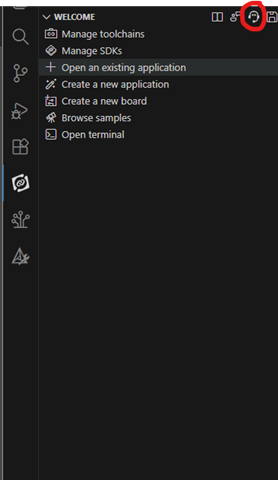
    Please generate support information by pressing this button in the nRF Connect extension of VS Code, and we can take a look at the logs there.

    It also seems to be discussed in this Github issue thread for reference. I'll try to keep an eye out for updates there as well, but we also have an internal discussion on this. https://github.com/zephyrproject-rtos/zephyr/issues/72963 

    Best regards,

    Simon

  • Hi Simon,

    I reset my system and now it's working again, I will try at some point to re-create it, but not sure if I will be able to. But if I do, I'll be sure to press that button, thanks!

    Geoff

Related