

Hi Nordic,
Could you please help me to play the pcm static data in nRF5340 Audio DK.
Thanks & Regards,
PSR.
Hi Nordic,
Could you please help me to play the pcm static data in nRF5340 Audio DK.
Thanks & Regards,
PSR.
can any one respond on this.
Thanks& Regards
PSR.

HI PSR,
Apologies for the lack of response so far.
Does your use-case require LE Audio, or do you want to get and play the PCM data on the same device?
For the LE Audio case, you can refer to the audio_system and audio_datapath files in nrf5340_audio/src/audio.
You can still refer to parts of the Audio application for the local case and use the unicast server or the broadcast sink. The CIS bidirectional walkie-talkie demo both records and plays audio: it records audio and transmits it to the peer device and it receives audio and plays it.
Best regards,
Maria

Hi Maria,
I'm currently working with PCM data from the nRF5340 DK and I want to play audio on the nRF5340 Audio board. Could you advise on which communication method I should use? Additionally, could you please provide any sample code for this?
Thank you!
You can transfer the data wired over I2S and wireless with LE Audio. We don't have a simple example which demonstrates this, but the nRF5340 Audio application uses both methods. PCM data is transfered over I2S from the CS47L63 to the nRF5340 on the nRF5340 Audio DK.
You can transfer the data wired over I2S and wireless with LE Audio. We don't have a simple example which demonstrates this, but the nRF5340 Audio application uses both methods. PCM data is transfered over I2S from the CS47L63 to the nRF5340 on the nRF5340 Audio DK.
Hi Maria,
I have only one nRF5340 Audio DK board. Can it work with both a microphone (input) and a headset (output) for audio at a time?
Thank you!
Hi Maria,
I am receiving PCM hex data on the nRF5340 DK board.
Can I transfer this PCM data to the nRF5340 Audio DK?
Will I be able to get audio from the nRF5340 Audio DK?
Hi Maria,
could you please respond anyone as soon as possible.
I followed this link is (Missing Forum Thread)
The nRF5340 DK is configured as a unicast audio client, and the nRF5340 audio DK is set up as a headset. However, I'm unable to get the sample audio from audio dk board, having trouble setting the QoS.
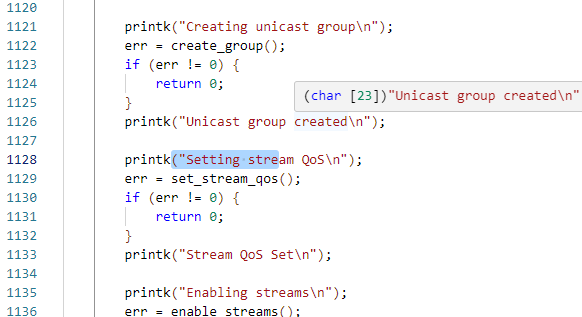
Could you please verify the attached logs?
Device found: 79:00:28:91:EE:A9 (random) (RSSI -59)
Device found: 87:4B:17:8F:AF:F1 (public) (RSSI -96)
Device found: C8:08:05:C6:4E:EA (random) (RSSI -74)
Device found: 48:61:DD:6C:D9:32 (random) (RSSI -84)
Device found: 4F:C2:F5:AE:7F:1D (random) (RSSI -45)
[AD]: 1 data_len 1
[AD]: 10 data_len 1
[AD]: 255 data_len 10
Device found: 04:7F:0E:C5:46:7B (public) (RSSI -95)
Device found: 79:00:28:91:EE:A9 (random) (RSSI -55)
Device found: 87:4B:17:8F:AF:F1 (public) (RSSI -96)
Device found: 4F:C2:F5:AE:7F:1D (random) (RSSI -45)
[AD]: 1 data_len 1
[AD]: 10 data_len 1
[AD]: 255 data_len 10
Device found: 86:99:6C:5F:EF:F5 (public) (RSSI -98)
Device found: 04:7F:0E:C5:46:7B (public) (RSSI -95)
Device found: 79:00:28:91:EE:A9 (random) (RSSI -50)
[AD]: 2 data_len 4
[AD]: 22 data_len 8
status=0
Audio server found with type 1, contexts 0x00030007 and meta_len 0; connecting
status=0
status=0
MTU exchanged: 23/23
Connected: 79:00:28:91:EE:A9 (random)
status=0
status=0
MTU exchanged: 65/247
status=0
status=0
Connected
Discovering sinks
codec_cap 0x20006900 dir 0x01
codec id 0x06 cid 0x0000 vid 0x0000 count 19
data: type 0x01 value_len 2
9400
data: type 0x02 value_len 1
22
data: type 0x03 value_len 1
01
data: type 0x04 value_len 4
28007800
data: type 0x05 value_len 1
01
meta: type 0x01 value_len 2
0700
dir 1 loc 1
snk ctx 5 src ctx 0
Sink #0: ep 0x20003370
Discover sinks complete: err 0
Sinks discovered
Discovering sources
codec_cap 0x20006900 dir 0x02
codec id 0x06 cid 0x0000 vid 0x0000 count 19
data: type 0x01 value_len 2
9400
data: type 0x02 value_len 1
22
data: type 0x03 value_len 1
01
data: type 0x04 value_len 4
28007800
data: type 0x05 value_len 1
01
meta: type 0x01 value_len 2
0300
dir 2 loc 0
snk ctx 5 src ctx 0
Source #0: ep 0x20003540
Discover sources complete: err 0
Sources discovered
Configuring streams
Audio Stream 0x20003ca4 configured
Configured sink stream[0]
Audio Stream 0x20003ccc configured
Configured source stream[0]
Creating unicast group
status=0
Unicast group created
Setting stream QoS
QoS: waiting for 2 streams
128: 28304
--- 133 messages dropped ---
129: 29397
130: 29766
131: 29403
132: 28315
133: 26530
134: 24092
135: 21061
136: 17511
137: 13530
138: 9216
139: 4675
140: 19
141: -4637
142: -9179
143: -13496
144: -17480
145: -21034
146: -24070
147: -26513
148: -28303
149: -29397
150: -29766
151: -29403
152: -28316
153: -26532
154: -24094
155: -21063
156: -17513
157: -13533
158: -9219
159: -4678
Audio Stream 0x20003ca4 enabled
Hi Nordic,
I was shared the nRF5340 Dk unicast audio client, In nRF5340 Audio Dk board i'm sharing , in that i'm getting error as Enable rejected,
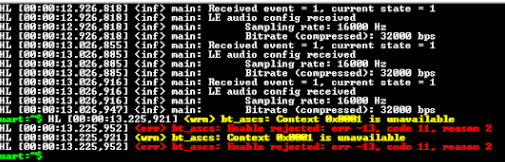
could you please help on this to rectify the error.
Thanks.
PSR
Hello,
Apologies for the wait.
PSR said:Audio Stream 0x20003ca4 enabled
Is this the last logging you get?
I tried to reproduce it with unicast audio client as is and with
CONFIG_BT_BAP_UNICAST_16_2_1=y
CONFIG_AUDIO_SOURCE_I2S=y
in prj.conf and building the audio application for the headset device.
In this case the stream was successfully enabled like in your log. In my case, one stream was configured, and it was also started shortly after it was enabled.
This is my log after yours ends. Before this, they are equivalent:
Audio Stream 0x20003c2c enabled
Streams enabled
Starting streams
Audio Stream 0x20003c2c started
Streams started
LC3 encode 2 frames in 2 SDUs
  TX LC3 l on streams[40]: 0
  TX LC3 l on streams[40]: 0
Which changes have you made to unicast audio client?
Best regards,
Maria