Hello,
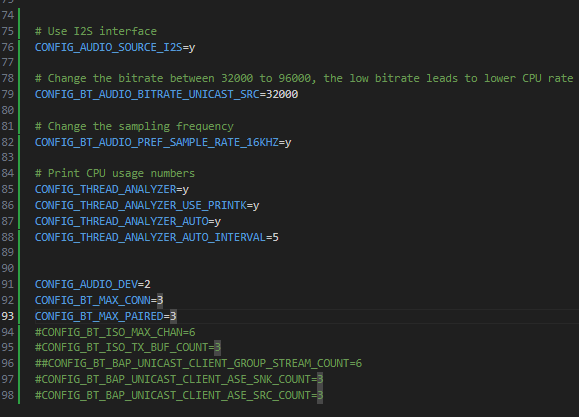
Because i want to connect more than two headset to one gateway, so i modify the prj.conf as follow

Hello,
Because i want to connect more than two headset to one gateway, so i modify the prj.conf as follow

Hi,
The nRF5340 Audio: Unicast client currently supports up to 2 headsets, one for left and one for right.
The default configuration will try to allocate high-quality QoS settings for two headsets. Trying to extend the BT_MAX_CONN will make the controller cannot allocate the proper resource (out of bandwidth). The crash error code shows the controller cannot allocate proper timing resources when creating CIG (connected isochronous group).
Would you like to make every headset get different streams or share the same stream contents?
If you want to share the same stream with multiple headsets, BIS would be the better way. BIS is a unidirectional communication protocol that allows for broadcasting one or more audio streams from a source device to an unlimited number of receivers that are not connected to the source.
Regards,
Amanda H.
Hello Amanda
Thank you for your reply!
Would you like to make every headset get different streams or share the same stream contents?
Yes, in our user scenarios, the gateway may be send different signal to more than two headsets, and this scenarios in our product in not work in the BIS mode. So i need to check the limitation of connection.
So, can i decrease the quality to increase the connection number? If i can, how much will the audio quality will decrease? I need to test and evaluate this result. So do you have any suggestions for me?
Thank you very much and looking forward to your reply!
Hello Amanda
Sorry for late, because i was deal with another function..
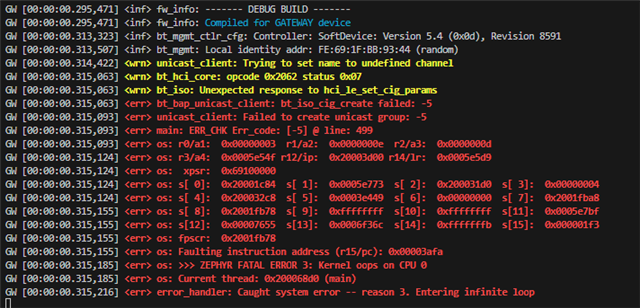
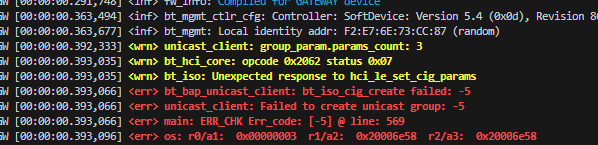
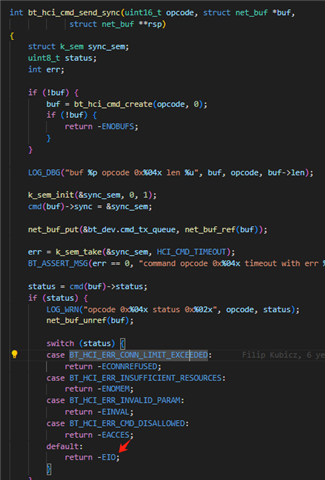
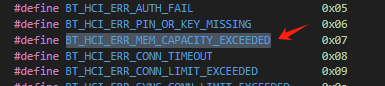
Now, i am back to this question. i use the v2.7.0 SDK, and when i modify the CONFIG_BT_MAX_CONN to 3, it will crashed, i followed the code, found the status is 7 means there is a "BT_HCI_ERR_MEM_CAPACITY_EXCEEDED" error.
I don't understand where the memory is insufficient, is it the network core or the application core?


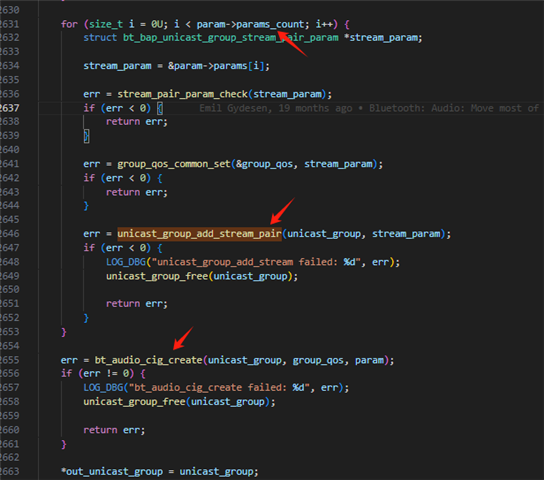
It hard to continue... I found if the "param->params_count" is more than 2, in the for loop if the "

Can you give me some suggestions about that, Thank you very much and looking forward to your reply!
Hi,
Did you follow my suggestion in the previous reply to modify?
-Amanda H.
Hello, Amanda
Yes, of course i follow your suggestions. I have add the following code to prj.conf

And for the audio channel, i think i can send the same channel signal to different headset, for example, i can send left channel to headset 1th and 2th, send right channle to headset 3th, 4th. I only want to increase the connection numbers first.
And I also briefly browsed through the project you sent me.( https://github.com/alexsven/sdk-nrf/commit/68a7ac3452a5c55a25ab275d761393dbdea4d5df), I found it also deal with the tx part, but it not modify the "CONFIG_BT_MAX_CONN ", so I feel a littgle confused, and i do not know what the version of SDK it based on, so i can not test it.
But what ever, I think the first thing is i can make the gateway connect to at least 3 headset at same time, even if i do not have 3 channel signal input.
But if i make the "CONFIG_BT_MAX_CONN " to 3, when the gateway start, it will crashed, even there is no headset connect to it. It will log out it have "BT_HCI_ERR_MEM_CAPACITY_EXCEEDED" error.
So, do you have some suggestions about that? Can you give me some help, it very hard to continue.
Thank you very much and looking forward to your reply!
Hi,
huma said:But if i make the "CONFIG_BT_MAX_CONN " to 3, when the gateway start, it will crashed, even there is no headset connect to it. It will log out it have "BT_HCI_ERR_MEM_CAPACITY_EXCEEDED" error.
Try to increase the value in https://github.com/nrfconnect/sdk-nrf/blob/v2.7.0/applications/nrf5340_audio/sysbuild/ipc_radio/prj.conf#L26-L33 for network core.
Hello, Amanda
Thank you very much! I will test it later. If there is some result, i will report to you.
Thank.
Hello, Amanda
Thank you very much! I will test it later. If there is some result, i will report to you.
Thank.