How to pair and bond with a static passkey?

I developed a project that using static passkey to pair and bond with nRF SDK17.

It be fulfilled by the follow way:

//write static passkey	
	m_static_pin_option.gap_opt.passkey.p_passkey = passkey;
	err_code =  sd_ble_opt_set(BLE_GAP_OPT_PASSKEY, &m_static_pin_option);
	APP_ERROR_CHECK(err_code);
//pair with MITM and check the passkey from phone
    #define  SEC_PARAM_BOND  1
    #define  SEC_PARAM_MITM  1
    #define  SEC_PARAM_LESC  0
    #define  SEC_PARAM_KEYPRESS  0
    #define  SEC_PARAM_IO_CAPABILITIES   BLE_GAP_IO_CAPS_DISPLAY_ONLY 
    #define  SEC_PARAM_OOB  0
    #define  SEC_PARAM_MIN_KEY_SIZE  7
    #define  SEC_PARAM_MAX_KEY_SIZE  16
    
    m_sec_param.bond           = SEC_PARAM_BOND;
    m_sec_param.mitm           = SEC_PARAM_MITM;
    m_sec_param.lesc           = SEC_PARAM_LESC;
    m_sec_param.keypress       = SEC_PARAM_KEYPRESS;
		m_sec_param.io_caps        = BLE_GAP_IO_CAPS_DISPLAY_ONLY;
    m_sec_param.oob            = SEC_PARAM_OOB;
    m_sec_param.min_key_size   = SEC_PARAM_MIN_KEY_SIZE;
    m_sec_param.max_key_size   = SEC_PARAM_MAX_KEY_SIZE;
    m_sec_param.kdist_own.enc  = 1;
    m_sec_param.kdist_own.id   = 1;
    m_sec_param.kdist_peer.enc = 1;
    m_sec_param.kdist_peer.id  = 1;
		
    err_code = pm_sec_params_set(&m_sec_param);
    APP_ERROR_CHECK(err_code);

However,when I turn to NCS,I don't know how to fulfill it.

I used the hid_mouse sample but it just push the button to confirm the bond.

How can I use the passkey to do the MITM protect?

Parents
  • Hello,

    Please see this API:
    https://docs.nordicsemi.com/bundle/ncs-2.7.99-cs1/page/zephyr/connectivity/bluetooth/api/connection_mgmt.html#c.bt_passkey_set

    As you can see from the description, you need to set CONFIG_BT_FIXED_PASSKEY=y for this API to work. 

    Also note that using a fixed/static passkey doesn't really provide any real security. It is possible to brute force relatively easily, and it is also possible to sniff/capture and crack it later. Adding LESC on top of a static passkey will increase the security though, since the sniffer can't pick up the Diffie Hellman keys (used in LESC). 

    But that being said, the security risk of a BLE mouse is relatively low. Even though someone would be able to listen in, the value of the data from a mouse is relatively low, which is why it usually doesn't use a (non-static) passkey in the first place. 

    A fixed passkey does however make it easier for the user to know that they connect to the correct device, since a normal user would see that they are able to use e.g. a 6-digit key printed on a sticker somewhere. 

    Best regards,

    Edvin

  • Hi,

    I already set CONFIG_BT_FIXED_PASSKEY=y and use bt_passkey_set() to set the static passkey.

    But I think the relevant code that I used is misfit to the way that use the passkey.

    I imitate the hid_mouse that use bt_conn_auth_cb_register() and bt_conn_auth_info_cb_register() to replace the peer_manager in nRF SDK17.

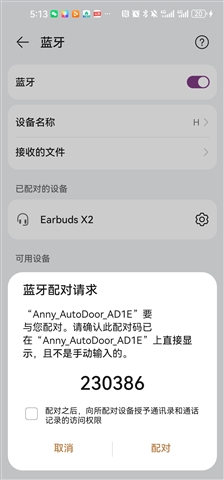
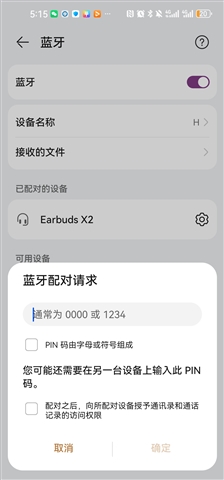
    I think it is the issue that even CONFIG_BT_FIXED_PASSKEY=y and bt_passkey_set() be used,the pairing show in my phone still display a 8 length passkey and confirm 、cancal button rather than a input box just like this:

    And that's what I want to achieve:

  • 1202.rar

    This is the project file.It is semi-finished.

    Now I seem realize the pairing and bonding with passkey successfully.But the time of this process seem a little bit long,at least longer than it in nrf SDK.If there have some methods to let it quicker?

  • What do you mean by slow? How long does it take?

    It looks like it happens almost instantly when I run it. 

    What HW are you running on? The nRF52832 DK?

    Best regards,

    Edvin

  • When I using my phone to connect with my board , The pop-up is quick appeared.

    The waiting happen at the time that I entry passkey and confirm.

    The display of phone is pairing and the process will keep about five seconds.

    But it finished immediately when I use the application in nRF SDK.

    The board using to test is designed by myself that refer to official design.

  • Do you mean that it is slow:

    1: after you have entered the code and press "confirm"

    or

    2: It takes a long time before the popup with the passkey appears?

    In my test, using the ncs\nrf\samples\bluetooth\peripheral_cgms on an nRF52832 DK the time after pressing confirm was almost instantly. Can you please try this sample on both a DK and your custom hardware? You don't need to worry about setting the static passkey, as this shouldn't affect the time it takes roughly one second before I can see it in the log, but the logging has some delay. 

    Can you see if you see the same 5 second delay in that application on a) a DK and b) your HW?

    Best regards,

    Edvin

  • It is slow as case 1 that you say,just like that as follow:

    There no the same 5 second delay when I test cgms in my HW.

Reply
  • It is slow as case 1 that you say,just like that as follow:

    There no the same 5 second delay when I test cgms in my HW.

Children
  • Ok, thank you for showing me. This could actually be unrelated to the security part. Do you know what connection interval that is being used? A sniffer trace using nRF Connect for Bluetooth LE would reveal this, and probably also reveal what takes so long. I suspect it is a long connection interval being used. I didn't see that you specify it anywhere, so it could be the phone that is selecting a long connection interval. It is possible for your peripheral to request a shorter connection interval, so that is something we could try. For a guide, you can follow the Nordic Developer Academy, and the Bluetooth Low Energy Fundamentals course. Particularly Lesson 3, exercise 2, steps 1-6 is relevant for this. It will also tell you the connection interval without using a sniffer, based on the connection callbacks from your application.

    Best regards,

    Edvin

Related