Example NUS service, the packet transmission is very long.

Using the nus central and peripheral examples from SDK_17.1.0 trying to transfer at least 1 kilobytes per second.

Peripheral on nRF52840 PCA10059, central on nrf52832 pca10040.

Successfully set BLE_GAP_PHY_2MBPS mode and buffer size 244 bytes.

MIN_CONN_INTERVAL MSEC_TO_UNITS(8, UNIT_1_25_MS)

MAX_CONN_INTERVAL MSEC_TO_UNITS(75, UNIT_1_25_MS) 

The function of the data transfer is as follows:

void BLE_PeripheralSend(void)
{ 
  uint32_t err_code;
  unsigned short length;
    
  if(BLE_connected==false) return;

  length = BLE_TX_channel.get_count();
  if(length == 0) return;

  if(length > BLE_NUS_MAX_DATA_LEN)
    {length = BLE_NUS_MAX_DATA_LEN;}
   
  SETBIT(TEST_PIN2);
  SETBIT(TEST_PIN);
    
  //reload to local buffer
  BLE_TX_channel.read((char*)data, (unsigned char)length);
    
  //============================================
  //Load in a loop until the block is transferred
  do
  {
      if(BLE_connected==false)  break;
 
      err_code = ble_nus_data_send(&m_nus, data, &length, BLE_conn_handle);
                    
      if((err_code != NRF_ERROR_INVALID_STATE) &&
         (err_code != NRF_ERROR_RESOURCES) &&
         (err_code != NRF_ERROR_NOT_FOUND))
      {
        APP_ERROR_CHECK(err_code);
      }
  }
  while (err_code == NRF_ERROR_RESOURCES);
  //============================================

  CLRBIT(TEST_PIN2);
}

static void ble_evt_handler(ble_evt_t const * p_ble_evt, void * p_context)
{

        //the transmitter has sent packets and the buffer is free
        case BLE_GATTS_EVT_HVN_TX_COMPLETE:
            CLRBIT(TEST_PIN);
            break;

No matter how many bytes are transferred. From one to 200, the transmission length is about 60 ms. If you start loading new data at this interval, the packets disappear. Instead of 1ms, it takes 60 times longer.

I have studied the topic devzone.nordicsemi.com/.../how-to-achieve-max-throughput-with-nus-service
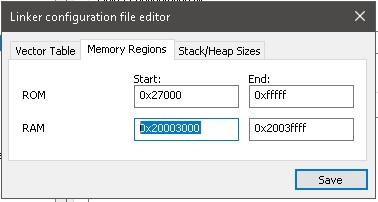
Implemented all the recommendations from it. But it does not solve the problem. If you use NRF_SDH_BLE_GAP_EVENT_LENGTH more than 6, the application immediately fails.

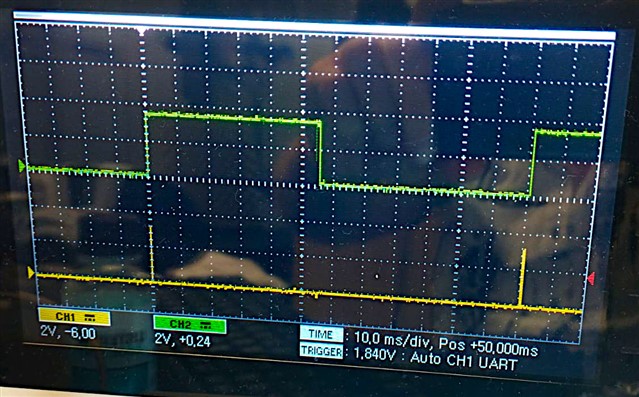
The yellow line in the picture: the residence time in the BLE_PeripheralSend() function This is 60us. This is followed by waiting for packet transmission, green line. This is not less than 40ms and not more than 60ms. A packet cannot be shortened in any way, even if it is 1 byte.
  • Hi!

    Implemented all the recommendations from it. But it does not solve the problem. If you use NRF_SDH_BLE_GAP_EVENT_LENGTH more than 6, the application immediately fails.

    You need to allocate more RAM to the SoftDevice. You should be able to see in the nrf_log output what changes are needed.

    From one to 200, the transmission length is about 60 ms. If you start loading new data at this interval, the packets disappear. Instead of 1ms, it takes 60 times longer.

    You are likely just spinning in the ble_nus_data_send() loop until the block is transferred. Try increasing NRF_SDH_BLE_GAP_EVENT_LENGTH  again.

  • nrf_log output had to delete, it was useless. Because it doesn't work via J-Link, it just freezes and stops displaying messages through the viewer. And there is no UART on the dongle.

    I'm not spinning in that cycle. The output from there is no more than 60us. CLRBIT(TEST_PIN2);

    That's the bottom line. But the event BLE_GATTS_EVT_HVN_TX_COMPLETE: comes after 60ms already

    >>ry increasing NRF_SDH_BLE_GAP_EVENT_LENGTH  again.

    This would make sense if the packet is longer than 20 bytes. I tried sending: 1, 2, 4, 8, 16 bytes in one call of BLE_PeripheralSend(). The busy length (Green line) does not change and is strictly equal to 60ms.

    Increased the memory size. NRF_SDH_BLE_GAP_EVENT_LENGTH = 60  Now the application does not crash. But the transfer speed did not increase. Transmission time of one packet is still 60ms.

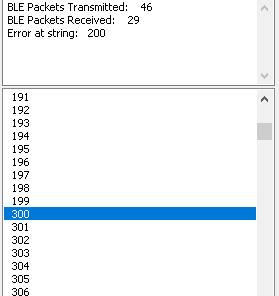
    Packets are still missing. To keep them from disappearing, I have to make the interval between packets more than 200ms. You can see here that a 100 byte packet is missing.

  • Hi!

    Are you able to capture a sniffer trace of what's happening on-air, and save and upload it here? 

    https://www.nordicsemi.com/Products/Development-tools/nrf-sniffer-for-bluetooth-le

  • Tried to do that a few days ago. But it's not working for you either. Try it yourself. Your sniffer is not installed in WireShark and is not visible there, it doesn't work. And there is no time to mess around with it.

    That's why I used Ubertooth github.com/.../Ubertooth-Win The packets seem to be fine.

    Today I found that debug output in SDK was not fully disabled and it was messing up packets in UART channel. It started working better, but there are still isolated losses of blocks. And it's somewhere in the USB-COM link and the Windows driver. Probably the J-Link gate is also messing something up.

    I would like to know what event the event appears on: BLE_GATTS_EVT_HVN_TX_COMPLETE

    Is this the end of the buffer transfer, or the end of the connection interval?

Related