Softdevice: Not responding to MCUMGR bootloader_info command

I am attempting to use the nRF Connect for Mobile application to test the MCUmgr implementation on my device running the Softdevice.
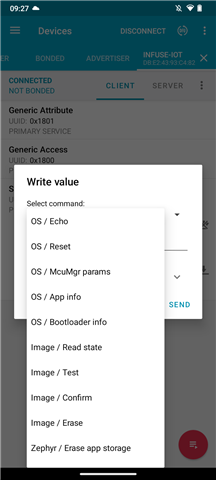
I am able to successfully run the "OS/Echo" and "OS/mcumgr_params" commands, but "OS/bootloader_info" never gets through.

As unlikely as it seems, this appears to be an issue at the Softdevice controller level based on the Wireshark traces I have collected.

The central device is repeatedly sending the command, with no acknowledgement from the Softdevice.
mcumgr_bootloader_info.pcapng

Version information:

 * NCS v2.7.0
 * nRF Connect for Mobile v4.28.1
 * Android 13

Reproduction application:

west build -b nrf52840dk/nrf52840 zephyr/samples/subsys/mgmt/mcumgr/smp_svr/ -- -DOVERLAY_CONFIG="overlay-bt.conf" -DCONFIG_BT_AUTO_PHY_UPDATE=n -DCONFIG_MCUMGR_GRP_OS_BOOTLOADER_INFO=y
west flash

Parents
  • I should also mention this is particularly problematic because the connection eventually drops due to the Softdevice is not responding, and this command is sent by the DFU logic when attempting to upgrade.

    As a result, I am currently unable to perform a DFU over MCUmgr.

  • Hi, 

    Are you using nRF52840DK?

    I am able to successfully run the "OS/Echo" and "OS/mcumgr_params" commands, but "OS/bootloader_info" never gets through.

    I'm unsure how to run those commands since I cannot find relevant docs. Could you elaborate on the details?

    JordanYates said:

    I should also mention this is particularly problematic because the connection eventually drops due to the Softdevice is not responding, and this command is sent by the DFU logic when attempting to upgrade.

    As a result, I am currently unable to perform a DFU over MCUmgr.

    Are you able to perform DFU via nRF Connect for Mobile app without those commands?

    Regards,
    Amanda H.

  • As contained in the reproduction command, yes this is on a nRF52840DK.

  • I cannot reproduce the issue. I don't get those command functions on the nRF Connect app with your command instructions. Do you modify the smp_svr sample? If so, what is that? 

    You should be able to upload and start the DFU by pressing the DFU icon on the right top corner with the unmodified smp_svr sample

  • I don't understand what you mean? You are unable to find the same menu in the app?
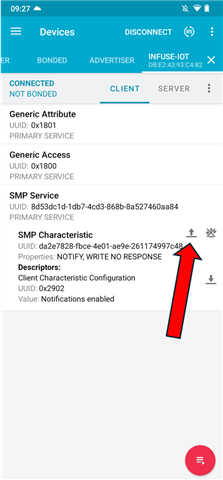
    The one step I did not include because I thought it was sort of obvious is that you need to tap the "SMP Service" row to expand out the two characteristics.

    If you mean some other problem, you will have to include a screenshot because I can't see any way for this to go wrong.

    The only modifications to `smp_srv` are those I specified in the reproduction instructions:
    west build -b nrf52840dk/nrf52840 zephyr/samples/subsys/mgmt/mcumgr/smp_svr/ -- -DOVERLAY_CONFIG="overlay-bt.conf" -DCONFIG_BT_AUTO_PHY_UPDATE=n -DCONFIG_MCUMGR_GRP_OS_BOOTLOADER_INFO=y

    Attempting to perform the DFU update as you describe is exactly the situation that does not work, because of the issue I describe. The screenshots I provided are simply a method to send the exact command that does not work, which narrows down the problem.

Reply
  • I don't understand what you mean? You are unable to find the same menu in the app?
    The one step I did not include because I thought it was sort of obvious is that you need to tap the "SMP Service" row to expand out the two characteristics.

    If you mean some other problem, you will have to include a screenshot because I can't see any way for this to go wrong.

    The only modifications to `smp_srv` are those I specified in the reproduction instructions:
    west build -b nrf52840dk/nrf52840 zephyr/samples/subsys/mgmt/mcumgr/smp_svr/ -- -DOVERLAY_CONFIG="overlay-bt.conf" -DCONFIG_BT_AUTO_PHY_UPDATE=n -DCONFIG_MCUMGR_GRP_OS_BOOTLOADER_INFO=y

    Attempting to perform the DFU update as you describe is exactly the situation that does not work, because of the issue I describe. The screenshots I provided are simply a method to send the exact command that does not work, which narrows down the problem.

Children
  • (Update)

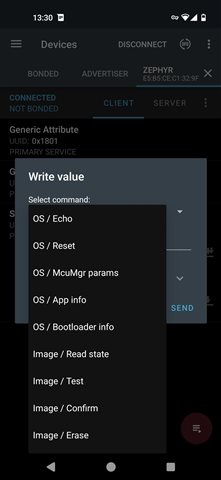
    My colleague can get the same menu in the app on his pixel 4a. 

    He ran the "OS/bootloader_info" command and got the result as the following figure. Also updating via DFU works as expected without issue. 

    What is your destination? If you just want to update via DFU, this command is not necessary and will not impact the DFU. 

    --

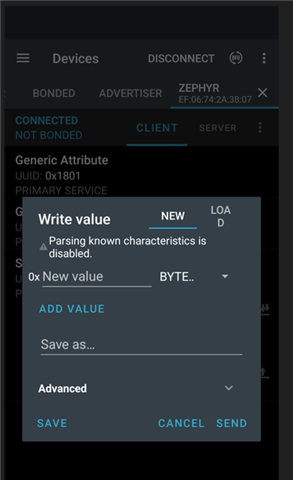
    What is the phone you use? I use Pixel 6a with Android 14, but cannot find the same menu in the app as you.

    Could you try to use the nRF Device app?

Related