DevAcademy - nRF Connect SDK Fundamentals - Lesson 1 Exercise 2

Hi Nordic community,

I'm starting this course as I'd like to start with Nordic.

I can't continue (better to say, start) the course as the instructions are different from the menu option I have.

At this point:
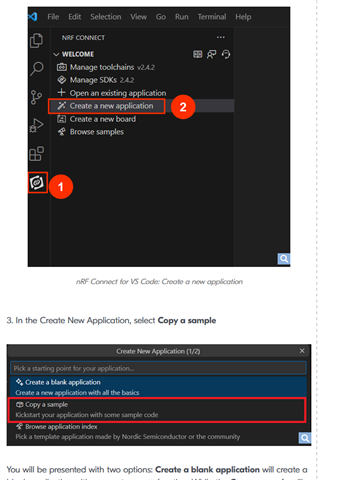
I don't have the option "Copy a sample". I then went to the installation folder (C:\ncs\v2.6.1\zephyr\samples\basic\blinky) and I copied to a local folder.

Unfortunately from that point onwards I couldn't continue, as the IDE doesn't allow me to execute the "Add build configuration".

How should I proceed?

I'm currently using the following versions:

VSCode:

Version: 1.94.0 (system setup)
Commit: d78a74bcdfad14d5d3b1b782f87255d802b57511
Date: 2024-10-02T13:08:12.626Z
Electron: 30.5.1
ElectronBuildId: 10262041
Chromium: 124.0.6367.243
Node.js: 20.16.0
V8: 12.4.254.20-electron.0
OS: Windows_NT x64 10.0.19045

nRF Connect for VS Code Extension Pack

v2024.9.5

Kind regards,

AGA

Parents
  • Hi 

    Just to verify here, you are using NCS 2.6.1 right?

    Can you please provide me an image of the option you have in the NRF Connect extension? 

    If you hit create a new application, which options do you see? 

    Like this

    Regards

    Runar

  • Hi   many thanks for your reply.

    Yes, I installed both the SDK and the toolchain using the version 2.6.1.

    Here the options I have:

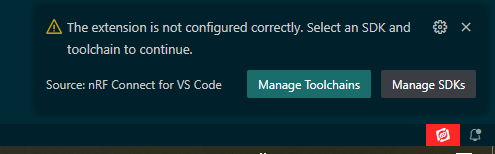
    I also spotted that on the right lower corner I have a red icon:

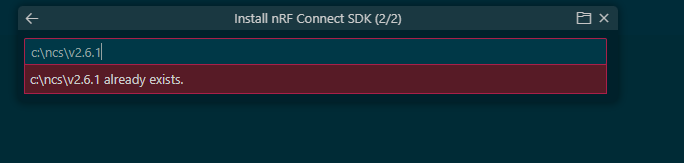
    If I press "Manage SDKs" I get this:

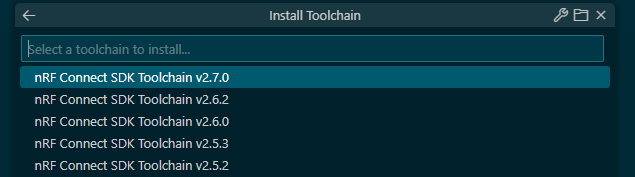
    While, if I press "Manage Toolchains" I get this:

    So, from the above pictures "looks" like that the both the SDK and the toolchain are correctly installed, although the red icon tells me something different.

    Is possible that the issue I'm having depends by this?

    Kind regards.

    AGA

Reply
  • Hi   many thanks for your reply.

    Yes, I installed both the SDK and the toolchain using the version 2.6.1.

    Here the options I have:

    I also spotted that on the right lower corner I have a red icon:

    If I press "Manage SDKs" I get this:

    While, if I press "Manage Toolchains" I get this:

    So, from the above pictures "looks" like that the both the SDK and the toolchain are correctly installed, although the red icon tells me something different.

    Is possible that the issue I'm having depends by this?

    Kind regards.

    AGA

Children
Related