nrF SDK 2.7 Matter-Light-Bulb Sample not Building for new ON/OFF Switch Endpoints

Hi All,

I am using nRF Connect SDK v2.7 + VsCode + NRF5340 DK and trying to add and extend matter-light-bulb sample. With 'MA-onofflight' when I try to compile the project it gives the following errors:

In file included from /home/user/ncs/v2.7.0/modules/lib/matter/src/app/clusters/scenes-server/scenes-server.cpp:19:
/home/user/ncs/v2.7.0/modules/lib/matter/src/app/clusters/scenes-server/scenes-server.h:38:9: error: 'MATTER_DM_SCENES_CLUSTER_SERVER_ENDPOINT_COUNT' was not declared in this scope; did you mean 'MATTER_DM_GROUPS_CLUSTER_SERVER_ENDPOINT_COUNT'?
38 | MATTER_DM_SCENES_CLUSTER_SERVER_ENDPOINT_COUNT + CHIP_DEVICE_CONFIG_DYNAMIC_ENDPOINT_COUNT;
| ^~~~~~~~~~~~~~~~~~~~~~~~~~~~~~~~~~~~~~~~~~~~~~
| MATTER_DM_GROUPS_CLUSTER_SERVER_ENDPOINT_COUNT
/home/user/ncs/v2.7.0/modules/lib/matter/src/app/clusters/scenes-server/scenes-server.h:38:9: note: maximum limit of 1000 namespaces searched for 'MATTER_DM_SCENES_CLUSTER_SERVER_ENDPOINT_COUNT'
/home/user/ncs/v2.7.0/modules/lib/matter/src/app/clusters/scenes-server/scenes-server.h:39:49: error: non-constant condition for static assertion
39 | static_assert(kScenesServerMaxEndpointCount <= kEmberInvalidEndpointIndex, "Scenes endpoint count error");
| ~~~~~~~~~~~~~~~~~~~~~~~~~~~~~~^~~~~~~~~~~~~~~~~~~~~~~~~~~~~
/home/user/ncs/v2.7.0/modules/lib/matter/src/app/clusters/scenes-server/scenes-server.h:69:58: error: size of array 'mSceneInfoStructs' is not an integral constant-expression
69 | Structs::SceneInfoStruct::Type mSceneInfoStructs[kScenesServerMaxEndpointCount][kScenesServerMaxFabricCount];
| ^~~~~~~~~~~~~~~~~~~~~~~~~~~~~
/home/user/ncs/v2.7.0/modules/lib/matter/src/app/clusters/scenes-server/scenes-server.h:70:40: error: size of array 'mSceneInfoStructsCount' is not an integral constant-expression
70 | uint8_t mSceneInfoStructsCount[kScenesServerMaxEndpointCount] = { 0 };
| ^~~~~~~~~~~~~~~~~~~~~~~~~~~~~
/home/user/ncs/v2.7.0/modules/lib/matter/src/app/clusters/scenes-server/scenes-server.cpp: In member function 'CHIP_ERROR chip::app::Clusters::ScenesManagement::ScenesServer::FabricSceneInfo::FindFabricSceneInfoIndex(chip::EndpointId, size_t&)':
/home/user/ncs/v2.7.0/modules/lib/matter/src/app/clusters/scenes-server/scenes-server.cpp:275:78: error: 'MATTER_DM_SCENES_CLUSTER_SERVER_ENDPOINT_COUNT' was not declared in this scope; did you mean 'MATTER_DM_GROUPS_CLUSTER_SERVER_ENDPOINT_COUNT'?
275 | emberAfGetClusterServerEndpointIndex(endpoint, ScenesManagement::Id, MATTER_DM_SCENES_CLUSTER_SERVER_ENDPOINT_COUNT);
| ^~~~~~~~~~~~~~~~~~~~~~~~~~~~~~~~~~~~~~~~~~~~~~
| MATTER_DM_GROUPS_CLUSTER_SERVER_ENDPOINT_COUNT
/home/user/ncs/v2.7.0/modules/lib/matter/src/app/clusters/scenes-server/scenes-server.cpp:275:78: note: maximum limit of 1000 namespaces searched for 'MATTER_DM_SCENES_CLUSTER_SERVER_ENDPOINT_COUNT'
ninja: build stopped: subcommand failed.
[4/27] cd /home/user/light_bulb/bht_1_multirelay_rev001_dk_debug/_sysbuild && /home/user/ncs/toolchains/e9dba88316/usr/local/bin/cmake -E true
FAILED: _sysbuild/sysbuild/images/light_bulb-prefix/src/light_bulb-stamp/light_bulb-build /home/user/light_bulb/bht_1_multirelay_rev001_dk_debug/_sysbuild/sysbuild/images/light_bulb-prefix/src/light_bulb-stamp/light_bulb-build
cd /home/user/light_bulb/bht_1_multirelay_rev001_dk_debug/light_bulb && /home/user/ncs/toolchains/e9dba88316/usr/local/bin/cmake --build .
ninja: build stopped: subcommand failed.
FATAL ERROR: command exited with status 1: /home/user/ncs/toolchains/e9dba88316/usr/local/bin/cmake --build /home/user/light_bulb/bht_1_multirelay_rev001_dk_debug


Note:
I have also attached the google-drive link containing the zap files. Thank you.

https://drive.google.com/file/d/16U3BJY3--_Ooi_fxhL19-Bvu3M5AVm3n/view?usp=sharing

Invoked the zap tool using:
~/ncs/v2.7.0/modules/lib/matter/scripts/tools/zap/run_zaptool.sh $HOME/light_bulb/src/light_bulb.zap

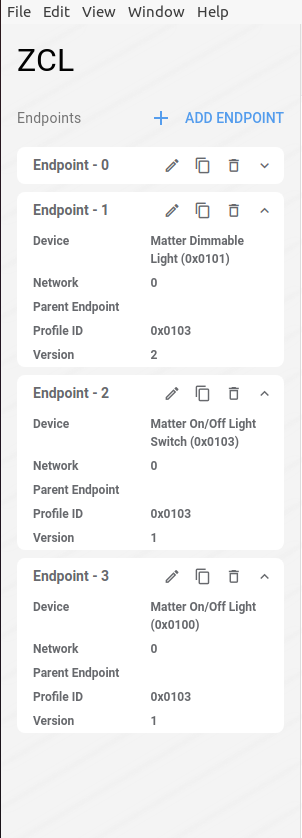
Please see Endpoint-3 On/Off LIght


  • Hi Jacky Ortega,

    I didn't encounter any such issue building the light_bulb sample. Here is my environment:

    Windows 10
    NCS v2.7.0
    Toolchain v2.7.0
    Sample: C:\ncs\v2.7.0\nrf\samples\matter\light_bulb (light_bulb)
    nRF Connect for VS Code v2024.11.75
    Built in-tree and out-of-tree
    Build target nrf5340dk/nrf5340/cpuapp
    Built with sysbuild

    The only difference is that I haven't changed the .zap file from the template one. However, that shouldn't cause the issue you wrote about.

    Could you provide some more details on how you built the sample? Where you put the application directory and OS version, for starter. Also, does it work if you build in-tree?

    To rule out long path issues, please also try with a shorter build directory name. I understand that this issue is more common on Windows, and you seem to be using Linux, but it doesn't hurt to rule it out first.

    Hieu

  • Hi  

    OS = Ubuntu 20.04
    VsCode = 1.94
    nRF-Connect Plugin + SDK v2.7

    The default matter-light-bulb samples without adding endpoint-3(MA-ONOFF Light) builds and compiles on my system but as soon as I add endpoint-3 the error messages appear.

    Please see my attached zap-file google-drive link. There I have attached both '.zap' and '.matter' files. Thank you.

  • Hello,

    Jacky Ortega said:
    The default matter-light-bulb samples without adding endpoint-3(MA-ONOFF Light) builds and compiles on my system but as soon as I add endpoint-3 the error messages appear.

    You need to run west zap-generate after you edit the .zap file. You can do this from the ZAP tool or from a terminal as shown in the link.

    Best regards,

    Maria

  • HI  ,

    Thank you very much. west zap-generate worked perfectly when using from $HOME/light_bulb i.e project directory.

    ZAP gets downloaded and executed from the following directory:
    ZAP installation directory: /home/user/ncs/v2.7.0/modules/lib/matter/.zap-install


    I have few questions related to several zap executable present in various directories and there use cases.

    [1] Approach 1: Does not work:

    ~/ncs/v2.7.0/modules/lib/matter/scripts/tools/zap/run_zaptool.sh $HOME/light_bulb/src/light_bulb.zap


    ~/ncs/v2.7.0/modules/lib/matter/scripts/tools/zap/generate.py $HOME/light_bulb/src/light_bulb.zap

    [2] Approach 2: Does not seems to work:

    When in  $HOME/light_bulb directory and using directly 'zap' command the tool opens from
    /home/user/ncs/v2.7.0/modules/lib/matter/zap/zap-linux-x64/zap

      
    [3] Approach 3: Works perfectly

    ZAP installation directory: /home/user/ncs/v2.7.0/modules/lib/matter/.zap-install

    Using the following works perfectly:

    west zap-gui - For creating & editing the zap files.

    west zap-generate - For Generating the respective files.

    Best Regards,

    Jacky Ortega

  • Hi Jacky Ortega,

    Jacky Ortega said:
    Thank you very much. west zap-generate worked perfectly when using from $HOME/light_bulb i.e project directory.

    Great to see!

    Jacky Ortega said:


    [1] Approach 1: Does not work:

    ~/ncs/v2.7.0/modules/lib/matter/scripts/tools/zap/run_zaptool.sh $HOME/light_bulb/src/light_bulb.zap


    ~/ncs/v2.7.0/modules/lib/matter/scripts/tools/zap/generate.py $HOME/light_bulb/src/light_bulb.zap

    [2] Approach 2: Does not seems to work:

    When in  $HOME/light_bulb directory and using directly 'zap' command the tool opens from
    /home/user/ncs/v2.7.0/modules/lib/matter/zap/zap-linux-x64/zap

    The zap command method is outdated and were replaced by the west commands. The west commands ensures that the correct instance of the ZAP tool is called. They were introduced in nRF Connect SDK v2.7.0 to simplify the process for editing ZAP-files and generating data model files.

    Best regards,

    Maria

Related