Zigbee Sleeping Configuration for Battery-Based Remote Implementation on nRF52840

Hi everyone,

Environment:

  • nRF Connect SDK v2.8.0
  • Light Switch example

I’m currently working on implementing a Zigbee Sleepy End Device (SED) for a battery-operated remote control using the nRF52840.

Requirements:

  1. The device should wake up from sleep mode upon a switch press and immediately serve its functionality.
  2. After waking up, the device should rejoin the Zigbee network and continue operating.

Current Progress:

  • I’m using the Light Switch example as the base.
  • I have successfully operated switches and joined the device to the Zigbee network.

Problem:

The current implementation results in high battery consumption, as I noticed that the system sleep mode is not enabled by default in this example.

Request for Guidance:

As I’m new to nRF development, I would appreciate any suggestions for:

  1. Examples or code snippets demonstrating Zigbee Sleepy End Device configurations.
  2. Documentation or guides specifically for enabling sleep modes in Zigbee applications using the nRF Connect SDK.
  3. Tips on optimizing battery life for such applications.

Rgeards,

Suresh

Parents
  • Hello,

    Maria is currently out of office. 

    Did you try to disable logging?

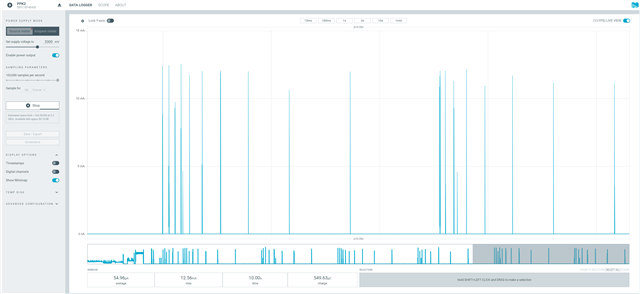
    I am seeing around 55µA using the attached light_switch sample from v2.9.0. I did some modiifications in prj.conf, as disabling logging (and setting the channel to a fixed channel, that I also do in the network coordinator sample, to reduce connection time).

    Additionally, I skipped the button check, and enabled low power mode in main.c. Have a look, and see what current consumption you are seeing.

    light_switch_lpn.zip

    Best regards,

    Edvin

Reply
  • Hello,

    Maria is currently out of office. 

    Did you try to disable logging?

    I am seeing around 55µA using the attached light_switch sample from v2.9.0. I did some modiifications in prj.conf, as disabling logging (and setting the channel to a fixed channel, that I also do in the network coordinator sample, to reduce connection time).

    Additionally, I skipped the button check, and enabled low power mode in main.c. Have a look, and see what current consumption you are seeing.

    light_switch_lpn.zip

    Best regards,

    Edvin

Children
No Data
Related