

Hi,
I am using nrf Connected SDK v2.6.2 on windows 10. I try to create a blank application project for the device ADXL363 on SPI2 bus on the nRF9160DK board.
I basically followed the sample here: https://github.com/aaron-mohtar-co/Lemon-IoT-LTE-nRF9160/tree/main/Examples/spi_sensor
The error message shown as below:
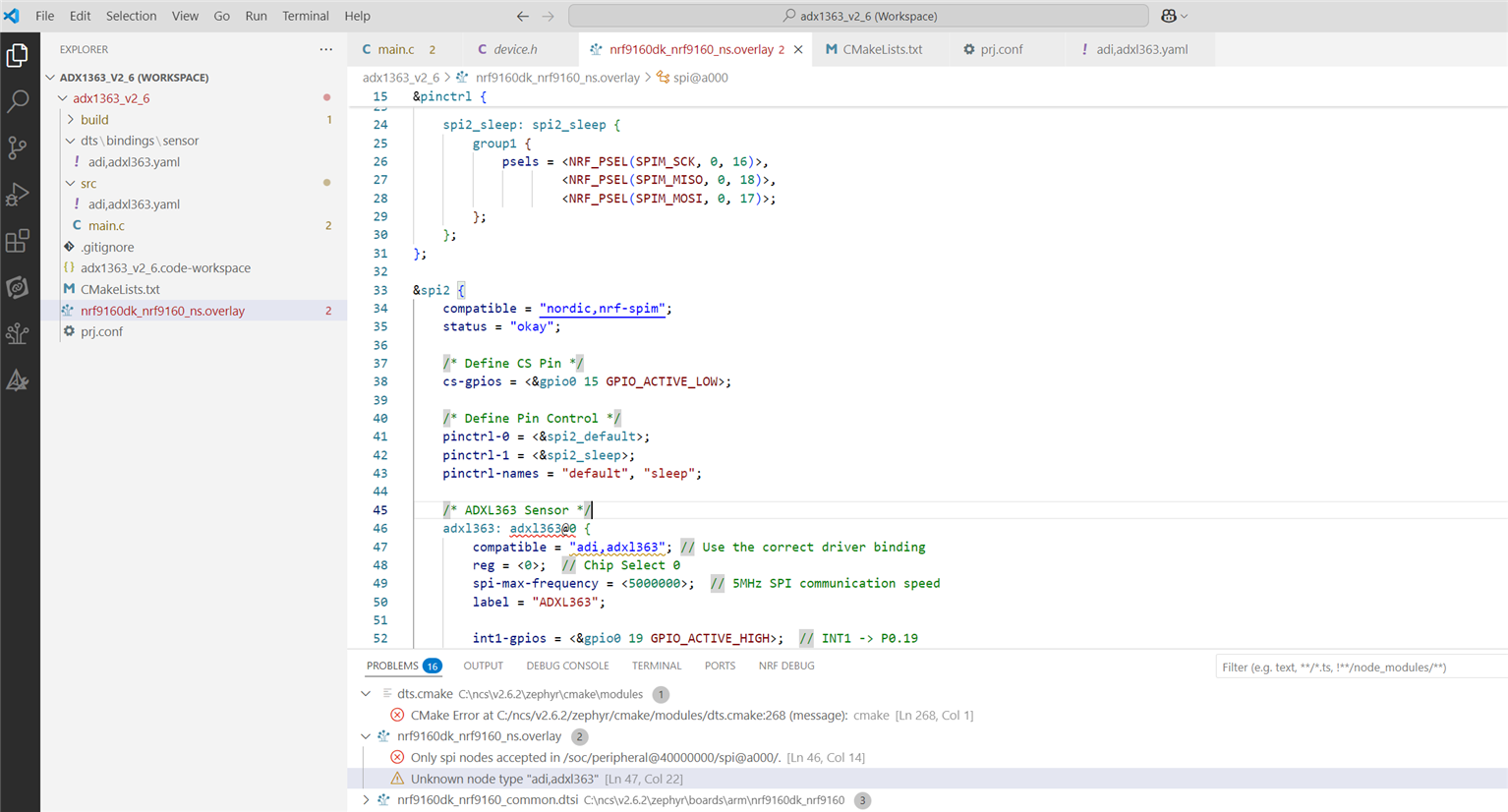
Main.c
#include <zephyr/kernel.h>
#include <zephyr/device.h>
#include <zephyr/devicetree.h>
#include <zephyr/drivers/spi.h>
#include <zephyr/drivers/gpio.h>
#include <zephyr/logging/log.h>

LOG_MODULE_REGISTER(adxl363_driver, CONFIG_LOG_DEFAULT_LEVEL);

/* Get ADXL363 SPI device */

const struct device *adxl_dev = DEVICE_DT_GET_ANY(adi_adxl363);

/* SPI Configuration */
struct spi_config spi_cfg = {
    .frequency = 5000000,  // 5 MHz SPI clock
    .operation = SPI_WORD_SET(8) | SPI_TRANSFER_MSB | SPI_MODE_CPOL | SPI_MODE_CPHA,
    .slave = 0,
};

/* Read ADXL363 Device ID */
void adxl363_read_device_id(void) {
    uint8_t tx_data[2] = {0x0B, 0x00};  // Read command for Device ID
    uint8_t rx_data[2] = {0};

    struct spi_buf tx_buf = { .buf = tx_data, .len = sizeof(tx_data) };
    struct spi_buf_set tx = { .buffers = &tx_buf, .count = 1 };

    struct spi_buf rx_buf = { .buf = rx_data, .len = sizeof(rx_data) };
    struct spi_buf_set rx = { .buffers = &rx_buf, .count = 1 };

    int ret = spi_transceive(adxl_dev, &spi_cfg, &tx, &rx);
    if (ret == 0) {
        LOG_INF("ADXL363 Device ID: 0x%02X", rx_data[1]);
        if (rx_data[1] == 0xAD) {
            LOG_INF("ADXL363 Connection Verified!");
        } else {
            LOG_ERR("Invalid Device ID! Expected 0xAD but got 0x%02X. Check Wiring!", rx_data[1]);
        }
    } else {
        LOG_ERR("SPI Communication Failed!");
    }
}

void main(void) {
    LOG_INF("Initializing ADXL363...");

    if (!device_is_ready(adxl_dev)) {
        LOG_ERR("ADXL363 device not ready! Check DeviceTree and wiring.");
        return;
    }

    LOG_INF("ADXL363 device found. Reading Device ID...");
    adxl363_read_device_id();
}
Devicetree
nrf9160dk_nrf9160_ns.overlay
&pinctrl {
    spi2_default: spi2_default {
        group1 {
            psels = <NRF_PSEL(SPIM_SCK, 0, 16)>,
                    <NRF_PSEL(SPIM_MISO, 0, 18)>,
                    <NRF_PSEL(SPIM_MOSI, 0, 17)>;
        };
    };

    spi2_sleep: spi2_sleep {
        group1 {
            psels = <NRF_PSEL(SPIM_SCK, 0, 16)>,
                    <NRF_PSEL(SPIM_MISO, 0, 18)>,
                    <NRF_PSEL(SPIM_MOSI, 0, 17)>;
        };
    };
};

&spi2 {
    compatible = "nordic,nrf-spim";
    status = "okay";

    /* Define CS Pin */
    cs-gpios = <&gpio0 15 GPIO_ACTIVE_LOW>;

    /* Define Pin Control */
    pinctrl-0 = <&spi2_default>;
    pinctrl-1 = <&spi2_sleep>;
    pinctrl-names = "default", "sleep";

    /* ADXL363 Sensor */
    adxl363: adxl363@0 {
        compatible = "adi,adxl363"; // Use the correct driver binding
        reg = <0>;  // Chip Select 0
        spi-max-frequency = <5000000>;  // 5MHz SPI communication speed
        label = "ADXL363";

        int1-gpios = <&gpio0 19 GPIO_ACTIVE_HIGH>;  // INT1 -> P0.19
    };
};
The blank application has no \dts directory. So, I created the binding file....
\dts\bindings\sensor\adi,adxl363.yaml
description: Analog Devices ADXL363 3-Axis Accelerometer

compatible: "adi,adxl363"

include: spi-device.yaml

properties:
  reg:
    type: int
    required: true
    description: "Chip Select (CS) number"

  spi-max-frequency:
    type: int
    required: true
    description: "Maximum SPI frequency in Hz"

  int1-gpios:
    type: phandle-array
    required: false
    description: "GPIO connected to the INT1 pin"

  int2-gpios:
    type: phandle-array
    required: false
    description: "GPIO connected to the INT2 pin"
How can I define the ADXL363 devicetree via SPI2 properly?

