Issue with nRF5340 Net core serial recovery

Hello,

I've an issue that I can't find clear instructions for the nRF5340 serial recovery for the network core.

Being able to update both cores from the bootloader level is crucial for my application, however, I feel like there's a lack of support regarding this area.

I've explored several threads here mentioning the same problem over several nRF Connect SDK versions, but most of them are out-of-date, and none of them reached a conclusion on whether it's possible or not.

Also, as mentioned in one of those tickets, it's mentioned that this Bluetooth: Peripheral UART sample project supports the Net-Core serial recovery by adding some extra configurations without mentioning how this can be tested or verified.

Also, the course for DFU from DevAcademy explicitly mentions that serial recovery for the net-core isn't covered.

Can you help with that?

FYI, updating the 2 cores over the serial port or using FOTA from the application works fine, but this requires the application to continue supporting this feature between subsequent versions and doesn't guard against application failures.

Thanks,

Ahmed

Parents Reply Children
  • Hello Vidar,

    I'm using SDK 2.9.0.

    Regarding the samples you mentioned, I've already checked them, and they don't seem to support the serial recovery for the network core.

    Following this sample mcuboot_netcore_serial_recovery , it's mentioned to use the signed binary for the network core.
    I've already tested it, and it results in the application not booting.

    The sample assumes that you just need to use a different binary, which I think is not enough.
    I'd expect it to work if the MCUmgr accepts HEX files as they contains information about the loading address.
    But, as the MCUmgr deals only with binary files, How would it differentiate between a binary targeted for the application from the one targeted for the net core.

    I'm expecting that another way should be used to tell the bootloader about this.
    In order to do the update from the application, I need to upload different images to different slots.
    This way, the bootloader can decide which goes where.

    Thanks,

    Ahmed

  • Hello,

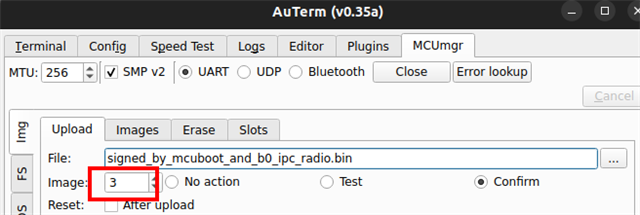
    Address information about the firmware image is transparent to the mcumgr client and it will only send the raw FW data over the serial interface. You do however need to specify the image number here:

    This tells the server to write the image to the mcuboot_primary_1 slot. 

    Best regards,

    Vidar

    https://docs.nordicsemi.com/bundle/ncs-3.0.1/page/nrf/app_dev/device_guides/nrf53/serial_recovery.html 

  • Hi Vidar,

    Thanks a lot for pointing out the image number; it works now.
    Also, thanks for sharing the serial recovery guidance page. Although I've checked it several times, I don't know how I missed the index mentioned in the MCUmgr command.

    Thanks,
    Ahmed

  • Hi   
    How did you update both app core and net core at a time in Mcuboot serial recover mode? did you upload them one by one and then reset the device? 

    • ./mcumgr image upload <build_dir_path>app_uodate.bin -e -n 3 -c serial_conn
    • ./mcumgr image upload <build_dir_path>net_ypdate.bin -e -n 1 -c serial_conn
    • reset device

      And can you share your mcuboot.config file?
      Thanks
  • Hi  

    Yes, you upload them one by one, but for the NET Core image, you need to wait around 30 seconds after the upload to get the NET Core updated before resetting the device.

    This the MCUBoot conf file

    #
    # Copyright (c) 2024 Nordic Semiconductor ASA
    #
    # SPDX-License-Identifier: LicenseRef-Nordic-5-Clause
    #
    
    CONFIG_PM=n
    
    CONFIG_MAIN_STACK_SIZE=10240
    CONFIG_MBEDTLS_CFG_FILE="mcuboot-mbedtls-cfg.h"
    
    CONFIG_BOOT_SWAP_SAVE_ENCTLV=n
    CONFIG_BOOT_ENCRYPT_IMAGE=n
    CONFIG_BOOT_BOOTSTRAP=n
    
    CONFIG_FLASH=y
    CONFIG_FPROTECT=y
    
    # MCUBoot serial
    CONFIG_MCUBOOT_SERIAL=y
    CONFIG_MCUBOOT_SERIAL_DIRECT_IMAGE_UPLOAD=y
    # Configure serial recovery to use CDC_ACM, which by default uses the USB
    CONFIG_BOOT_SERIAL_CDC_ACM=y
    
    # Decrease memory footprint
    CONFIG_LOG=n
    ### Decrease footprint by ~4 KB in comparison to CBPRINTF_COMPLETE=y
    CONFIG_CBPRINTF_NANO=y
    CONFIG_TIMESLICING=n
    CONFIG_BOOT_BANNER=n
    CONFIG_CONSOLE=n
    CONFIG_CONSOLE_HANDLER=n
    CONFIG_UART_CONSOLE=n
    CONFIG_RTT_CONSOLE=n
    CONFIG_USE_SEGGER_RTT=n
    CONFIG_RESET_ON_FATAL_ERROR=n
    
    # Increase the maximum number of image sectors MCUboot can handle
    CONFIG_BOOT_MAX_IMG_SECTORS=2048
    
    # Flash
    CONFIG_SPI=y
    CONFIG_SPI_NOR=y
    CONFIG_SPI_NOR_CS_WAIT_DELAY=5
    CONFIG_SPI_NOR_FLASH_LAYOUT_PAGE_SIZE=4096
    CONFIG_NORDIC_QSPI_NOR=n
    CONFIG_MULTITHREADING=y
    CONFIG_BOOT_ERASE_PROGRESSIVELY=y
    CONFIG_SOC_FLASH_NRF_EMULATE_ONE_BYTE_WRITE_ACCESS=y
    
    # The network core cannot access external flash directly. The flash simulator must be used to
    # provide a memory region that is used to forward the new firmware to the network core.
    CONFIG_FLASH_SIMULATOR=y
    CONFIG_FLASH_SIMULATOR_DOUBLE_WRITES=y
    CONFIG_FLASH_SIMULATOR_STATS=n
    
    # The following configurations are required to support serial recovery of the
    # network image
    CONFIG_PCD_APP=y
    
    CONFIG_BOOT_IMAGE_ACCESS_HOOKS=y
    
    CONFIG_MCUBOOT_INDICATION_LED=y
    
    # Increase flash space for MCUboot child image, to fit USB drivers
    CONFIG_PM_PARTITION_SIZE_MCUBOOT=0x12000
    

Related