nRF Connect for VS Code - Code analysis does not work anymore

Hi,

a couple of days ago, I had to install some STM plugins for VS Code (I'm sorry Sob).

In the process, the "CMake Tools" from Microsoft were also installed. I remember seeing some message that reported a conflict between plugins (if I remember related to code analysis or Intellisense or so).

I've dieabled the new plugins, but I do not get context-sensitive information in the nRF Connect for VS Code plugin anymore. In other words: When I edit my code, and perform a right-click, functions like "Go to declaration" or "Find all references" etc. does not work anymore. I cannot jump to the definitions of my variables anymore.

How can I enable dynamic code analysis for nRF Connect for VS Code again? I could not find any disabled Nordic plugins...

Best regards,
Michael

Parents
  • Hi Michael,


    Could you try to Ctrl+Shift+P and select "Developer : Show Running Extensions " and see if you have only C/C++ running and nothing of STM?

    If so, you could try Ctrl+Shift+P and select "C/C++ : Reset IntelliSense Database".

    Please try this and let me know how it goes.

    Regards,

    Priyanka

  • Hi Priyanka,

    nothing from STM running, C/C++ from Microsoft is running. Although, I do not have the option to reset the Intellisense database, it is missing from the list...

    I tried disabling and enabling C/C++, but nothing changed.

    I also tried disabling the CMake plugin from twxs (CMake Tools was already disabled), which did not help. (But I think CMake was installed before already, maybe even a dependency to the NCS Plugin?)

    According to "Show Running Extenions", I also noticed the plugins "NPM support for VS Code" and "Emmet", which are not listed in the installed plugin section (left screen side "Extensions" icon), if this is important.

    It seems like the C/C++ plugin has some of its functionalities blocked...

    Best regards,
    Michael

  • I think I found the problem:

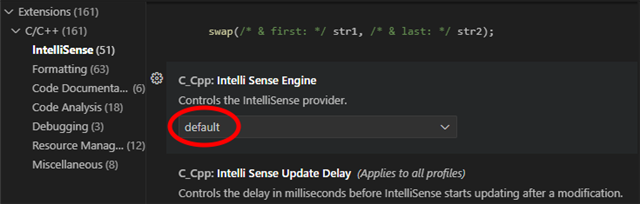
    Go to the Extensions view, select C/C++ and on the gear symbol ('Manage') next to the Auto-Update checkbox, select "Settings". Then, select "IntelliSense" and scroll down almost to the bottom to the "Intelli Sense Engine" setting. In my case, it was disabled. I set it back to "default" and now the code analysis is running again.

    It is a bit annoying that this important setting is hidden so deep in the configuration, and it is annoying that it is not reset to default even if I remove the C/C++ extension and re-install it again. And it makes me sad that extensions from different conpanies might side-stab the settings of another company because there are compatibility issues with extensions.

    But enough with the complaints. Maybe my findings can help other developers that are expected to work with both Nordic and STM hardware to re-enable their code analysis under C/C++ Nerd

    Best regards,
    Michael

  • Hi Michael,

    Being that you used the term "code analysis"--you know, there is a feature "Run Code Analysis on Active File" which you do by right clicking when viewing a C source code file in the editor and looking down in the list to find it and left click on it. If you are working in the Windows environment, I wonder if you could try it and let me know if it gives you problems. I mean, not working correctly like problems. If you see a red squiggle at the first character of text in the editor, that means there are problems. You can put the cursor on a red squiggle, and it will then tell you, its complaints. I cannot get Code Analysis to work for me on WIndows, so I am curious if other people have problems. If you have time. Thanks.

    Burt S.

  • I had the hover functionality (to examine declarations and macro evaluations, which sounds very similar to the Michael's issue) break very recently so I did some poking around. It seems Intellisense is getting confused.

    I have an ESP tools extension that I disabled for my Nordic workspace, but it broke Intellisense anyway after an update for it that was pushed around 8/21/2026. The telltale sign was that ESPs compiler recommendation was overriding the compiler indicated by the nrfConnect extension. I checked the .vscode and Intellisense settings and nothing was off, but even re-applying the Nordic setting did not help, but upon opening my workspace, messages appeared that indicated Intellisense was using the wrong compiler's settings (it referred directly to the ESP compiler, which isn't even in my path, nor in any path I could find in settings, but there are many).

    Then I disabled the ESP tools extension completely and finally removed that extension and it was STILL referring to ESP. I finally took my whole ESP tools ".espressif" folder in my home directory and renamed it to "backup.espressif" and that did the trick, though nothing has changed (no recent timestamps) in that folder.

    Hope this helps someone. It's possible this is an Intellisense change, since VS code has recently had an update, too. I've had the ESP tools disabled without trouble for more than a year until sometime in the past 5 days.

    UPDATE: Go to Code->Preferences->Settings and search for "Intelli Sense". You'll see an entry that has a button below it that says "edit in json" if you have the problem. As soon as I opened the indicated .json, the espressif path setting was there. I cleared out the espressif path text and left only the empty pair of quotes, then pressed save and closed it. I then exited out of VSCode completely (on macOS there's always a second window lurking), and then relaunched. No more attempts to find espressif and it is now taking the defaults from nrfConnect without a hitch (or any sort of output). Searching for the "Intelli Sense" entry now turns up nothing with an "edit in json" for me, so it seems something cleaned it up. I'm now able to right-click and examine everything in the build context.

Reply
  • I had the hover functionality (to examine declarations and macro evaluations, which sounds very similar to the Michael's issue) break very recently so I did some poking around. It seems Intellisense is getting confused.

    I have an ESP tools extension that I disabled for my Nordic workspace, but it broke Intellisense anyway after an update for it that was pushed around 8/21/2026. The telltale sign was that ESPs compiler recommendation was overriding the compiler indicated by the nrfConnect extension. I checked the .vscode and Intellisense settings and nothing was off, but even re-applying the Nordic setting did not help, but upon opening my workspace, messages appeared that indicated Intellisense was using the wrong compiler's settings (it referred directly to the ESP compiler, which isn't even in my path, nor in any path I could find in settings, but there are many).

    Then I disabled the ESP tools extension completely and finally removed that extension and it was STILL referring to ESP. I finally took my whole ESP tools ".espressif" folder in my home directory and renamed it to "backup.espressif" and that did the trick, though nothing has changed (no recent timestamps) in that folder.

    Hope this helps someone. It's possible this is an Intellisense change, since VS code has recently had an update, too. I've had the ESP tools disabled without trouble for more than a year until sometime in the past 5 days.

    UPDATE: Go to Code->Preferences->Settings and search for "Intelli Sense". You'll see an entry that has a button below it that says "edit in json" if you have the problem. As soon as I opened the indicated .json, the espressif path setting was there. I cleared out the espressif path text and left only the empty pair of quotes, then pressed save and closed it. I then exited out of VSCode completely (on macOS there's always a second window lurking), and then relaunched. No more attempts to find espressif and it is now taking the defaults from nrfConnect without a hitch (or any sort of output). Searching for the "Intelli Sense" entry now turns up nothing with an "edit in json" for me, so it seems something cleaned it up. I'm now able to right-click and examine everything in the build context.

Children
No Data
Related