

I used Nordic52480 DK(bulb) as DUT to run Matter Certification case TC-DGGEN-2.1 .
Steps:
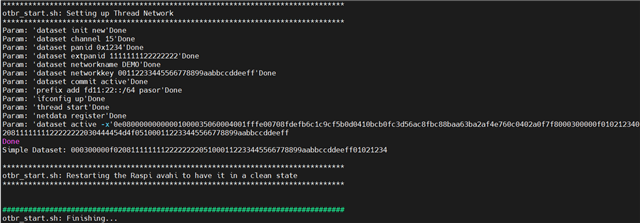
1. setup OTBR on Pi4:./certification-tool/backend/test_collections/matter/scripts/OTBR/otbr_start.sh
2. Config on testharness like below:
{
"config": {
"test_parameters": null,
"network": {
"wifi": {
"ssid": "testharness",
"password": "wifi-password"
},
"thread": {
"operational_dataset_hex": "0e08000000000001000035060004001fffe00708fdefb6c1c9cf5b0d0410bcb0fc3d56ac8fbc88baa63ba2af4e760c0402a0f7f8000300000f0102123402081111111122222222030444454d4f051000112233445566778899aabbccddeeff"
}
},
"dut_config": {
"discriminator": "3840",
"setup_code": "20202021",
"pairing_mode": "ble-thread",
"chip_timeout": null,
"chip_use_paa_certs": false,
"trace_log": true
}
},
"pics": {
"clusters": {
"General Diagnostics Cluster Test Plan": {
"name": "General Diagnostics Cluster Test Plan",
"items": {
"DGGEN.S": {
"number": "DGGEN.S",
"enabled": true
},
"DGGEN.C": {
"number": "DGGEN.C",
"enabled": false
},
"DGGEN.S.A0000": {
"number": "DGGEN.S.A0000",
"enabled": true
},
"DGGEN.S.A0001": {
"number": "DGGEN.S.A0001",
"enabled": true
},
"DGGEN.S.A0002": {
"number": "DGGEN.S.A0002",
"enabled": false
},
"DGGEN.S.A0003": {
"number": "DGGEN.S.A0003",
"enabled": false
},
"DGGEN.S.A0004": {
"number": "DGGEN.S.A0004",
"enabled": false
},
"DGGEN.S.A0005": {
"number": "DGGEN.S.A0005",
"enabled": false
},
"DGGEN.S.A0006": {
"number": "DGGEN.S.A0006",
"enabled": false
},
"DGGEN.S.A0007": {
"number": "DGGEN.S.A0007",
"enabled": false
},
"DGGEN.S.A0008": {
"number": "DGGEN.S.A0008",
"enabled": true
},
"DGGEN.S.C00.Rsp": {
"number": "DGGEN.S.C00.Rsp",
"enabled": true
},
"DGGEN.S.E00": {
"number": "DGGEN.S.E00",
"enabled": false
},
"DGGEN.S.E01": {
"number": "DGGEN.S.E01",
"enabled": false
},
"DGGEN.S.E02": {
"number": "DGGEN.S.E02",
"enabled": false
},
"DGGEN.S.E03": {
"number": "DGGEN.S.E03",
"enabled": true
},
"DGGEN.S.C": {
"number": "DGGEN.S.C",
"enabled": false
},
"DGGEN.S.E": {
"number": "DGGEN.S.E",
"enabled": false
},
"DGGEN.S.A": {
"number": "DGGEN.S.A",
"enabled": false
},
"DGGEN.C.A0000": {
"number": "DGGEN.C.A0000",
"enabled": false
},
"DGGEN.C.A0001": {
"number": "DGGEN.C.A0001",
"enabled": false
},
"DGGEN.C.A0002": {
"number": "DGGEN.C.A0002",
"enabled": false
},
"DGGEN.C.A0003": {
"number": "DGGEN.C.A0003",
"enabled": false
},
"DGGEN.C.A0004": {
"number": "DGGEN.C.A0004",
"enabled": false
},
"DGGEN.C.A0005": {
"number": "DGGEN.C.A0005",
"enabled": false
},
"DGGEN.C.A0006": {
"number": "DGGEN.C.A0006",
"enabled": false
},
"DGGEN.C.A0007": {
"number": "DGGEN.C.A0007",
"enabled": false
},
"DGGEN.C.A0008": {
"number": "DGGEN.C.A0008",
"enabled": false
},
"DGGEN.C.C00.Tx": {
"number": "DGGEN.C.C00.Tx",
"enabled": false
}
}
}
}
}
}
3. run TC-DGGEN-2.1, but auto commission fail. (nordic52840 factory reset before run case) , log refer to below file.
UI_Test_Run_2025_06_11_10_51_25.log


