Cellular UDP on nRF9151 DK does not enter PSM

Hello,

I am trying to measure nRF9151 current using Power Profiler Kit II, running Cellular UDP project on EVK and following the steps in:

https://docs.nordicsemi.com/bundle/ncs-latest/page/nrf/samples/cellular/udp/README.html

Added the following lines to prj.conf:

CONFIG_SERIAL=n
CONFIG_TFM_LOG_LEVEL_SILENCE=n
CONFIG_UDP_DATA_UPLOAD_FREQUENCY_SECONDS=30
It seems the modem doesn't enter PSM mode in the image below:
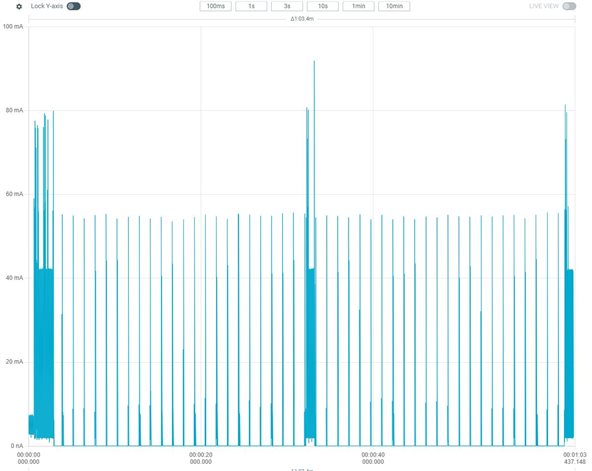
Thanks in advance for your comments and insight to help resolve this issue.

Roya

Parents
  • Hi Roya,

    Are you sure that you are requesting PSM, etc.?

    Could you try running eg. XMONITOR for me? There is a bit on this here and here.

    Regards,

    Elfving

  • Hi Elfving,

    My understanding was that running Cellular UDP sample project would be sufficient as a standalone code to check power consumption in PSM mode. PSM is already enabled with 60 min RPTAU, and I just need to configure the data upload size (default: 10) and upload frequency (e.g. 30 sec).

    Please see below the prj.conf of UDP project:

    # General config
    CONFIG_PICOLIBC_IO_FLOAT=y
    CONFIG_NCS_SAMPLES_DEFAULTS=y
    CONFIG_SERIAL=n
    CONFIG_TFM_LOG_LEVEL_SILENCE=n

    # Network
    CONFIG_NETWORKING=y
    CONFIG_NET_NATIVE=n
    CONFIG_NET_SOCKETS=y
    CONFIG_NET_SOCKETS_OFFLOAD=y
    CONFIG_POSIX_API=y

    # LTE link control
    CONFIG_LTE_LINK_CONTROL=y

    # Modem library
    CONFIG_NRF_MODEM_LIB=y

    # Heap and stacks
    CONFIG_HEAP_MEM_POOL_SIZE=1024
    CONFIG_MAIN_STACK_SIZE=4096
    CONFIG_SYSTEM_WORKQUEUE_STACK_SIZE=2048

    CONFIG_UDP_DATA_UPLOAD_FREQUENCY_SECONDS=30

    # LTE parameters
    ## PSM
    CONFIG_UDP_PSM_ENABLE=y
    CONFIG_LTE_PSM_REQ_RPTAU="00100001"
    CONFIG_LTE_PSM_REQ_RAT="00000000"

    ## eDRX
    CONFIG_UDP_EDRX_ENABLE=n

    ## RAI
    CONFIG_UDP_RAI_ENABLE=y

    ## Enable required LTE link control modules
    CONFIG_LTE_LC_EDRX_MODULE=y
    CONFIG_LTE_LC_PSM_MODULE=y
    CONFIG_LTE_LC_RAI_MODULE=y

    - On your second question, please see below the result:

    > AT+CPSMS=1,,,"00101000","01000001"
    OK
    > AT+CPSMS?
    +CPSMS: 1,,,"00101000","01000001"
    OK
    > AT%XMONITOR
    %XMONITOR: 5,"","","302720","757B",7,12,"007A637A",101,5060,54,34,"","11100000","11100000","01001001"
    OK

    It seems the network has not enabled the requested PSM mode, is it correct?

    Thank you,

    Roya

  • After a second look I agree that the sample should fix everything in regards to PSM on its own.

    _rd said:
    %XMONITOR: 5,"","","302720","757B",7,12,"007A637A",101,5060,54,34,"","11100000","11100000","01001001"

    Yeah, looks like it. You could contact your cell provider to figure out what you need to do here. It's typical that they have some requirements as to eg. the period requested for it to be granted.

    Regards,

    Elfving

  • So, to be clear -

    1) Is the approach the OP uses by setting the LTE paramaters in prj.conf the correct way to set up the paramaters? Or are there any differences / pros / cons in configuring things directly in code like this?

    lte_lc_psm_param_set("00111000", "00000110"); // 24 hours &12 seconds
    lte_lc_psm_req(true);
    
    lte_lc_ptw_set(LTE_LC_LTE_MODE_LTEM, "0000"); // 1.28 seconds
    lte_lc_edrx_param_set(LTE_LC_LTE_MODE_LTEM,"0000"); // 5.12 seconds
    lte_lc_edrx_req(true);
    
    rai_set();
    2) Interesting comment regarding cell provider: assuming we are 99% confident that we have configured things as intended, are there any ways in which we can check what has been implemented (with the modem library - not AT commands)? I do not know this industry. Is it common for network providers to either not support or disable certain features or, worse still, only provide them at their discretion?
  • I guess, there may just be more cellular network details to consider.

    PSM is a feature intended for sleeps about 1h and more.

    You send every 30s, right? 

    Before the modem enters the sleeping mode, it must enter the IDLE mode. That either requires RAI (and proper applying it). If RAI is not used, the network defines a timeout to switch from RRC active to idle. And after that there is a "PSM active time", which also must pass, before the modem goes to sleep.

    But a 30s send interval doesn't fit PSM (except you want to kill your SIM). Let me recommend to check with your network provider, if eDRX is also offered, that's a much better choice for 30s. 

    And finally:

    Sending every 30s drains your battery, regardless of eDRX or PSM ... maybe you do some calculations, which runtime would be expected sending every 30s with your values from above. Subtract the energy in the "inactive" periods, and you may see, if eDRX or PSM will really change your runtime.

  • I see you've also gotten a great reply by Achim here, have a look at that.

    Monkeytronics said:

    1) Is the approach the OP uses by setting the LTE paramaters in prj.conf the correct way to set up the paramaters? Or are there any differences / pros / cons in configuring things directly in code like this?

    That looks correct. You can do this.

    Monkeytronics said:
    2) Interesting comment regarding cell provider: assuming we are 99% confident that we have configured things as intended, are there any ways in which we can check what has been implemented (with the modem library - not AT commands)?

    Have a look at the modem library and devacademy for more on this.

    Monkeytronics said:
    I do not know this industry. Is it common for network providers to either not support or disable certain features or, worse still, only provide them at their discretion?

    Yes, but I would say it's understandable in. Extremely short PSM values doesn't really make much sense for instance. 

    Regards,

    Elfving

  • Hi,

    Thank you both for helpful comments.

    - It makes sense to use PSM for longer sleep intervals, 30 s was just for testing.

    - I will check it again with different network providers, if not generally supported may be turning off the modem for long intervals would be a solution.

    - Interesting note about setting LTE parameters, I guess setting directly in the code is better in low level development and setting by AT commands for applications such as SLM?

    Regards,

    Roya

Reply
  • Hi,

    Thank you both for helpful comments.

    - It makes sense to use PSM for longer sleep intervals, 30 s was just for testing.

    - I will check it again with different network providers, if not generally supported may be turning off the modem for long intervals would be a solution.

    - Interesting note about setting LTE parameters, I guess setting directly in the code is better in low level development and setting by AT commands for applications such as SLM?

    Regards,

    Roya

Children
  • - It makes sense to use PSM for longer sleep intervals, 30 s was just for testing.

    Let me recommend then, that you use something as 300s to see, if it then enters the psm sleep after a longer RRC active and idle period,

    - I will check it again with different network providers, if not generally supported may be turning off the modem for long intervals would be a solution.

    PSM is widely support, but as I already wrote Spark NZ has used different base stations (1.5 years) ago, and it toke some month to have them fixed the old/broken ones in the test area. So, if you test, you will need to track the base-station and see, if the result depends on that. Hope this is now generally fixed, but you will see.
    If "switching on/off" helps is something you will also need to discuss with Spark NZ, some operators will block too frequently network registrations. But with 1h I guess you will be save.

  • Interesting note about setting LTE parameters, I guess setting directly in the code is better in low level development and setting by AT commands for applications such as SLM?

    Isn't the point more, that you need to know, what happens in your device-cloud communication?

    Very first question: TCP/TLS for MQTT? Then you may get disappointed. UDP/DTLS 1.2 CID/CoAP, then you may construct your message exchange and setup the parameters accordingly. E.g. if the device sends the most messages as coap-oneway (no-server-response-option), then RAI last message is your friend. If you want then once a day a response, then "CP-RAI one-response" or "AS-RAI no data" works.
    Did you need to retransmit such a request with response, because the response wasn't received in time? Then be careful that usually also means, that you not longer control the possible messages. Luckily that's pretty rare. So in that case you may stop using RAI and see, if the response is received twice.

    So, I don't think, that there are general parameters, especially for RAI. So, first check, how you want to exchange messages. Then you may optimize the parameters.

Related