ZCBOR encode a key as a numeric value and not a character string

Hello,

I want to encode a key as a numeric value instead of a string using the ZCBOR library.

I've tried testing this, but each time, the key is converted to a string.

uint8_t cbor_payload[200] = {0};

ZCBOR_STATE_E(encoding_state, 3, cbor_payload, sizeof(cbor_payload), 0);

uint32_t ints[1] = {1};

char var[] = "test";

bool ok = zcbor_map_start_encode(encoding_state, 10);

ok &= zcbor_uint32_encode(encoding_state, ints) &&

       zcbor_tstr_put_term(encoding_state, var, strlen(var));

ok &= zcbor_map_end_encode(encoding_state, 10);

Output: {"1":"test"}

I'd like to have {1:"test"} instead.

Is there a function that can do this?

Looking forward to hearing from you,

Sincerely,

Parents
  • Hi jp, 
    I took a quick look at the code you sent. 
    Seems to me it's encoded correctly. 

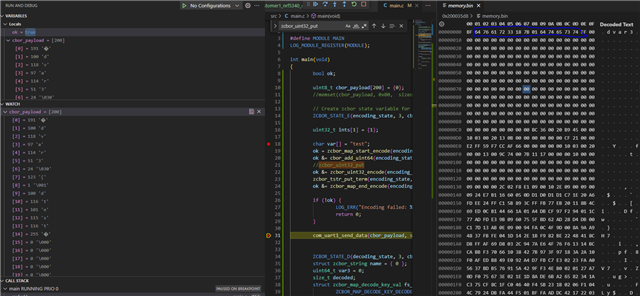
    You can find it's identical what in the blue box here(cbor_payload) when I put a break point after the encoding: 

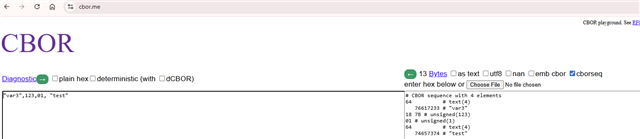
    And what cbor.me live encoding here showed: 

    So the encoded sequence will be: 64 76 61 72 33 18 7B 01 64 74 65 73 74

    I haven't looked into why it couldn't decode, but could you tell what is not correct in your opinion ? 

  • Hi,

    Yes, it's fine, it works. My problem was that I couldn't decode the message. I had to create a zcbor_map_decode_bulk function, but to decode a key into a numeric value, not a string.
    My C# application wasn't decoding the message correctly. This led me astray.
    But with your method, I was able to see that the message was correctly encoded.
    Thank you for your help.

Reply
  • Hi,

    Yes, it's fine, it works. My problem was that I couldn't decode the message. I had to create a zcbor_map_decode_bulk function, but to decode a key into a numeric value, not a string.
    My C# application wasn't decoding the message correctly. This led me astray.
    But with your method, I was able to see that the message was correctly encoded.
    Thank you for your help.

Children
No Data
Related