NRF5340DK High frequency SPIM communication failure / spi_transceive() delay problem

Hello,

I am trying to exchange data with an external slave sensor via SPIM communication using the nRF5340DK.

I am currently facing two main issues:

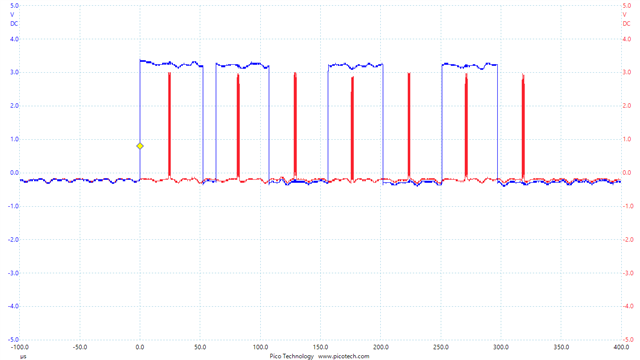
1.The spi_transceive() function takes too long to execute.

This is significantly reducing the effective data transfer rate.
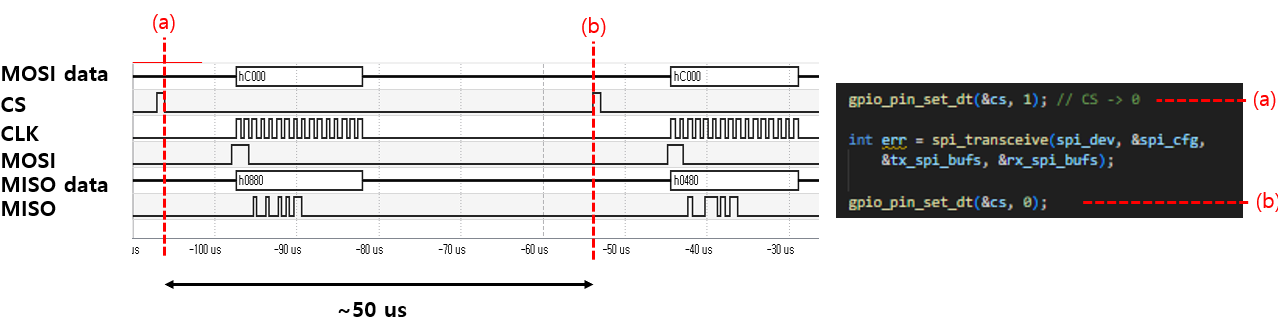
I have also reviewed a Q&A from someone who pointed out a similar delay with spi_transceive().

Time gap between each spi_transceive )

However, the solution suggested in that Q&A, which involved modifying spi configuration in the main.c, doesn't seem to be applicable to the nRF5340 as it resulted in an error

To clearly explain my situation, I have attached my main.c, overlay, and configuration files. 

main.c

#include <zephyr/kernel.h>
#include <zephyr/device.h>
#include <zephyr/drivers/spi.h>
#include <zephyr/drivers/uart.h>
#include <zephyr/sys/printk.h>
#include <zephyr/drivers/gpio.h>
#include <stdio.h>

/* Get SPI device from devicetree */
#define SPI_DEVICE_NODE DT_ALIAS(spi4_basic)
static const struct device *spi_dev = DEVICE_DT_GET(SPI_DEVICE_NODE);

static const struct device *uart_for_data_tx = DEVICE_DT_GET(DT_CHOSEN(zephyr_console));

#define SW0_NODE     DT_ALIAS(sw0)
static const struct gpio_dt_spec cs = GPIO_DT_SPEC_GET(SW0_NODE, gpios);


static struct spi_config spi_cfg = {
    .frequency = 1000000,           // SPI frequency.
    .operation = SPI_OP_MODE_MASTER | SPI_WORD_SET(8) | SPI_TRANSFER_MSB, // SPI Mode 0
    .slave = 0,                     // Master mode
    .cs = NULL,
    //.cs = &spi_cs,                // Manage CS pin with cs-gpios in Devicetree
};


/* RHD2000 command definitions (16-bit) */
#define RHD_CMD_CONVERT(channel) (uint16_t)((((uint16_t)(channel) & 0x3F) << 8)) 
// Input: 00RR RRRR 0000 0000 
// Output: DDDD DDDD DDDD DDDD
#define RHD_CMD_WRITE(reg, data) (uint16_t)(0x8000 | (((uint16_t)(reg) & 0x3F) << 8) | ((uint16_t)(data) & 0xFF)) 
// Input: 10RR RRRR DDDD DDDD
// Output: 1111 1111 DDDD DDDD , D: same with input's D (for confirm)
#define RHD_CMD_READ(reg)        (uint16_t)(0xC000 | (((uint16_t)(reg) & 0x3F) << 8))
// Input: 11RR RRRR 0000 0000
#define RHD_CMD_CALIBRATE        (uint16_t)(0x5500) // 0101 0101 0000 0000 
#define RHD_CMD_DUMMY_READ       RHD_CMD_READ(63) //


static int rhd_spi_transfer(uint16_t tx_command, uint8_t *rx_buffer) {
    uint8_t tx_buffer[2];

    // Convert 16-bit command to a Big-Endian byte array
    tx_buffer[0] = (uint8_t)(tx_command >> 8);  // MSB
    tx_buffer[1] = (uint8_t)(tx_command & 0xFF); // LSB

    const struct spi_buf tx_spi_buf = {
        .buf = tx_buffer,
        .len = sizeof(tx_buffer)
    };
    const struct spi_buf_set tx_spi_bufs = {
        .buffers = &tx_spi_buf,
        .count = 1
    };

    // Directly store received data in the rx_buffer passed from main
    struct spi_buf rx_spi_buf = {
        .buf = rx_buffer,
        .len = 2
    };
    const struct spi_buf_set rx_spi_bufs = {
        .buffers = &rx_spi_buf,
        .count = 1
    };

    while (1) {

        gpio_pin_set_dt(&cs, 1); // CS -> 0

        int err = spi_transceive(spi_dev, &spi_cfg,
            &tx_spi_bufs, &rx_spi_bufs); 

        gpio_pin_set_dt(&cs, 0);

        return 0;
    }
}

int main(void)
{
    int ret;
    int err;
    ret = gpio_pin_configure_dt(&cs, GPIO_OUTPUT_INACTIVE);
    gpio_pin_set_dt(&cs, 0); // I still don't understand why the output is 1 when 0 is passed to the set function.

    if (!device_is_ready(spi_dev)) {
        printk("SPI device %s is not ready!\n", spi_dev->name);
        return 0;
    }

    if (!device_is_ready(uart_for_data_tx)) {
        printk("UART device for data TX (%s) is not ready!\n", uart_for_data_tx->name);
        return 0;
    }

    printk("nRF5340 SPIM example started.\n");
    printk("Reading MISO pin (connected to DC voltage) and sending to PC via UART every second.\n");


    uint8_t rx_main_buffer[2];

    err = rhd_spi_transfer(RHD_CMD_WRITE(0, 0xDE), rx_main_buffer); // ADC configuration, disable fast settle
    if (err) return err;


    while (1) {
        /* SPI communication (transceive) - send dummy bytes via MOSI to read MISO value */
        rhd_spi_transfer(RHD_CMD_READ(0) , rx_main_buffer);
    }
    return 0;
};

app.overlay

/ {

    chosen {
        zephyr,console = &uart0;    
        zephyr,shell-uart = &uart0; 
    };

    aliases {
        spi4-basic = &spi4;
    };

};


&uart0 {
    status = "okay";             
    current-speed = <1000000>;    
};


&pinctrl {
    spi4_custom_pins: spi4_custom_pins { 
        group1 {
            psels = <NRF_PSEL(SPIM_SCK,  1, 15)>,   
                    <NRF_PSEL(SPIM_MOSI, 1, 14)>,  
                    <NRF_PSEL(SPIM_MISO, 1, 13)>;  
        };
    };


    spi4_custom_pins_sleep: spi4_custom_pins_sleep {
         group1 {
            psels = <NRF_PSEL(SPIM_SCK,  1, 15)>,
                    <NRF_PSEL(SPIM_MOSI, 1, 14)>,
                    <NRF_PSEL(SPIM_MISO, 1, 13)>;
            low-power-enable; 
        };
    };
};


&spi4 {
    compatible = "nordic,nrf-spim";
    status = "okay"; 
    pinctrl-0 = <&spi4_custom_pins>; 
    pinctrl-1 = <&spi4_custom_pins_sleep>; 
    pinctrl-names = "default", "sleep";   
    cs-gpios = <&gpio1 12 GPIO_ACTIVE_LOW>;
    //max-frequency = <560000>;
    //easydma-maxcnt-bits = <32>;
};

prj.conf

# enable console
CONFIG_CONSOLE=y
CONFIG_UART_CONSOLE=y

CONFIG_SERIAL=y
CONFIG_PRINTK=y


CONFIG_SPI=y

CONFIG_GPIO=y 

In main.c, when I configure the SPI structure, I set the frequency to 1MHz.

I have confirmed with an oscilloscope that the actual clock frequency is indeed 1MHz.

Also, I'm controlling the CS pin directly via GPIO

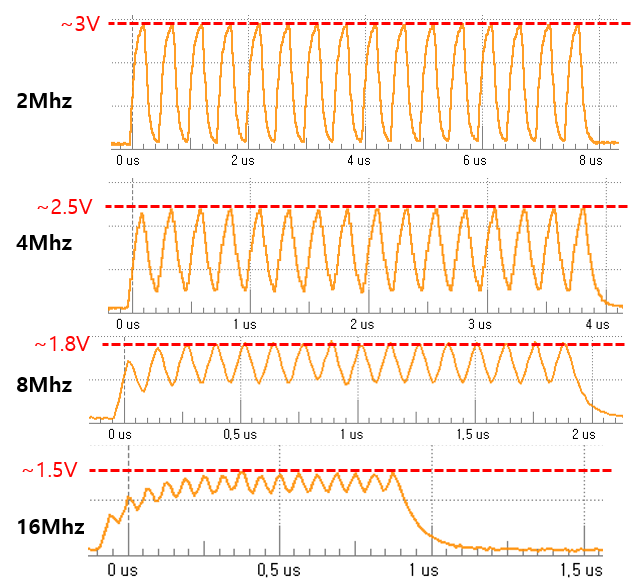
2. Although the nRF5340 specifications state that it supports SPI frequencies up to 8MHz (and even up to 32MHz for spi4),

the quality of the Clock (CLK) signal degrades significantly at frequencies higher than 4MHz.
Thank you.

Best regards, 

gwan0624

Parents
  • Here is a possible strategy for reducing the delay using (G)PPI. 

    (Note: I sometimes use PPI and GPPI interchangeably. GPPI is a wrapper library that unifies PPI, DPPI, and the newer PPI variants introduced for multicore systems.)

    Take a look at
    ncs\modules\hal\nordic\nrfx\samples\src\nrfx_gppi\one-to-one

    This sample sets up a timer together with GPIOTE to generate a kind of PWM signal.

    As you know, the (G)PPI (Generic Programmable Peripheral Interconnect) can be used to connect events and tasks between different peripherals.

    For example, when generating PWM you can use a timer event to toggle a GPIO.

    In your case, you probably want to connect an SPI event (e.g. “transfer done”) directly to an SPI task (e.g. “start transfer”).

    If the SPI transfer happens too quickly, you could instead trigger the SPI transfer from a timer event.

    The point here is to avoid waiting for the CPU (running an OS) to notice that an SPI transfer has finished, then prepare the next one, and finally send it. By wiring events and tasks directly in hardware through GPPI, you get immediate peripheral-to-peripheral triggering without CPU involvement.

    Looking again at
    ncs\modules\hal\nordic\nrfx\samples\src\nrfx_gppi\one_to_one\main.c
    At the end of the file you’ll see:

        nrfx_gppi_channel_endpoints_setup(gppi_channel,
            nrfx_timer_compare_event_address_get(&timer_inst, NRF_TIMER_CC_CHANNEL0),
            nrfx_gpiote_out_task_address_get(&gpiote_inst, OUTPUT_PIN));
     
        nrfx_gppi_channels_enable(BIT(gppi_channel));

    What we want to do is replace the GPIOTE task with an SPI start task.

    If you open
    ncs\modules\hal\nordic\nrfx\drivers\include\nrfx_spim.h
    and search for "address_get(", you’ll see several helper functions. These are designed to fetch the hardware addresses of peripheral tasks and events, so they can be used with (G)PPI.

    In particular:

    • nrfx_spim_start_task_address_get() is very useful here.

    • nrfx_spim_end_event_address_get() can also be handy if you later want to chain “transfer done” → “start transfer.”

    For a first step, I would suggest taking the one-to-one example and replacing the GPIOTE task with nrfx_spim_start_task_address_get(). This way, you can make SPI transactions start directly on a timer event. Then you can freely control how often/how fast by adjusting the timer.

  • Dear Håkon,

    Just a quick update - I've made some good progress on the problem.

    I will get back soon once I have the results organized.

    Best regards,

    gwan0624


  • Hi! I've taken over this case for a bit as my coworker is currently busy with something else.

    gwan0624 said:
    I will investigate what the problem is and get back to you. (especially, using nrfx_spim_end_event_address_get() function).

    Sounds good!

    gwan0624 said:

    1.I will control an RHD2132 device with the nRF5340.

    To operate the RHD2132, I need to send an initial configuration of about 20 lines of data, and then continuously send a single-line command in an infinite loop.

    However, the code I have created so far can only perform a repetitive task (i.e., continuously sending the same command). Is it possible to implement the code to first send the ~20 lines of configuration data and then enter a loop to send the single-line command repeatedly?

    That sounds like a plan, and is very much possible.

    gwan0624 said:

    2.I will use the nRF5340's SPIM4 peripheral to control both an RHD2132 and an nRF7002.

    I would like to create a loop where I communicate with the RHD2132, then communicate with the nRF7002, and then repeat the cycle.

    This doesn't seem impossible, but I wanted to ask just to be sure.

    Unfortuntately that is not possible. I am not that familiar with your application, but could you eg. communicate with one of them with another peripheral? Like the QSPI?

    Regards,

    Elfving

Reply
  • Hi! I've taken over this case for a bit as my coworker is currently busy with something else.

    gwan0624 said:
    I will investigate what the problem is and get back to you. (especially, using nrfx_spim_end_event_address_get() function).

    Sounds good!

    gwan0624 said:

    1.I will control an RHD2132 device with the nRF5340.

    To operate the RHD2132, I need to send an initial configuration of about 20 lines of data, and then continuously send a single-line command in an infinite loop.

    However, the code I have created so far can only perform a repetitive task (i.e., continuously sending the same command). Is it possible to implement the code to first send the ~20 lines of configuration data and then enter a loop to send the single-line command repeatedly?

    That sounds like a plan, and is very much possible.

    gwan0624 said:

    2.I will use the nRF5340's SPIM4 peripheral to control both an RHD2132 and an nRF7002.

    I would like to create a loop where I communicate with the RHD2132, then communicate with the nRF7002, and then repeat the cycle.

    This doesn't seem impossible, but I wanted to ask just to be sure.

    Unfortuntately that is not possible. I am not that familiar with your application, but could you eg. communicate with one of them with another peripheral? Like the QSPI?

    Regards,

    Elfving

Children
  • Dear Elfving,

    Hello. It took some time to optimize the code, as there were a few issues.

    Currently, by linking the TIMER and SPI modules via GPPI, I have achieved much faster SPI communication compared to the blocking mode based on Zephyr RTOS and nrfx drivers.

    (SPI communication rate: 76kS/s to 355kS/s)

    #include <zephyr/kernel.h>
    #include <stdio.h>
    
    #include <zephyr/sys/printk.h>
    #include <zephyr/device.h>
    
    #include <zephyr/drivers/uart.h>
    #include <zephyr/drivers/gpio.h>
    #include <zephyr/drivers/spi.h>
    
    #include <nrfx_spim.h>
    #include <nrfx_timer.h>
    #include <helpers/nrfx_gppi.h>
    
    static const nrfx_spim_t spim_inst = NRFX_SPIM_INSTANCE(4);
     
    static const nrfx_timer_t timer_inst = NRFX_TIMER_INSTANCE(2);
    
    
    static uint8_t m_gppi_channel; 


    int main(void)
    {
        nrfx_err_t err; 
        (void)err; 
        printk("nRF5340 SPIM high-speed example started.\n");
    
    
        nrfx_spim_config_t spim_config = {
            .sck_pin      = 47, // P1.15
            .mosi_pin     = 46, // P1.14
            .miso_pin     = 45, // P1.13
            .ss_pin       = 44, // P1.12
            .ss_active_high = false,
            .irq_priority = NRFX_SPIM_DEFAULT_CONFIG_IRQ_PRIORITY,
            .orc          = 0xFF,
            .frequency    = 16000000, // 16MHz
            .mode         = NRF_SPIM_MODE_0,
            .bit_order    = NRF_SPIM_BIT_ORDER_MSB_FIRST,
            .use_hw_ss    = true,
            .ss_duration  = 2,
        };
    
        printk("spi configuration structure created. \n");
    
    
        err = nrfx_spim_init(&spim_inst, &spim_config, NULL, NULL);
    
        printk("spi configuration over. \n");
    
    
        nrfx_timer_config_t timer_config = {
            .frequency          = 16000000, // 16MHz
            .mode               = NRF_TIMER_MODE_TIMER,
            .bit_width          = NRF_TIMER_BIT_WIDTH_16,
            .interrupt_priority = NRFX_TIMER_DEFAULT_CONFIG_IRQ_PRIORITY,
            .p_context          = NULL
        };
    
        printk("timer configuration structure created. \n");


        err = nrfx_timer_init(&timer_inst, &timer_config, NULL);
    
        printk("timer configureation over \n");


        uint32_t ticks = nrfx_timer_us_to_ticks(&timer_inst, 3);
        nrfx_timer_extended_compare(&timer_inst, NRF_TIMER_CC_CHANNEL0, ticks, NRF_TIMER_SHORT_COMPARE0_CLEAR_MASK, false);
    
    
        err = nrfx_gppi_channel_alloc(&m_gppi_channel); 
     
        nrfx_gppi_channel_endpoints_setup(m_gppi_channel,
        nrfx_timer_compare_event_address_get(&timer_inst, NRF_TIMER_CC_CHANNEL0),
        nrfx_spim_start_task_address_get(&spim_inst)
        );
    
    
        nrfx_gppi_channels_enable(BIT(m_gppi_channel));
    
        uint16_t tx_cmd = AA;
        uint8_t rx_b[2]; 
        uint8_t test_bit = 0xAA;
    
        uint8_t tx_b[2];
        
        tx_b[0] = (tx_cmd >> 8) & 0xFF; // MSB
        tx_b[1] = tx_cmd & 0xFF;        // LSB


        nrfx_spim_xfer_desc_t xfer_desc = NRFX_SPIM_XFER_TRX(&test_bit, sizeof(test_bit), &rx_b, sizeof(rx_b));
    
        uint32_t xfer_flags = NRFX_SPIM_FLAG_REPEATED_XFER | NRFX_SPIM_FLAG_HOLD_XFER; 


        err = nrfx_spim_xfer(&spim_inst, &xfer_desc, xfer_flags);
    
        nrfx_timer_enable(&timer_inst);
    ;
    
        while (1) {
            k_cpu_idle();
        }
        return 0;
    }

    I hope this code helps those who wonder how to optimize SPI speed based on nRF5340.


    Additionally, I am currently using a macro for the timer toggle, but it looks like the speed can be further improved by programming this directly instead of using a macro.

    As a follow-up development, I plan to use two SPI modules connected to a single TIMER module via GPPI. At that time, I will also implement ping-pong buffering for the transmit/receive buffers using DMA.

    In other words, I will be using two SPI modules simultaneously on the nRF5340: one connected to the RHD2132 and the other to the nRF7002.


    Your previous advice was very helpful for my development. I really appreciate about that.


    Best regards, 

    gwan0624

  • Hi   ,

    I am currently facing this problem and this thread is great.  Try to get data at high speed from a biopotential monitor (also Intan but the RHS version with 32bit commands) and the Zephyr's SPI calls are woefully slow.  I am running SPIM4 @ 16Mhz on the high speed pins and using a combination of spi_tranceive_dt and spi_write_dt (which indecently take the same amount of time).  Look at the trace below - the reds are the clocking of 32bits (4 bytes in rx/tx) and the blues are the time inside spi_write_dt!  What is the point of having 16/32Mhz on SPIM4 if the driver calls are an order of magnitude longer than the SPI clocks themselves? Or is the Zephyr driver simply not up to the task?

    My question is have you basically abandoned the Zephyr driver and implemented using nrfx direct? Your snippet above seems to suggest that? Earlier in the thread it sounded like a hybrid model was being proposed is all.

    Thanks.

  • Dear geoffF,

    1. When using the Zephyr driver, I also experienced significant delays before and after the actual clocking (as mentioned earlier in the thread). In my personal opinion, this latency seems to stem from Zephyr's abstraction layer, which prioritizes compatibility across various manufacturers' boards rather than being optimized solely for Nordic.

    I believe the fact that SPIM4 supports up to 32MHz while the driver lags is because the Nordic hardware and Zephyr OS are fundamentally separate entities with different goals. Nordic focuses on enabling the chip's maximum performance, whereas Zephyr likely prioritizes portability and compatibility over raw peak performance.

    Therefore, SPI implementation on a Nordic device running Zephyr generally goes into two categories: (a) Polling or Interrupt-based: For irregular, asynchronous communication where performance requirements are lower. This allows for easy development using Zephyr APIs. (b) Optimization via DPPI/PPI: For high-performance requirements. This minimizes Zephyr OS intervention.


    2. Yes, I have abandoned the Zephyr SPI driver. I implemented the solution using nrfx directly. Even when using nrfx_spim_xfer based on nrfx, I explored two approaches:

    - Blocking mode: As seen in standard sample codes.

    - DPPI-based Timer Trigger mode: Using hardware interconnection for precise timing.

    If you require high-speed communication, I highly recommend using the DPPI (or PPI) based approach.


    Best regards,

    gwan0624

  • Thanks so much for the response. Never used (D)PPI on Nordic directly so some learning to do! Thanks again.

  • Sorry I did have one final question  how did you get NRFX_SPIM_EXTENDED_ENABLED set in your projects using nrfx with spim4?  The use of use_hw_ss and ss_duration depend in it being defined but it is not a standard kconfig option? If you leave the device tree entry in place it seems to define it, but I was under the impression you don't do that if using nrfx over Zephyr?

Related