

platform": {
"os": "win32",
"osVersion": "Windows 11 Pro",
"osKernel": "10.0.22631",
"vscode": "1.102.3",
"electron": "35.6.0",
"node": "v22.15.1"
}
I followed the steps below to set up my development environment, based on the instructions from link
Setup 1
1. Installed SEGGER J-Link v8.56a
Path: C:\Program Files\SEGGER\JLink_v856a
2. Installed nrfutil and nrfutil device
Path: C:\ncs
2. Ran the following commands in CMD: nrfutil self-upgrade, nrfutil install device, nrfutil device --version
3. Installed VS Code
Path: C:\Users\rsef4\AppData\Local\Programs\Microsoft VS Code
4. Installed Toolchain v3.0.2
5. Installed nRF Connect SDK v3.0.2
- Setup Details:
- J-Link: v8.56a
- nrfutil: 2.12.6 → nrfutil-device 2.8.8, nrfutil-sdk-manager 1.3.0
- VS Code Extensions:
- nordic-semiconductor.nrf-connect version: 2025.5.152
- nordic-semiconductor.nrf-terminal version: 2024.9.14
- nordic-semiconductor.nrf-devicetree version: 2025.4.22
- nordic-semiconductor.nrf-kconfig version: 2025.4.26
- Toolchain: v3.0.2
- nRF Connect SDK: v3.0.2
setup 2
- Toolchain: v2.6.0
- nRF Connect SDK: v2.6.0
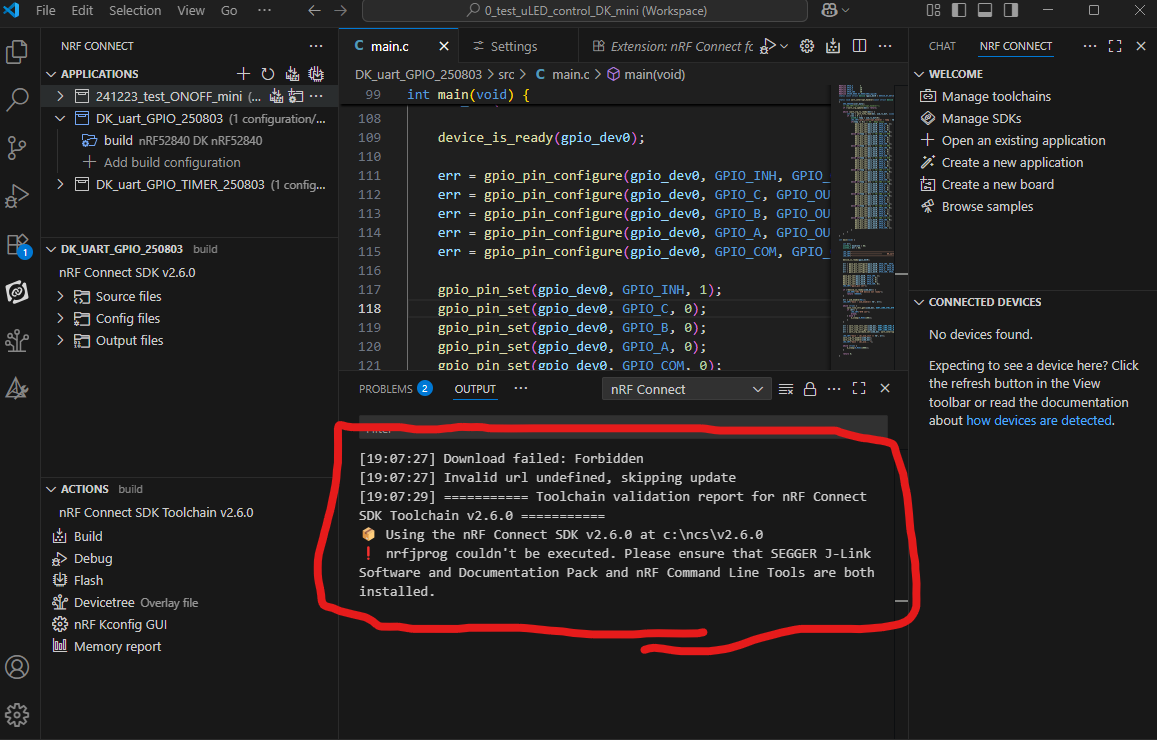
I would like to use Setup 2, but I'm seeing a warning message recommending the installation of the nRF Command Line Tools.
If I install the nRF Command Line Tools as suggested, will it conflict with my current Setup 1? I'm unsure and would like to confirm before proceeding.
Thank you.
