CS PIN WHEN SET HIGH IS 1.8V, and I need at least 2.8V

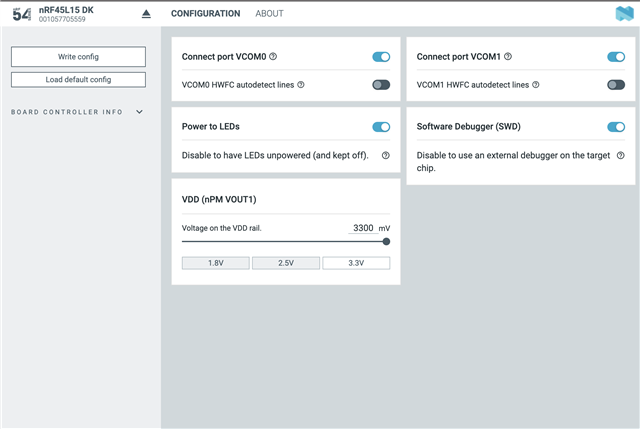
So when I toggle the pin high, it gets set to 1.8V. I want it to be at least 2.8V. I did configure the VDD to 3.3V. The VDDIO does show 3.3V, but a pin like let say P1.11 set to high will only be 1.8V. So I want it to drive an eink display but it doesn't recognize the pin going high because the nrf54l15 pin only goes high to 1.8V and needs at least 2.8V for it to be considered High for the eink display controller. So is this a board problem, or there is no functionality to fix this? Would I just need a level-shifter? Also, I'm using a nrf54l15 dk. PCA10156. 0.9.3 2025.26 1057705559 
Parents
  • Hi,

    Have you measured the VDD/VDDM voltage of the nRF54L15DK? The GPIO high voltage is equal to the VDD/VDDM voltage.


    When using the board configuration the config needs to be written to the board, before the VDD voltage is changed.

    To verify that the config has been changed I recommend reconnecting the USB debug connector after writing the config and relaunching the board configuration. The currently used config will be loaded form the board after a couple of seconds.


    Best regards,

    Bendik

Reply
  • Hi,

    Have you measured the VDD/VDDM voltage of the nRF54L15DK? The GPIO high voltage is equal to the VDD/VDDM voltage.


    When using the board configuration the config needs to be written to the board, before the VDD voltage is changed.

    To verify that the config has been changed I recommend reconnecting the USB debug connector after writing the config and relaunching the board configuration. The currently used config will be loaded form the board after a couple of seconds.


    Best regards,

    Bendik

Children
  • I did measured the VDD/VDDM voltage of the nRF54L15DK and it is getting 3.3V. The VDDIO is also getting 3.3V. However, I'm still not getting the GPIO high voltage being equal to the VDD/VDDM voltage. I'm still getting 1.8V. 

    ----- CODE (If needed)-----

    gpio_dev is port1

    EPD_CS_PIN is 11

    ret = gpio_pin_configure(gpio_dev, EPD_CS_PIN, GPIO_OUTPUT_ACTIVE);
    gpio_pin_set(gpio_dev, EPD_CS_PIN, 1); -this is setting it high to 1.8V so not sure what might be the problem.
    ---------------------------------
    I ran this in the Nordic AI and got this response:
    "If you have configured VDD and VDDIO to 3.3V using the Board Configurator, the GPIOs on the nRF54L15 DK should be able to output voltages close to 3.3V when set high. This is confirmed by both the product specification and user reports: the GPIO output high voltage (VOH) is specified as VDD - 0.4V (minimum), up to VDD, depending on drive strength and load, and users have successfully set GPIOs to 3.3V using the Board Configurator app (GPIO Voltage level on nrf54L15PDK; nRF54L15 GPIO Electrical Specs).
    If you are seeing only 1.8V on a pin like P1.11 despite VDDIO being 3.3V, this is not expected and suggests a board-level issue. Possible causes include:
    • The Board Configurator setting was not properly applied, or the board controller firmware is outdated.
    • The pin is loaded by other components (e.g., connected to an LED, button, or external memory via solder bridges), which can pull the voltage down. Check the solder bridge configuration for your DK to ensure the pin is not shared with other circuitry (nRF54L15 DK Solder Bridge Table).
    • There may be a hardware fault or misconfiguration on the DK.
    What you can do:
    1. Double-check that VDDIO is set to 3.3V in the Board Configurator and that the configuration has been written to the board.
    2. Ensure your board controller firmware is up to date.
    3. Inspect the solder bridges and board schematics to confirm that P1.11 is not connected to other loads.
    4. If the above steps do not resolve the issue, it may be a hardware problem specific to your DK.
    In summary, the nRF54L15 is capable of outputting at least 2.8V (up to VDDIO) on its GPIOs when properly configured. If you are not seeing this, it is likely a board configuration or hardware issue, not a limitation of the chip itself."
    I also have two DKs and they both do the same thing.

  • The e-ink display must have a supply above 2.8V to stop internal schottky protection diodes clamping at a lower voltage and if an interface chip is used on the e-ink display that interface must also have a supply above 2.8V unless it is a level-shifter interface. Worth measuring the e-ink supply voltage to be sure, ideally same voltage as NRF54.

    If e-ink voltage is correct try setting the pin to be High-Drive (not an option for all io pins).

    On the DK I think P1.11 is also used as a TWI SCL which needs to be disabled or disconnected.

  • Thanks. So when I turn on DRIVE 1 HIGH in the device tree visual editor it reaches 2.9V, so that worked.

Related