Simple "Hello World" lvgl label repeating when upgrading from 2.9.1 to 3.0.1

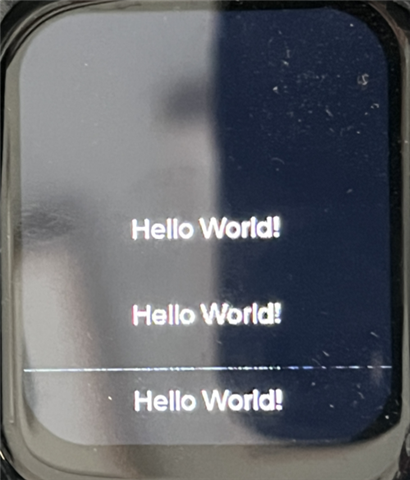
I have a custom board using a nrf5340 and a st7789 display using spi and mipi_dbi. It's I have it working on a sample project and printing "Hello World" I was using nrfConnect (Nordic’s VS Code Addin) 2.9.1 which used lvgl 8.*. When I moved the code (which is really simple) to 3.0.1 which is lvgl 9.3.0 and the screen shows “Hello World” three times starting in the center (where I expect it to be) and then twice below it. 

int screen_helloworld_init()
{
	LOG_DBG("Creating home screen");
	scr_home = lv_obj_create(NULL);

	lv_screen_load_anim(scr_home, LV_SCR_LOAD_ANIM_NONE, 0, 0, true);

	lv_obj_t *hello_world_label;

	lv_obj_set_style_bg_color(lv_scr_act(), lv_palette_main(LV_PALETTE_GREEN), LV_PART_MAIN);
	lv_obj_set_style_text_color(lv_scr_act(), lv_color_white(), LV_PART_MAIN);

	hello_world_label = lv_label_create(lv_scr_act());

	lv_label_set_text(hello_world_label, "Hello World!");
	lv_obj_align(hello_world_label, LV_ALIGN_CENTER, 0, 0);
	lv_obj_set_style_text_font(hello_world_label, &lv_font_montserrat_16, LV_PART_MAIN);

	return 0;
}

I have this running in the main while loop:

  lv_timer_handler();


In my dts I have:

/ {
    mipi_dbi {
		compatible = "zephyr,mipi-dbi-spi";
		spi-dev = <&spi4>;
		dc-gpios = <&gpio0 19 GPIO_ACTIVE_HIGH>;
		reset-gpios =  <&gpio0 23 GPIO_ACTIVE_LOW>;
		write-only;
		#address-cells = <1>;
		#size-cells = <0>;
        st7789v_st7789v_tl019fqv01: st7789v@0 {
            compatible = "sitronix,st7789v";
            mipi-max-frequency = <20000000>;
            reg = <0>;
            width = <240>;
            height = <280>;
            x-offset = <0>;
            y-offset = <20>;
            vcom = <0x19>;
            gctrl = <0x35>;
            vrhs = <0x12>;
            vdvs = <0x20>;
            mdac = <0x00>;
            gamma = <0x01>;
            colmod = <0x05>;
            lcm = <0x2c>;
            porch-param = [0c 0c 00 33 33];
            cmd2en-param = [5a 69 02 01];
            pwctrl1-param = [a4 a1];
            pvgam-param = [D0 04 0D 11 13 2B 3F 54 4C 18 0D 0B 1F 23];
            nvgam-param = [D0 04 0C 11 13 2C 3F 44 51 2F 1F 1F 20 23];
            ram-param = [00 F0];
            rgb-param = [CD 08 14];
            //mipi-mode = <MIPI_DBI_MODE_SPI_4WIRE>;
            mipi-mode = "MIPI_DBI_MODE_SPI_4WIRE";
        };
    };
};

I'm curious if anybody else experienced something like this.

Parents
  • Hello,

    Did you call screen_helloworld_init() in your code apart from once elsewhere in the project? You can review your code to ensure you are not creating or loading the screen or label multiple times as display is showing ''Hello World'' 3 times. Check the main function and lv_screen_load_anim() to ensure that you are not reloading the same screen multiple times without clearing previous objects.

    DTS looks ok. One thing you need to change for mipi-mode. mipi-mode is as an integer, not a string. You need to replace this

    mipi-mode = "MIPI_DBI_MODE_SPI_4WIRE";

    to 

    mipi-mode = MIPI_DBI_MODE_SPI_4WIRE;

    Thanks.

    BR

    Kazi

Reply
  • Hello,

    Did you call screen_helloworld_init() in your code apart from once elsewhere in the project? You can review your code to ensure you are not creating or loading the screen or label multiple times as display is showing ''Hello World'' 3 times. Check the main function and lv_screen_load_anim() to ensure that you are not reloading the same screen multiple times without clearing previous objects.

    DTS looks ok. One thing you need to change for mipi-mode. mipi-mode is as an integer, not a string. You need to replace this

    mipi-mode = "MIPI_DBI_MODE_SPI_4WIRE";

    to 

    mipi-mode = MIPI_DBI_MODE_SPI_4WIRE;

    Thanks.

    BR

    Kazi

Children
  • When I do what you recommend:

                mipi-mode = MIPI_DBI_MODE_SPI_4WIRE;

    I get an error on build:

    -- Found devicetree overlay: djboard_nrf5340_cpuapp_310.overlay
    devicetree error: /Users/xxxxxxxxx/Projects/GitHub/xxxxxxxxx/pcb1_lvgl/boards/ew/djboard/djboard_nrf5340_cpuapp.dts:57 (column 25): parse error: malformed value
    CMake Error at /opt/nordic/ncs/v3.1.0/zephyr/cmake/modules/dts.cmake:306 (execute_process):
      execute_process failed command indexes:


    line 57 is the line in the dts. If I convert it back to what worked in 2.9.1:

    mipi-mode = <MIPI_DBI_MODE_SPI_4WIRE>;

    I get this error:

    devicetree.dtlib.DTError: expected property 'mipi-mode' on /mipi_dbi/st7789v@0 in /opt/nordic/ncs/v3.1.0/zephyr/misc/empty_file.c to be assigned with 'mipi-mode = "string";', not 'mipi-mode = < 0x2 >;'

    Which is why I created a string with it. This should map to something Zephyr expects, I think.


    Here is all the code. Again, this worked in 2.9.1:

    #include <zephyr/kernel.h>
    #include <zephyr/device.h>
    #include <zephyr/drivers/display.h>
    #include <zephyr/pm/device.h>
    #include <zephyr/drivers/pwm.h>
    #include <zephyr/drivers/gpio.h>
    #include <zephyr/logging/log.h>
    #include <stdio.h>
    #include <app_version.h>
    #include <lvgl.h>
    
    LOG_MODULE_REGISTER(app, LOG_LEVEL_DBG);
    
    int count = 0;
    
    // BACKLIGHT MANAGER CODE
    #define PWM_LED0    DT_ALIAS(pwm_led0)
    static const struct pwm_dt_spec pwm_led0 = PWM_DT_SPEC_GET(PWM_LED0);
    
    int backlight_manager_init(void) 
    {
    
    	LOG_DBG("Starting backlight PWM");
    
    		
    	if (!pwm_is_ready_dt(&pwm_led0)) {
    		LOG_ERR("Error: PWM device %s is not ready", pwm_led0.dev->name);
    		return -1;
    	}
    
        return 0;
    
    }
    
    static void set_pwm(const struct pwm_dt_spec *pwmdev, uint8_t percent) {
    
    	LOG_DBG("Setting PWM to %d%%", percent);
    
    	int ret;
    	uint32_t step = pwmdev->period / 100;
    	uint32_t pulse_width = step * percent;
    
    	if (!device_is_ready(pwmdev->dev)) {
    		LOG_ERR("PWM device not ready");
    		return;
    	}
    
    	ret = pwm_set_pulse_dt(pwmdev, pulse_width);
    	if (ret < 0) {
    		LOG_ERR("Failed to set pulse width: %i", ret);
    		return;
    	}
    }
    
    void backlight_manager_wake()
    {
        set_pwm(&pwm_led0, 100); 
        //set_pwm(&backlight_spec, 1);
    }
    
    
    void backlight_manager_sleep()
    {
        set_pwm(&pwm_led0, 0);
    }
    
    // DISPLAY MANAGER CODE
    static const struct device *display_dev  = DEVICE_DT_GET(DT_CHOSEN(zephyr_display));
    
    int display_manager_init(void) 
    {
        LOG_DBG("Initializing display manager");
    	if (!device_is_ready(display_dev)) {
    		LOG_ERR("Device not ready, aborting test");
    		return 0;
    	}
    
        display_blanking_off(display_dev);
    
        return 0;
    }
    
    // VOLTAGE CODE
    int change_gpio_voltage(uint32_t target_voltage)
    {
        int err = 0;
        
        uint32_t regout = NRF_UICR->VREGHVOUT;
        LOG_INF("change_gpio_voltage: REGOUT = 0x%08x", regout);
        LOG_INF("change_gpio_voltage: target voltage is %d", target_voltage);    
        if ((regout & UICR_VREGHVOUT_VREGHVOUT_Msk)  != target_voltage) {
            LOG_INF("Target voltage not set. Configuring");
    
            // Set NVMC in write mode:
            NRF_NVMC->CONFIG = NVMC_CONFIG_WEN_Wen << NVMC_CONFIG_WEN_Pos;
            while (NRF_NVMC->CONFIG != NVMC_CONFIG_WEN_Wen << NVMC_CONFIG_WEN_Pos) {
                // Wait...
            }
    
            // Write the actual UICR Register:
            NRF_UICR->VREGHVOUT = (target_voltage | ~UICR_VREGHVOUT_VREGHVOUT_Msk);
            while (NRF_NVMC->READY == NVMC_READY_READY_Busy) {
                // Wait...
            }
    
            // Set NVMC back in read mode:
            NRF_NVMC->CONFIG = NVMC_CONFIG_WEN_Ren << NVMC_CONFIG_WEN_Pos;
            while (NRF_NVMC->CONFIG != NVMC_CONFIG_WEN_Ren << NVMC_CONFIG_WEN_Pos) {
                // Wait...
            }
            // Check whether it was set successfully:
            if ((NRF_UICR->VREGHVOUT & UICR_VREGHVOUT_VREGHVOUT_Msk) != target_voltage) {
                err = 0;
            }
            // Reset if success. Config will remain on future reboots.
            if (err == 0) {
                NVIC_SystemReset();
            }
        } else {
            LOG_INF("Target voltage already set. No action needed.");
            err = 0;
        }
        return err;
    
    }
    
    // SCREEN HELLO WORLD CODE
    static  lv_obj_t *scr_home;
    
    int screen_helloworld_init()
    {
    	LOG_DBG("Creating home screen");
    
    	scr_home = lv_obj_create(NULL);
    	// Used this function as it automatically deletes previous screen.
    	// Should work as you did also I think. But have not used lv_scr_load_xxx before
    	//lv_screen_load_anim(scr_home, LV_SCR_LOAD_ANIM_NONE, 0, 0, true);
    	lv_screen_load(scr_home);
    
    	lv_obj_t *hello_world_label;
    
    	lv_obj_set_style_bg_color(lv_scr_act(), lv_palette_main(LV_PALETTE_GREEN), LV_PART_MAIN);
    	lv_obj_set_style_text_color(lv_scr_act(), lv_color_white(), LV_PART_MAIN);
    
    	hello_world_label = lv_label_create(lv_scr_act());
    
    	lv_label_set_text(hello_world_label, "Hello World!");
    	lv_obj_align(hello_world_label, LV_ALIGN_CENTER, 0, 0);
    	lv_obj_set_style_text_font(hello_world_label, &lv_font_montserrat_16, LV_PART_MAIN);
    
    	return 0;
    }
    
    // SCREEN HELLO WORLD 2CODE
    static  lv_obj_t *scr_home2;
    
    int screen_helloworld2_init()
    {
    	LOG_DBG("Creating home screen");
    
    	scr_home2 = lv_obj_create(NULL);
    	// Used this function as it automatically deletes previous screen.
    	// Should work as you did also I think. But have not used lv_scr_load_xxx before
    	lv_screen_load_anim(scr_home2, LV_SCR_LOAD_ANIM_NONE, 0, 0, true);
    	//lv_screen_load(scr_home2);
    
    	lv_obj_t *hello_world_label;
    
    	lv_obj_set_style_bg_color(lv_scr_act(), lv_palette_main(LV_PALETTE_GREEN), LV_PART_MAIN);
    	lv_obj_set_style_text_color(lv_scr_act(), lv_color_white(), LV_PART_MAIN);
    
    	hello_world_label = lv_label_create(lv_scr_act());
    
    	lv_label_set_text(hello_world_label, "Hello World 2!");
    	lv_obj_align(hello_world_label, LV_ALIGN_CENTER, 0, 0);
    	lv_obj_set_style_text_font(hello_world_label, &lv_font_montserrat_16, LV_PART_MAIN);
    
    	return 0;
    }
    
    
    int main(void)
    {
        LOG_DBG("Hello World! %s (%s)", CONFIG_BOARD, APP_VERSION_EXTENDED_STRING);
    	change_gpio_voltage(UICR_VREGHVOUT_VREGHVOUT_3V0);
    	display_manager_init();
    	backlight_manager_init();
    	screen_helloworld_init();
    	backlight_manager_wake();
    	while (count < 100) {
    		count++;
    		LOG_DBG("looping %d", count);
    		if (count == 50) {
    			LOG_DBG("Let's load screen 2");
    			screen_helloworld2_init();
    		}
    		k_sleep(K_MSEC(1000));
    		lv_timer_handler();
    	}
    	backlight_manager_sleep();
    	return 0;
    }
    

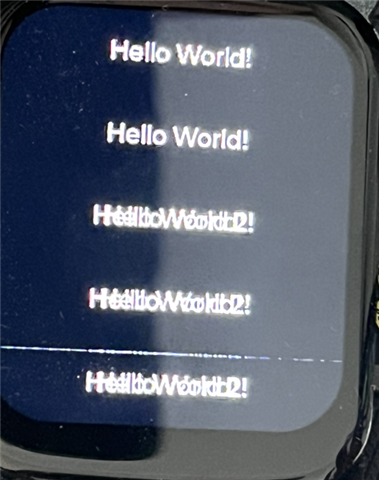
    I changed it and added a "Hello World 2" screen. At first my screen looked like this:


    With the change it looked like this:


Related