Hi,
I am a bit stuck with configuring nrf5340 project to include the bootloader properly.
The SDK-toolchain I use is v3.0.2
What I need:
encrypted and signed update image. At least for the application core, as the network core FW comes from a library anyway, and it is freely available to anybody.
Currently, I am in a stage, following various examples, where I can generate the required images. Encrypted and signed for the app core, signed image for network core.
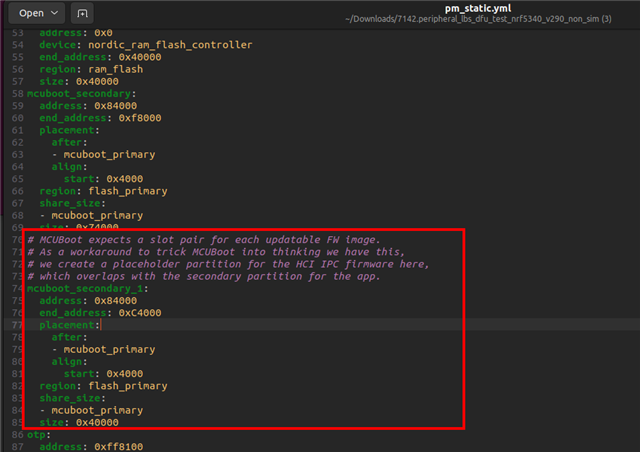
But the thing I want to change is to use a non-simultaneous update for the cores. That is because I do not want to use an additional partition for the network core update; there is no external flash included in the project, and there will not be one. I want to use only two partitions: primary, where the active application is running, and secondary, which is used for either network core update or for the application core update. I.e., I want to get rid of the mcuboot_secondary_1 256KB partition and free it for either settings or extend the other two partitions.
I do not have static partitioning yet, just plan to create one after I get the project correctly configured.
Some extra information: I need the firmware update functionality only in mcuboot, over the USB-CDC. The application will use retained memory to fall back into the bootloader if necessary. This one is working fine. FW update over BT should not be there.
Is there a ready-made example for nrf5340 to have that kind of functionality? Updating both cores from mcuboot, not app, and using only two partitions for that?
Current prj.conf
CONFIG_PRINTK=y
CONFIG_STDOUT_CONSOLE=y
CONFIG_GPIO=y

CONFIG_NCS_SAMPLES_DEFAULTS=y
CONFIG_SYSTEM_WORKQUEUE_STACK_SIZE=2048

CONFIG_BT=y
CONFIG_BT_PERIPHERAL=y
CONFIG_BT_DEVICE_NAME="Nordic_LB"

# Enable the LBS service
CONFIG_BT_LBS=y
CONFIG_BT_LBS_POLL_BUTTON=y
CONFIG_DK_LIBRARY=y


CONFIG_RETAINED_MEM=y
CONFIG_RETENTION=y
CONFIG_RETAINED_MEM_ZEPHYR_RAM=y
CONFIG_RETENTION_BOOT_MODE=y
CONFIG_REBOOT=y
sysbuild.conf
# https://docs.nordicsemi.com/bundle/ncs-latest/page/nrf/releases_and_maturity/migration/migration_sysbuild.html
SB_CONFIG_BOOTLOADER_MCUBOOT=y
SB_CONFIG_MCUBOOT_MODE_OVERWRITE_ONLY=y
SB_CONFIG_MCUBOOT_UPDATEABLE_IMAGES=2
SB_CONFIG_SECURE_BOOT_NETCORE=y
SB_CONFIG_NETCORE_APP_UPDATE=y

# DFU zip package will include un-encrypted images
SB_CONFIG_DFU_MULTI_IMAGE_PACKAGE_BUILD=n
#SB_CONFIG_DFU_MULTI_IMAGE_PACKAGE_APP=y
#SB_CONFIG_DFU_MULTI_IMAGE_PACKAGE_NET=y

SB_CONFIG_BOOT_ENCRYPTION=y
SB_CONFIG_BOOT_SIGNATURE_TYPE_ECDSA_P256=y
SB_CONFIG_BOOT_SIGNATURE_KEY_FILE="${APPLICATION_CONFIG_DIR}/keys/mcuboot_priv.pem"
SB_CONFIG_BOOT_ENCRYPTION_KEY_FILE="${APPLICATION_CONFIG_DIR}/keys/mcuboot_priv.pem"
SB_CONFIG_SECURE_BOOT_SIGNING_KEY_FILE="${APPLICATION_CONFIG_DIR}/keys/mcuboot_priv.pem"
nrf5340dk_nrf5340_cpuapp.conf for mcuboot
# Configure MCUboot features
CONFIG_BOOT_MAX_IMG_SECTORS=256
CONFIG_MCUBOOT_DOWNGRADE_PREVENTION=y
CONFIG_BOOT_ECDSA_TINYCRYPT=y

# Enable flash simulator
CONFIG_PCD_APP=y
CONFIG_FLASH_SIMULATOR=y
CONFIG_FLASH_SIMULATOR_DOUBLE_WRITES=y
CONFIG_FLASH_SIMULATOR_STATS=n

# CONFIG_NORDIC_QSPI_NOR=y
# CONFIG_NORDIC_QSPI_NOR_FLASH_LAYOUT_PAGE_SIZE=4096

# CONFIG_BOOT_IMAGE_ACCESS_HOOKS=y
# CONFIG_BOOT_IMAGE_ACCESS_HOOK_NRF5340=y

CONFIG_MULTITHREADING=y
nrf5340dk_nrf5340_cpuapp.overlay
/ {
  aliases {
		mcuboot-button0 = &button3;
		mcuboot-led0 = &led3;
  };
};
/ {
    chosen {
        zephyr,uart-mcumgr = &usbd;
        zephyr,console = &uart0;    };
};
&zephyr_udc0 {
		cdc_acm_uart0: cdc_acm_uart0 {
		compatible = "zephyr,cdc-acm-uart";
	};
};
/ {
        sram@2007FFFF {
                compatible = "zephyr,memory-region", "mmio-sram";
                reg = <0x2007FFFF 0x1>;
                zephyr,memory-region = "RetainedMem";
                status = "okay";

                retainedmem {
                        compatible = "zephyr,retained-ram";
                        status = "okay";
                        #address-cells = <1>;
                        #size-cells = <1>;

                        retention0: retention@0 {
                                compatible = "zephyr,retention";
                                status = "okay";
                                reg = <0x0 0x1>;
                        };
                };
        };

        chosen {
                zephyr,boot-mode = &retention0;
        };
};

/* Reduce SRAM0 usage by 1 byte to account for non-init area */
&sram0 {
        reg = <0x20000000 0x7FFFF>;
};
prj.conf for mcuboot:
CONFIG_MAIN_STACK_SIZE=10240
CONFIG_MBEDTLS_CFG_FILE="mcuboot-mbedtls-cfg.h"
CONFIG_PM_PARTITION_SIZE_MCUBOOT=0x20000

CONFIG_BOOT_SWAP_SAVE_ENCTLV=n
CONFIG_BOOT_ENCRYPT_IMAGE=n

CONFIG_BOOT_UPGRADE_ONLY=y
CONFIG_BOOT_BOOTSTRAP=n

CONFIG_UART_CONSOLE=y
CONFIG_MCUBOOT_SERIAL=y
CONFIG_BOOT_SERIAL_CDC_ACM=y
CONFIG_MCUBOOT_SERIAL_DIRECT_IMAGE_UPLOAD=y

CONFIG_BOOT_SERIAL_PIN_RESET=n
CONFIG_BOOT_SERIAL_NO_APPLICATION=y
CONFIG_MCUBOOT_INDICATION_LED=y

# Use Retention system
CONFIG_RETAINED_MEM=y
CONFIG_RETENTION=y
CONFIG_RETAINED_MEM_ZEPHYR_RAM=y
CONFIG_RETENTION_BOOT_MODE=y
CONFIG_BOOT_SERIAL_BOOT_MODE=y


### mbedTLS has its own heap
# CONFIG_HEAP_MEM_POOL_SIZE is not set

### We never want Zephyr's copy of tinycrypt.  If tinycrypt is needed,
### MCUboot has its own copy in tree.
# CONFIG_TINYCRYPT is not set
# CONFIG_TINYCRYPT_ECC_DSA is not set
# CONFIG_TINYCRYPT_SHA256 is not set

CONFIG_FLASH=y
CONFIG_FPROTECT=y

### Various Zephyr boards enable features that we don't want.
# CONFIG_BT is not set
# CONFIG_BT_CTLR is not set
# CONFIG_I2C is not set

CONFIG_LOG=y
CONFIG_LOG_MODE_MINIMAL=y # former CONFIG_MODE_MINIMAL
### Ensure Zephyr logging changes don't use more resources
CONFIG_LOG_DEFAULT_LEVEL=0
### Use info log level by default
CONFIG_MCUBOOT_LOG_LEVEL_INF=y
### Decrease footprint by ~4 KB in comparison to CBPRINTF_COMPLETE=y
CONFIG_CBPRINTF_NANO=y
### Use the minimal C library to reduce flash usage
CONFIG_MINIMAL_LIBC=y
CONFIG_NRF_RTC_TIMER_USER_CHAN_COUNT=0

# NCS boot banner
CONFIG_NCS_APPLICATION_BOOT_BANNER_STRING="MCUboot"


# CONFIG_MCUMGR=y
# CONFIG_NET_BUF=y
# # CONFIG_ZCBOR=y
# CONFIG_CRC=y

CONFIG_IMG_MANAGER=y
CONFIG_STREAM_FLASH=y
# CONFIG_MCUMGR_GRP_IMG=y
# CONFIG_MCUMGR_GRP_OS=y
# CONFIG_SIZE_OPTIMIZATIONS=y
CONFIG_BOOT_SERIAL_IMG_GRP_HASH=y
# CONFIG_ENABLE_MGMT_PERUSER=y
# CONFIG_BOOT_MGMT_CUSTOM_STORAGE_ERASE=y
CONFIG_BOOT_SERIAL_IMG_GRP_IMAGE_STATE=y
CONFIG_BOOT_SERIAL_IMG_GRP_SLOT_INFO=y


# Configure MCUboot features
CONFIG_BOOT_MAX_IMG_SECTORS=256
CONFIG_MCUBOOT_DOWNGRADE_PREVENTION=y
CONFIG_BOOT_ECDSA_TINYCRYPT=y

# Enable flash simulator
CONFIG_PCD_APP=y
CONFIG_FLASH_SIMULATOR=y
CONFIG_FLASH_SIMULATOR_DOUBLE_WRITES=y
CONFIG_FLASH_SIMULATOR_STATS=n

# CONFIG_BOOT_IMAGE_ACCESS_HOOKS=y
# CONFIG_BOOT_IMAGE_ACCESS_HOOK_NRF5340=y

CONFIG_MULTITHREADING=y
The above settings seem to be fine otherwise, but create three partitions in total, mcuboot_primary, mcuboot_secondary, and mcuboot_secondary_1. That last one I need to remove.
There is no use for the secondary_1 partition anyway; mcumgr updates the images one by one.
BR, Madis