- nRF connection Desktop v5.2.0
- Toolchain Manager v1.6.0
- Visual studio cade v2.9.2
- Windows 11 pro Platform
Hi,
What access point are you using? It could be that the access point does not support TWT.
Can you share device logs when enabling TWT? You can also try the Wi-Fi TWT sample.
Best regards,
Marte
Hi,
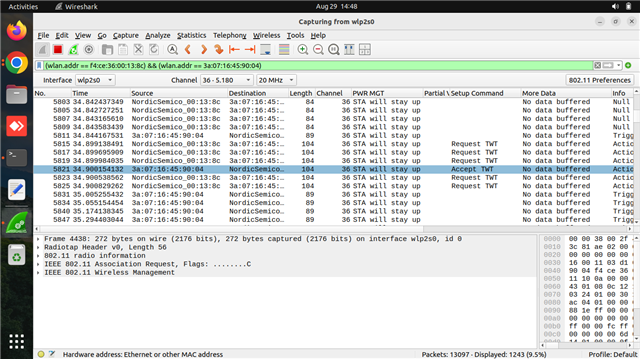
We are currently using a FreeBox Access Point, which supports TWT (Target Wake Time) power save mode. In the packet capture, we can see both the TWT Request and Accept frames. However, the client is still not entering power save mode.
TWT enabling logs:-
uart:~$ wifi twt setup 0 0 2 2 0 1 1 1 2000 60000
TWT operation TWT setup with dg: 2, flow_id: 2 requested
TWT response: TWT accept
== TWT negotiated parameters ==
TWT Dialog token: 2
TWT flow ID: 1
TWT negotiation type: TWT individual negotiation
TWT responder: true
TWT implicit: true
TWT announce: true
TWT trigger: true
TWT wake interval: 2048 us
TWT interval: 60000 us
For your reference Pcap screenshot attached below.
Thanks & regards,
Naveen P

Hi Naveen,
The latest version of the nRF Connect SDK is v3.1.0. v5.2.0 does not exist.
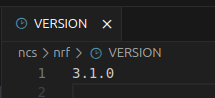
You can find the SDK version in the <ncs_installation>/nrf/VERSION file:

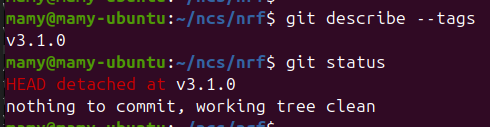
Another option is to open <ncs_installation>/nrf in a terminal and use git describe --tag or git status:
Best regards,
Marte
Hi Marte,

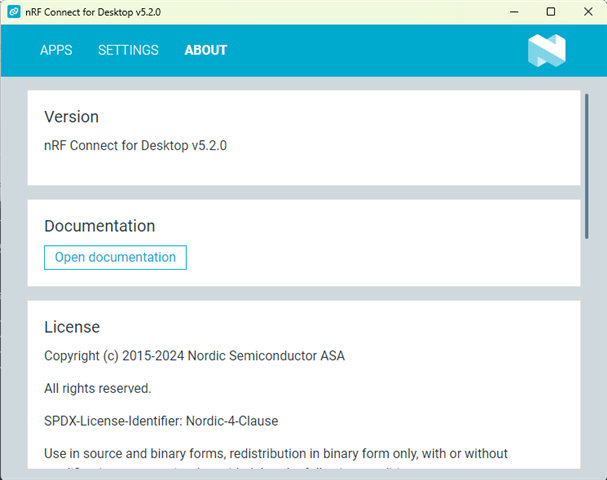
For your reference, I’ve attached a screenshot of the nRF Connect version. In Google Chrome, the latest version shown for the Windows platform is v5.2.0.
Best regards,
Naveen P
Hi Naveen,
That is the version of the nRF Connect for Desktop application, and not the SDK. Please check which version of the nRF Connect SDK you have.
Best regards,
Marte
Hi Marte,
sorry for wrong update,We are using nRF connect SDK v2.9.2.
Hi,
How do you verify that the device does not enter sleep mode?
Can you try the Wi-Fi TWT sample?
Best regards,
Marte
Hi,
How do you verify that the device does not enter sleep mode?
Can you try the Wi-Fi TWT sample?
Best regards,
Marte
Hi Marte,
We verified the PCAPs that I shared with you privately.
After running the following command:
wifi twt setup 0 0 2 2 0 1 1 1 2000 60000
we initiated a ping from the client side and captured the PCAPs. Upon reviewing the captures, we observed that the client did not send the "SAT will go to sleep" message.
We will test with the Wi-Fi TWT sample and get back to you.
Thanks & Regards,
Naveen P
Hi,
First, the TWT interval is in microseconds, so setting it to 60000 equals 0.06 seconds. This interval is the total TWT interval, i.e., both wake-up time and sleeping time. I would recommend increasing it, for example, to 6000000 instead.
Can you verify that the device does not enter sleep mode by measuring the power consumption or checking the sleep state using NET_EVENT_WIFI_TWT_SLEEP_STATE? You can see examples of how to check the sleep state in the TWT sample (see https://github.com/nrfconnect/sdk-nrf/blob/v2.9.2/samples/wifi/twt/src/main.c#L306) and in Lesson 6 exercise 2 - Enabling TWT with notification in our Wi-Fi Fundamentals course on DevAcademy. The latter also shows how to measure power consumption.
Best regards,
Marte
Hi Marte,
Apologies for the delayed response. I did try setting the interval to 6000000 as you suggested, but unfortunately, the client still does not enter the sleep state. It continues to stay awake
For your reference I had attached the pcaps below.
https://drive.google.com/file/d/19-B2L2V7YFyelTCId7S2xmWr-m4ONEEM/view?usp=drive_link
Hi,
Please verify that the device does not enter sleep state by measuring the power consumption or checking the sleep state using NET_EVENT_WIFI_TWT_SLEEP_STATE as I mentioned in my previous reply.
Best regards,
Marte
Hi,
As you advised, we followed the link https://academy.nordicsemi.com/courses/wi-fi-fundamentals/lessons/lesson-6-wifi-fundamentals/topic/lesson-6-exercise-2-2/nk, but we are still facing the same issue.
Thanks & Regards,
Naveen