- nRF connection Desktop v5.2.0
- Toolchain Manager v1.6.0
- Visual studio cade v2.9.2
- Windows 11 pro Platform
Hi,
What access point are you using? It could be that the access point does not support TWT.
Can you share device logs when enabling TWT? You can also try the Wi-Fi TWT sample.
Best regards,
Marte
Hi,
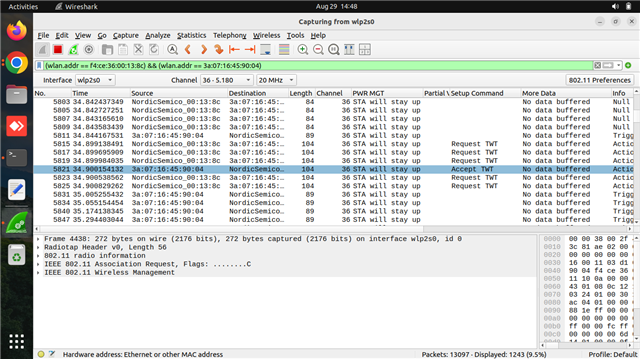
We are currently using a FreeBox Access Point, which supports TWT (Target Wake Time) power save mode. In the packet capture, we can see both the TWT Request and Accept frames. However, the client is still not entering power save mode.
TWT enabling logs:-
uart:~$ wifi twt setup 0 0 2 2 0 1 1 1 2000 60000
TWT operation TWT setup with dg: 2, flow_id: 2 requested
TWT response: TWT accept
== TWT negotiated parameters ==
TWT Dialog token: 2
TWT flow ID: 1
TWT negotiation type: TWT individual negotiation
TWT responder: true
TWT implicit: true
TWT announce: true
TWT trigger: true
TWT wake interval: 2048 us
TWT interval: 60000 us
For your reference Pcap screenshot attached below.
Thanks & regards,
Naveen P

Hi,
Naveen Pyda said:However, we are still not seeing the expected logs.
Was this with the Wi-Fi TWT sample or the Wi-Fi shell sample?
Naveen Pyda said:I tried with another AP as well, but we are still facing the same issue I mentioned earlier.
Please provide the details of the AP you tested with. Additionally, make sure that TWT is enabled in the AP settings.
I have attached a version of the TWT sample without the traffic generator and TWT teardown. Can you test this and send the logs?
Please also share which version of the nRF7002 DK you are using. The version is the line under "PCA10143" on the sticker on the DK.
Best regards,
Marte
Hi Marte,
As you mentioned, the details of the AP are: Ruckus-R770, SSID: TWT, Password: naveen123. The AP supports TWT power save.
As you advised, we made the same changes in ncs/v2.9.2/nrf/samples/wifi/twt/src/main.c, but we are not receiving any logs from the client side. I had previously shared screenshots and logs for this issue.
As you advised, we followed the steps to collect the logs, but we are still not able to see the logs as expected.Please find the attached screenshot for your reference.
The version of the nRF7002 DK is 1.0.2.
We will try the twt.zip. If we find any solution or face any issue, I will let you know.
Thanks & Regards,
Naveen P
Hi Marte,
However, we are still not seeing the expected logs.Was this with the Wi-Fi TWT sample or the Wi-Fi shell sample?
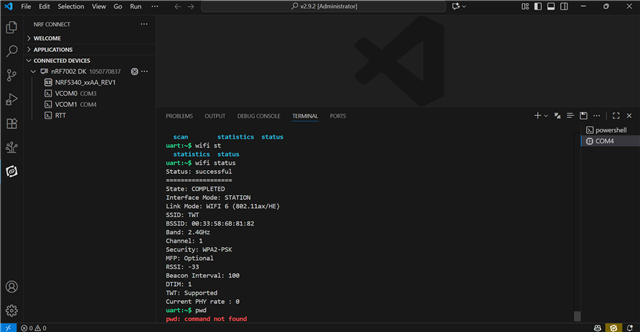
We have a little bit of confusion about this. Actually, we are connecting the Nordic device through the terminal in VS Code. You can see below attached screenshot.

We will try the twt.zip. If we find any solution or face any issue, I will let you know.
All files were replaced with the twt.zip files in the path ncs/v2.9.2/nrf/samples/wifi/twt/. After that, we flashed the build using the commands below:
1.west build -p always -b nrf7002dk/nrf5340/cpuapp
2.westflash
We flashed the build in both the shell and twt paths.
Still, we are not able to see the logs as expected. You can see below attached screenshot.

Thanks & Regards,
Naveen P
Hi Naveen,
Naveen Pyda said:As you advised, we made the same changes inncs/v2.9.2/nrf/samples/wifi/twt/src/main.c
Naveen Pyda said:All files were replaced with the twt.zip files in the pathncs/v2.9.2/nrf/samples/wifi/twt/. After that, we flashed the build using the commands below:
Please build and test the application I shared (twt.zip), not the sample in the SDK. The only change you need to make is to set the credentials in prj.conf.
Naveen Pyda said:but we are not receiving any logs from the client side. I had previously shared screenshots and logs for this issue.
Just to make sure I understand correctly, do you not get any logs at all? With the TWT application I attached, you should get logs like this:
*** Booting nRF Connect SDK v2.9.2-4ab7b98fc76f *** *** Using Zephyr OS v3.7.99-aa34a5632971 *** [00:00:00.665,954] <inf> net_config: Initializing network [00:00:00.665,954] <inf> net_config: Waiting interface 1 (0x20001080) to be up... [00:00:00.666,107] <inf> net_config: IPv4 address: 192.168.1.99 [00:00:00.666,168] <inf> net_config: Running dhcpv4 client... [00:00:00.666,412] <inf> twt: Starting nrf7002dk with CPU frequency: 64 MHz [00:00:00.668,273] <inf> wifi_supplicant: wpa_supplicant initialized [00:00:01.666,534] <inf> twt: Static IP address (overridable): 192.168.1.99/255.255.255.0 -> 192.168.1.1 [00:00:03.595,886] <inf> wifi_mgmt_ext: Connection requested [00:00:03.595,916] <inf> twt: Connection requested [00:00:03.595,977] <inf> twt: ================== [00:00:03.596,008] <inf> twt: State: SCANNING [00:00:03.896,148] <inf> twt: ================== [00:00:03.896,179] <inf> twt: State: SCANNING [00:00:04.196,350] <inf> twt: ================== [00:00:04.196,350] <inf> twt: State: SCANNING [00:00:04.496,520] <inf> twt: ================== [00:00:04.496,520] <inf> twt: State: SCANNING [00:00:04.796,691] <inf> twt: ================== [00:00:04.796,722] <inf> twt: State: SCANNING [00:00:05.096,862] <inf> twt: ================== [00:00:05.096,893] <inf> twt: State: SCANNING [00:00:05.397,033] <inf> twt: ================== [00:00:05.397,064] <inf> twt: State: SCANNING [00:00:05.697,204] <inf> twt: ================== [00:00:05.697,235] <inf> twt: State: SCANNING [00:00:05.997,375] <inf> twt: ================== [00:00:05.997,406] <inf> twt: State: SCANNING [00:00:06.297,576] <inf> twt: ================== [00:00:06.297,607] <inf> twt: State: SCANNING [00:00:06.597,747] <inf> twt: ================== [00:00:06.597,778] <inf> twt: State: SCANNING [00:00:06.897,918] <inf> twt: ================== [00:00:06.897,949] <inf> twt: State: SCANNING [00:00:07.198,089] <inf> twt: ================== [00:00:07.198,120] <inf> twt: State: SCANNING [00:00:07.498,291] <inf> twt: ================== [00:00:07.498,321] <inf> twt: State: SCANNING [00:00:07.798,461] <inf> twt: ================== [00:00:07.798,492] <inf> twt: State: SCANNING [00:00:08.098,632] <inf> twt: ================== [00:00:08.098,663] <inf> twt: State: SCANNING [00:00:08.398,803] <inf> twt: ================== [00:00:08.398,834] <inf> twt: State: AUTHENTICATING [00:00:08.631,469] <inf> twt: Connected [00:00:08.706,115] <inf> twt: ================== [00:00:08.706,146] <inf> twt: State: COMPLETED [00:00:08.706,176] <inf> twt: Interface Mode: STATION [00:00:08.706,207] <inf> twt: Link Mode: WIFI 6 (802.11ax/HE) [00:00:08.706,207] <inf> twt: SSID: <SSID> [00:00:08.706,237] <inf> twt: BSSID: FC:34:97:0B:F6:DC [00:00:08.706,268] <inf> twt: Band: 5GHz [00:00:08.706,268] <inf> twt: Channel: 44 [00:00:08.706,298] <inf> twt: Security: WPA2-PSK [00:00:08.706,329] <inf> twt: MFP: Optional [00:00:08.706,329] <inf> twt: RSSI: -64 [00:00:08.706,329] <inf> twt: TWT: Supported [00:00:10.706,420] <inf> twt: AP is TWT capable, establishing TWT [00:00:10.721,038] <inf> twt: TWT setup requested [00:00:10.807,250] <inf> twt: TWT response: TWT accept [00:00:10.807,250] <inf> twt: == TWT negotiated parameters == [00:00:10.807,250] <inf> twt: TWT Dialog token: 1 [00:00:10.807,281] <inf> twt: TWT flow ID: 0 [00:00:10.807,312] <inf> twt: TWT negotiation type: TWT individual negotiation [00:00:10.807,312] <inf> twt: TWT responder: true [00:00:10.807,342] <inf> twt: TWT implicit: true [00:00:10.807,373] <inf> twt: TWT announce: false [00:00:10.807,403] <inf> twt: TWT trigger: false [00:00:10.807,403] <inf> twt: TWT wake interval: 65024 us [00:00:10.807,403] <inf> twt: TWT interval: 524000 us [00:00:10.807,434] <inf> twt: ======================== [00:00:10.807,556] <inf> twt: TWT sleep state: sleeping [00:00:10.911,285] <inf> twt: TWT sleep state: awake [00:00:10.976,074] <inf> twt: TWT sleep state: sleeping [00:00:11.021,148] <inf> twt: TWT Setup success [00:00:11.435,577] <inf> twt: TWT sleep state: awake [00:00:11.500,457] <inf> twt: TWT sleep state: sleeping [00:00:11.959,838] <inf> twt: TWT sleep state: awake [00:00:12.024,871] <inf> twt: TWT sleep state: sleeping [00:00:12.484,161] <inf> twt: TWT sleep state: awake [00:00:12.549,255] <inf> twt: TWT sleep state: sleeping [00:00:13.008,453] <inf> twt: TWT sleep state: awake [00:00:13.028,564] <inf> net_dhcpv4: Received: 192.168.32.104 [00:00:13.028,747] <inf> net_config: IPv4 address: 192.168.32.104 [00:00:13.028,778] <inf> net_config: Lease time: 36000 seconds [00:00:13.028,808] <inf> net_config: Subnet: 255.255.255.0 [00:00:13.028,839] <inf> net_config: Router: 192.168.32.1 [00:00:13.028,961] <inf> twt: DHCP IP address: 192.168.32.104 [00:00:13.077,911] <inf> twt: TWT sleep state: sleeping [00:00:13.532,714] <inf> twt: TWT sleep state: awake [00:00:13.598,052] <inf> twt: TWT sleep state: sleeping [00:00:14.057,037] <inf> twt: TWT sleep state: awake [00:00:14.122,467] <inf> twt: TWT sleep state: sleeping [00:00:14.581,329] <inf> twt: TWT sleep state: awake [00:00:14.646,881] <inf> twt: TWT sleep state: sleeping [00:00:15.106,353] <inf> twt: TWT sleep state: awake [00:00:15.171,264] <inf> twt: TWT sleep state: sleeping [00:00:15.629,882] <inf> twt: TWT sleep state: awake [00:00:15.695,648] <inf> twt: TWT sleep state: sleeping [00:00:16.154,174] <inf> twt: TWT sleep state: awake [00:00:16.220,001] <inf> twt: TWT sleep state: sleeping [00:00:16.678,436] <inf> twt: TWT sleep state: awake [00:00:16.744,628] <inf> twt: TWT sleep state: sleeping [00:00:17.202,697] <inf> twt: TWT sleep state: awake [00:00:17.268,737] <inf> twt: TWT sleep state: sleeping [00:00:17.726,959] <inf> twt: TWT sleep state: awake
Naveen Pyda said:We have a little bit of confusion about this. Actually, we are connecting the Nordic device through the terminal in VS Code. You can see below attached screenshot.
My question was related to which sample you built and flashed to your board, not how you connect to the serial port on the device.
Naveen Pyda said:We flashed the build in both the shell and twt paths.
Are you flashing both the TWT sample and shell sample to the nRF7002 DK? These are two separate samples, and you should only flash one at a time. If you flash one sample first and then the other, the last sample will overwrite the first sample you flashed.
Naveen Pyda said:2.westflash
Please use this to make sure you erase everything on the device:
west flash --recover
Best regards,
Marte
Hi Marte,
First of all, thank you for explaining everything clearly.
As per your advice, we erased and flashed the new build provided by you in privacy twt.zip. We also added the credentials in prj.conf, but the client is not connecting to the SSID.
Please build and test the application I shared (twt.zip), not the sample in the SDK. The only change you need to make is to set the credentials in prj.conf.
Could you please guide us on how to run the TWT setup command: wifi twt setup 0 0 2 2 0 1 1 1 2000 60000000?
Please find the attached logs below:
*** Booting nRF Connect SDK v2.9.2-4ab7b98fc76f ***
*** Using Zephyr OS v3.7.99-aa34a5632971 ***
[00:00:00.271,972] <inf> net_config: Initializing network
[00:00:00.272,003] <inf> net_config: Waiting interface 1 (0x20001080) to be up...
[00:00:00.272,155] <inf> net_config: IPv4 address: 192.168.1.99
[00:00:00.272,216] <inf> net_config: Running dhcpv4 client...
[00:00:00.272,460] <inf> twt: Starting nrf7002dk with CPU frequency: 64 MHz
[00:00:00.274,291] <inf> wifi_supplicant: wpa_supplicant initialized
[00:00:00.277,221] <err> wifi_nrf: nrf_wifi_wpa_supp_set_key: rpu_ctx_zep is NULL
[00:00:00.277,252] <err> wifi_nrf: nrf_wifi_wpa_supp_set_key: rpu_ctx_zep is NULL
[00:00:00.277,282] <err> wifi_nrf: nrf_wifi_wpa_supp_set_key: rpu_ctx_zep is NULL
[00:00:00.277,313] <err> wifi_nrf: nrf_wifi_wpa_supp_set_key: rpu_ctx_zep is NULL
[00:00:00.277,313] <err> wifi_nrf: nrf_wifi_wpa_supp_set_key: rpu_ctx_zep is NULL
[00:00:00.277,343] <err> wifi_nrf: nrf_wifi_wpa_supp_set_key: rpu_ctx_zep is NULL
[00:00:01.272,583] <inf> twt: Static IP address (overridable): 192.168.1.99/255.255.255.0 -> 192.168.1.1
[00:00:03.191,375] <err> wifi_nrf: nrf_wifi_wpa_supp_scan2: RPU context not initialized
[00:00:03.192,871] <err> wifi_nrf: nrf_wifi_wpa_supp_scan2: RPU context not initialized
[00:00:03.193,145] <inf> wifi_mgmt_ext: Connection requested
[00:00:03.193,176] <inf> twt: Connection requested
[00:00:03.193,237] <inf> twt: ==================
[00:00:03.193,267] <inf> twt: State: DISCONNECTED
[00:00:03.493,408] <inf> twt: ==================
[00:00:03.493,438] <inf> twt: State: DISCONNECTED
[00:00:03.793,579] <inf> twt: ==================
[00:00:03.793,579] <inf> twt: State: DISCONNECTED
[00:00:04.093,750] <inf> twt: ==================
[00:00:04.093,750] <inf> twt: State: DISCONNECTED
[00:00:04.193,603] <err> wifi_nrf: nrf_wifi_wpa_supp_scan2: RPU context not initialized
[00:00:04.393,920] <inf> twt: ==================
[00:00:04.393,951] <inf> twt: State: DISCONNECTED
[00:00:04.694,122] <inf> twt: ==================
[00:00:04.694,152] <inf> twt: State: DISCONNECTED
[00:00:04.994,293] <inf> twt: ==================
[00:00:04.994,293] <inf> twt: State: DISCONNECTED
[00:00:05.194,305] <err> wifi_nrf: nrf_wifi_wpa_supp_scan2: RPU context not initialized
[00:00:05.294,464] <inf> twt: ==================
[00:00:05.294,494] <inf> twt: State: DISCONNECTED
[00:00:05.594,635] <inf> twt: ==================
[00:00:05.594,635] <inf> twt: State: DISCONNECTED
[00:00:05.894,836] <inf> twt: ==================
[00:00:05.894,866] <inf> twt: State: DISCONNECTED
[00:00:06.195,068] <err> wifi_nrf: nrf_wifi_wpa_supp_scan2: RPU context not initialized
[00:00:06.195,343] <inf> twt: ==================
[00:00:06.195,343] <inf> twt: State: DISCONNECTED
[00:00:06.495,513] <inf> twt: ==================
[00:00:06.495,513] <inf> twt: State: DISCONNECTED
[00:00:06.795,684] <inf> twt: ==================
[00:00:06.795,684] <inf> twt: State: DISCONNECTED
[00:00:07.095,886] <inf> twt: ==================
[00:00:07.095,916] <inf> twt: State: DISCONNECTED
Thanks & Regards,
Naveen P
Hi Marte,
First of all, thank you for explaining everything clearly.
As per your advice, we erased and flashed the new build provided by you in privacy twt.zip. We also added the credentials in prj.conf, but the client is not connecting to the SSID.
Please build and test the application I shared (twt.zip), not the sample in the SDK. The only change you need to make is to set the credentials in prj.conf.
Could you please guide us on how to run the TWT setup command: wifi twt setup 0 0 2 2 0 1 1 1 2000 60000000?
Please find the attached logs below:
*** Booting nRF Connect SDK v2.9.2-4ab7b98fc76f ***
*** Using Zephyr OS v3.7.99-aa34a5632971 ***
[00:00:00.271,972] <inf> net_config: Initializing network
[00:00:00.272,003] <inf> net_config: Waiting interface 1 (0x20001080) to be up...
[00:00:00.272,155] <inf> net_config: IPv4 address: 192.168.1.99
[00:00:00.272,216] <inf> net_config: Running dhcpv4 client...
[00:00:00.272,460] <inf> twt: Starting nrf7002dk with CPU frequency: 64 MHz
[00:00:00.274,291] <inf> wifi_supplicant: wpa_supplicant initialized
[00:00:00.277,221] <err> wifi_nrf: nrf_wifi_wpa_supp_set_key: rpu_ctx_zep is NULL
[00:00:00.277,252] <err> wifi_nrf: nrf_wifi_wpa_supp_set_key: rpu_ctx_zep is NULL
[00:00:00.277,282] <err> wifi_nrf: nrf_wifi_wpa_supp_set_key: rpu_ctx_zep is NULL
[00:00:00.277,313] <err> wifi_nrf: nrf_wifi_wpa_supp_set_key: rpu_ctx_zep is NULL
[00:00:00.277,313] <err> wifi_nrf: nrf_wifi_wpa_supp_set_key: rpu_ctx_zep is NULL
[00:00:00.277,343] <err> wifi_nrf: nrf_wifi_wpa_supp_set_key: rpu_ctx_zep is NULL
[00:00:01.272,583] <inf> twt: Static IP address (overridable): 192.168.1.99/255.255.255.0 -> 192.168.1.1
[00:00:03.191,375] <err> wifi_nrf: nrf_wifi_wpa_supp_scan2: RPU context not initialized
[00:00:03.192,871] <err> wifi_nrf: nrf_wifi_wpa_supp_scan2: RPU context not initialized
[00:00:03.193,145] <inf> wifi_mgmt_ext: Connection requested
[00:00:03.193,176] <inf> twt: Connection requested
[00:00:03.193,237] <inf> twt: ==================
[00:00:03.193,267] <inf> twt: State: DISCONNECTED
[00:00:03.493,408] <inf> twt: ==================
[00:00:03.493,438] <inf> twt: State: DISCONNECTED
[00:00:03.793,579] <inf> twt: ==================
[00:00:03.793,579] <inf> twt: State: DISCONNECTED
[00:00:04.093,750] <inf> twt: ==================
[00:00:04.093,750] <inf> twt: State: DISCONNECTED
[00:00:04.193,603] <err> wifi_nrf: nrf_wifi_wpa_supp_scan2: RPU context not initialized
[00:00:04.393,920] <inf> twt: ==================
[00:00:04.393,951] <inf> twt: State: DISCONNECTED
[00:00:04.694,122] <inf> twt: ==================
[00:00:04.694,152] <inf> twt: State: DISCONNECTED
[00:00:04.994,293] <inf> twt: ==================
[00:00:04.994,293] <inf> twt: State: DISCONNECTED
[00:00:05.194,305] <err> wifi_nrf: nrf_wifi_wpa_supp_scan2: RPU context not initialized
[00:00:05.294,464] <inf> twt: ==================
[00:00:05.294,494] <inf> twt: State: DISCONNECTED
[00:00:05.594,635] <inf> twt: ==================
[00:00:05.594,635] <inf> twt: State: DISCONNECTED
[00:00:05.894,836] <inf> twt: ==================
[00:00:05.894,866] <inf> twt: State: DISCONNECTED
[00:00:06.195,068] <err> wifi_nrf: nrf_wifi_wpa_supp_scan2: RPU context not initialized
[00:00:06.195,343] <inf> twt: ==================
[00:00:06.195,343] <inf> twt: State: DISCONNECTED
[00:00:06.495,513] <inf> twt: ==================
[00:00:06.495,513] <inf> twt: State: DISCONNECTED
[00:00:06.795,684] <inf> twt: ==================
[00:00:06.795,684] <inf> twt: State: DISCONNECTED
[00:00:07.095,886] <inf> twt: ==================
[00:00:07.095,916] <inf> twt: State: DISCONNECTED
Thanks & Regards,
Naveen P
Hi Naveen
Naveen Pyda said:We also added the credentials in prj.conf, but the client is not connecting to the SSID.
Did you set the credentials by changing these configs to the SSID and password for your network?
CONFIG_WIFI_CREDENTIALS_STATIC_SSID="MySSID" CONFIG_WIFI_CREDENTIALS_STATIC_PASSWORD="MyPassword"
What kind of security does the network use? In prj.conf, in the sample I shared, I set CONFIG_WIFI_CREDENTIALS_STATIC_TYPE_PSK, which is used if a network uses a password and PSK security, which is the most standard. If your network uses something else, you need to change this config to match your network's configuration. Here you can see the different config options for this:
Naveen Pyda said:Could you please guide us on how to run the TWT setup command:wifi twt setup 0 0 2 2 0 1 1 1 2000 60000000?
You do not need to run this command in the sample I shared, as the sample sets up TWT in the code itself:
static int setup_twt(void)
{
struct net_if *iface = net_if_get_first_wifi();
struct wifi_twt_params params = { 0 };
int ret;
twt_flow_id = 1;
params.operation = WIFI_TWT_SETUP;
params.negotiation_type = WIFI_TWT_INDIVIDUAL;
params.setup_cmd = WIFI_TWT_SETUP_CMD_REQUEST;
params.dialog_token = 1;
params.flow_id = twt_flow_id;
params.setup.responder = 0;
params.setup.trigger = IS_ENABLED(CONFIG_TWT_TRIGGER_ENABLE);
params.setup.implicit = 1;
params.setup.announce = IS_ENABLED(CONFIG_TWT_ANNOUNCED_MODE);
params.setup.twt_wake_interval = CONFIG_TWT_WAKE_INTERVAL;
params.setup.twt_interval = CONFIG_TWT_INTERVAL;
ret = net_mgmt(NET_REQUEST_WIFI_TWT, iface, ¶ms, sizeof(params));
if (ret) {
LOG_INF("TWT setup failed: %d", ret);
return ret;
}
LOG_INF("TWT setup requested");
return 0;
}
When the device connects to the network, it will send a request to enable TWT on its own.
Best regards,
Marte
Hi Marte,
Did you set the credentials by changing these configs to the SSID and password for your network?
Fullscreen12CONFIG_WIFI_CREDENTIALS_STATIC_SSID="MySSID"CONFIG_WIFI_CREDENTIALS_STATIC_PASSWORD="MyPassword"XXXXXXXXXXXXXXXXXXXXXXXXXXXXXXXXXXXXXXXXXXXXXXXXXXCONFIG_WIFI_CREDENTIALS_STATIC_SSID="MySSID" CONFIG_WIFI_CREDENTIALS_STATIC_PASSWORD="MyPassword"What kind of security does the network use? In prj.conf, in the sample I shared, I set
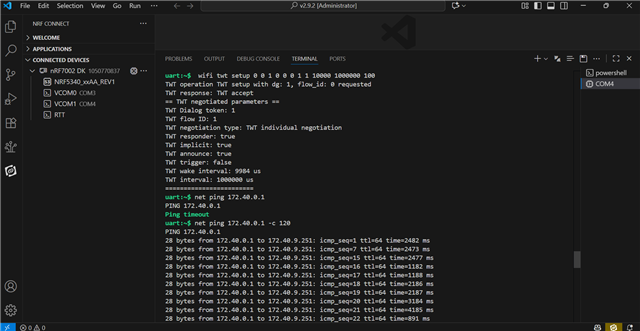
Now the client is connected to the SSID and working as expected, but we want to run ping traffic on this client.
Please find the attached logs below for your reference:
*** Booting nRF Connect SDK v2.9.2-4ab7b98fc76f ***
*** Using Zephyr OS v3.7.99-aa34a5632971 ***
[00:00:00.486,999] <inf> net_config: Initializing network
[00:00:00.486,999] <inf> net_config: Waiting interface 1 (0x20001080) to be up...
[00:00:00.487,182] <inf> net_config: IPv4 address: 192.168.1.99
[00:00:00.487,213] <inf> net_config: Running dhcpv4 client...
[00:00:00.487,457] <inf> twt: Starting nrf7002dk with CPU frequency: 64 MHz
[00:00:00.489,349] <inf> wifi_supplicant: wpa_supplicant initialized
[00:00:01.487,579] <inf> twt: Static IP address (overridable): 192.168.1.99/255.255.255.0 -> 192.168.1.1
[00:00:03.419,860] <inf> wifi_mgmt_ext: Connection requested
[00:00:03.419,891] <inf> twt: Connection requested
[00:00:03.419,952] <inf> twt: ==================
[00:00:03.419,982] <inf> twt: State: SCANNING
[00:00:03.720,123] <inf> twt: ==================
[00:00:03.720,153] <inf> twt: State: SCANNING
[00:00:04.020,324] <inf> twt: ==================
[00:00:04.020,355] <inf> twt: State: SCANNING
[00:00:04.320,495] <inf> twt: ==================
[00:00:04.320,495] <inf> twt: State: SCANNING
[00:00:04.620,666] <inf> twt: ==================
[00:00:07.322,296] <inf> twt: State: AUTHENTICATING
[00:00:07.622,436] <inf> twt: ==================
[00:00:07.622,467] <inf> twt: State: AUTHENTICATING
[00:00:07.940,948] <inf> twt: ==================
[00:00:07.940,979] <inf> twt: State: ASSOCIATED
[00:00:07.941,009] <inf> twt: Interface Mode: STATION
[00:00:07.941,009] <inf> twt: Link Mode: WIFI 6 (802.11ax/HE)
[00:00:07.941,040] <inf> twt: SSID: TWT
[00:00:07.941,070] <inf> twt: BSSID: 00:33:58:AB:81:82
[00:00:07.941,101] <inf> twt: Band: 5GHz
[00:00:07.941,101] <inf> twt: Channel: 64
[00:00:07.941,131] <inf> twt: Security: WPA2-PSK
[00:00:07.941,131] <inf> twt: MFP: Optional
[00:00:07.941,162] <inf> twt: RSSI: -56
[00:00:07.941,162] <inf> twt: TWT: Supported
[00:00:07.994,842] <inf> twt: Connected
[00:00:08.248,474] <inf> twt: ==================
[00:00:08.248,504] <inf> twt: State: COMPLETED
[00:00:08.248,535] <inf> twt: Interface Mode: STATION
[00:00:08.248,565] <inf> twt: Link Mode: WIFI 6 (802.11ax/HE)
[00:00:08.248,596] <inf> twt: SSID: TWT
[00:00:08.248,626] <inf> twt: BSSID: 00:33:58:AB:81:82
[00:00:08.248,626] <inf> twt: Band: 5GHz
[00:00:08.248,657] <inf> twt: Channel: 64
[00:00:08.248,657] <inf> twt: Security: WPA2-PSK
[00:00:08.248,687] <inf> twt: MFP: Optional
[00:00:08.248,687] <inf> twt: RSSI: -55
[00:00:08.248,718] <inf> twt: TWT: Supported
[00:00:09.273,620] <inf> net_dhcpv4: Received: 172.40.9.251
[00:00:09.273,803] <inf> net_config: IPv4 address: 172.40.9.251
[00:00:09.273,803] <inf> net_config: Lease time: 600 seconds
[00:00:09.273,864] <inf> net_config: Subnet: 255.255.240.0
[00:00:09.273,895] <inf> net_config: Router: 172.40.0.1
[00:00:09.273,986] <inf> twt: DHCP IP address: 172.40.9.251
[00:00:10.248,779] <inf> twt: AP is TWT capable, establishing TWT
[00:00:10.256,622] <inf> twt: TWT setup requested
[00:00:10.282,958] <inf> twt: TWT response: TWT accept
[00:00:10.282,958] <inf> twt: == TWT negotiated parameters ==
[00:00:10.282,989] <inf> twt: TWT Dialog token: 1
[00:00:10.282,989] <inf> twt: TWT flow ID: 1
[00:00:10.283,020] <inf> twt: TWT negotiation type: TWT individual negotiation
[00:00:10.283,020] <inf> twt: TWT responder: true
[00:00:10.283,050] <inf> twt: TWT implicit: true
[00:00:10.283,081] <inf> twt: TWT announce: false
[00:00:10.283,111] <inf> twt: TWT trigger: false
[00:00:10.283,111] <inf> twt: TWT wake interval: 65024 us
[00:00:10.283,111] <inf> twt: TWT interval: 524000 us
[00:00:10.283,111] <inf> twt: ========================
[00:00:10.283,264] <inf> twt: TWT sleep state: sleeping
[00:00:10.412,811] <inf> twt: TWT sleep state: awake
[00:00:10.477,783] <inf> twt: TWT sleep state: sleeping
[00:00:10.556,701] <inf> twt: TWT Setup success
[00:00:10.937,164] <inf> twt: TWT sleep state: awake
[00:00:11.002,258] <inf> twt: TWT sleep state: sleeping
[00:00:11.461,486] <inf> twt: TWT sleep state: awake
[00:00:11.526,672] <inf> twt: TWT sleep state: sleeping
[00:00:11.985,809] <inf> twt: TWT sleep state: awake
[00:00:12.051,086] <inf> twt: TWT sleep state: sleeping
Thanks & Regards,
Naveen P
Hi Marte,
we want to run ping traffic on this client.
And we want to run iperf or zperf.
Hi Marte,
Any updates on this?
Hi,
Based on the logs with the TWT sample, the device enters sleep mode as it should, so this is most likely also the case when you use the shell sample. In other words, you can chose to use the TWT sample I shared or the Wi-Fi shell sample in the SDK for TWT.
If you want to use the TWT sample I shared, you can enable zperf by adding the following in prj.conf:
CONFIG_NET_SHELL=y CONFIG_NET_ZPERF=y CONFIG_ZVFS_OPEN_MAX=12
This lets you use iperf/zperf as in the Wi-Fi Throughput sample, i.e., you can use the following command on the nRF7002:
zperf udp upload <ipaddress> 5001 10 1K 50M zperf udp download 5001
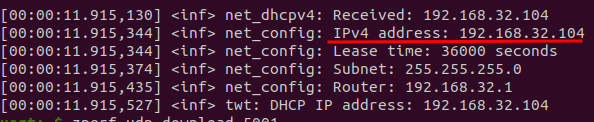
If you get any errors, you might have to increase CONFIG_ZVFS_OPEN_MAX and CONFIG_NET_SOCKETS_POLL_MAX. You should also remove CONFIG_NET_CONFIG_MY_IPV4_ADDR from prj.conf, as if you have this, zperf will try to use the address set there instead of the device's actual address. You can see the device's address in the log:

Best regards,
Marte