- nRF connection Desktop v5.2.0
- Toolchain Manager v1.6.0
- Visual studio cade v2.9.2
- Windows 11 pro Platform
Hi Merta,
Any updates on this?
Hi Marte,
Any updates on this?
Hi,
Naveen Pyda said:However, we are still not seeing the expected logs.
Was this with the Wi-Fi TWT sample or the Wi-Fi shell sample?
Naveen Pyda said:I tried with another AP as well, but we are still facing the same issue I mentioned earlier.
Please provide the details of the AP you tested with. Additionally, make sure that TWT is enabled in the AP settings.
I have attached a version of the TWT sample without the traffic generator and TWT teardown. Can you test this and send the logs?
Please also share which version of the nRF7002 DK you are using. The version is the line under "PCA10143" on the sticker on the DK.
Best regards,
Marte
Hi Marte,
As you mentioned, the details of the AP are: Ruckus-R770, SSID: TWT, Password: naveen123. The AP supports TWT power save.
As you advised, we made the same changes in ncs/v2.9.2/nrf/samples/wifi/twt/src/main.c, but we are not receiving any logs from the client side. I had previously shared screenshots and logs for this issue.
As you advised, we followed the steps to collect the logs, but we are still not able to see the logs as expected.Please find the attached screenshot for your reference.
The version of the nRF7002 DK is 1.0.2.
We will try the twt.zip. If we find any solution or face any issue, I will let you know.
Thanks & Regards,
Naveen P
Hi Marte,
However, we are still not seeing the expected logs.Was this with the Wi-Fi TWT sample or the Wi-Fi shell sample?
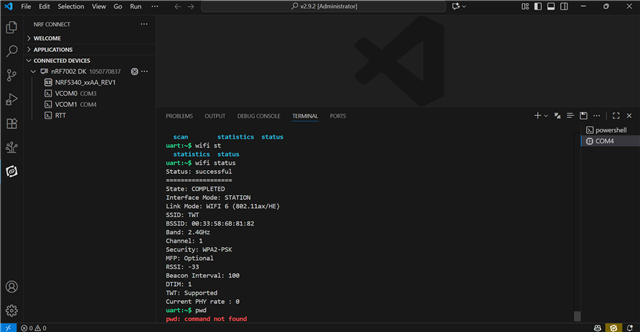
We have a little bit of confusion about this. Actually, we are connecting the Nordic device through the terminal in VS Code. You can see below attached screenshot.

We will try the twt.zip. If we find any solution or face any issue, I will let you know.
All files were replaced with the twt.zip files in the path ncs/v2.9.2/nrf/samples/wifi/twt/. After that, we flashed the build using the commands below:
1.west build -p always -b nrf7002dk/nrf5340/cpuapp
2.westflash
We flashed the build in both the shell and twt paths.
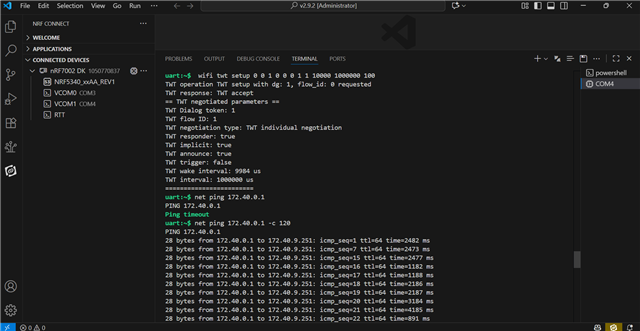
Still, we are not able to see the logs as expected. You can see below attached screenshot.

Thanks & Regards,
Naveen P