The client does not enter sleep mode as expected.

We are using the Nordic Semiconductor nRF7002-DK. In this board, both PS-Poll and No-PS-Poll power-saving modes are working as expected. However, when running in TWT (Target Wake Time) power mode using the following command:-wifi twt setup 0 0 2 2 0 1 1 1 1000 60000, the client does not enter sleep mode as expected. Can you help us to enter the device into sleep mode.
Applications Versions: 
  1. nRF connection Desktop v5.2.0
  2. Toolchain Manager v1.6.0
  3. Visual studio cade v2.9.2
  4. Windows 11 pro Platform
  • Hi,

    Based on the logs with the TWT sample, the device enters sleep mode as it should, so this is most likely also the case when you use the shell sample. In other words, you can chose to use the TWT sample I shared or the Wi-Fi shell sample in the SDK for TWT.

    If you want to use the TWT sample I shared, you can enable zperf by adding the following in prj.conf:

    CONFIG_NET_SHELL=y
    CONFIG_NET_ZPERF=y
    CONFIG_ZVFS_OPEN_MAX=12

    This lets you use iperf/zperf as in the Wi-Fi Throughput sample, i.e., you can use the following command on the nRF7002:

    zperf udp upload <ipaddress> 5001 10 1K 50M
    zperf udp download 5001

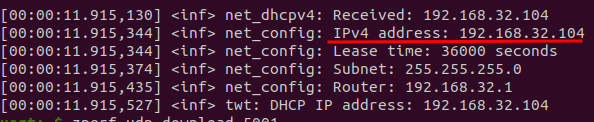
    If you get any errors, you might have to increase CONFIG_ZVFS_OPEN_MAX and CONFIG_NET_SOCKETS_POLL_MAX. You should also remove CONFIG_NET_CONFIG_MY_IPV4_ADDR from prj.conf, as if you have this, zperf will try to use the address set there instead of the device's actual address. You can see the device's address in the log:

    Best regards,
    Marte

  • Hi Marte,

    As you mentioned, we are getting logs in the TWT sample. However, in the Pcap capture, we are not able to see the client entering sleep mode. For your reference, I have attached the Pcap files

    If you want to use the TWT sample I shared, you can enable zperf by adding the following in prj.conf:

    Fullscreen
    1
    2
    3
    CONFIG_NET_SHELL=y
    CONFIG_NET_ZPERF=y
    CONFIG_ZVFS_OPEN_MAX=12
    XXXXXXXXXXXXXXXXXXXXXXXXXXXXXXXXXXXXXXXXXXXXXXXXXX

    As per your suggestion, I added the three lines to the prj.conf file in the TWT sample. However, after making these changes, I encountered a new issue. Kindly find the logs below for your reference.

    Please share the complete file with include these three lines.

    Logs :-

    :00:00.346,221] <inf> wifi_nrf: Management buffer offload enabled

    *** Booting nRF Connect SDK v2.9.2-4ab7b98fc76f ***
    *** Using Zephyr OS v3.7.99-aa34a5632971 ***
    [00:00:00.475,280] <inf> net_config: Initializing network
    [00:00:00.475,280] <inf> net_config: Waiting interface 1 (0x20001300) to be up...
    [00:00:00.475,463] <inf> net_config: IPv4 address: 192.168.1.99
    [00:00:00.475,494] <inf> net_config: Running dhcpv4 client...
    [00:00:00.475,738] <inf> twt: Starting nrf7002dk with CPU frequency: 64 MHz
    [00:00:00.477,386] <inf> wifi_supplicant: wpa_supplicant initialized
    [00:00:00.512,420] <err> wifi_supplicant: Failed to initialize supplicant control interface
    [00:00:01.475,860] <inf> twt: Static IP address (overridable): 192.168.1.99/255.255.255.0 -> 192.168.1.1
    [00:00:01.475,982] <err> wifi_mgmt_ext: Connection request failed

    [00:00:01.475,982] <err> twt: Connection request failed
    [00:00:01.476,013] <inf> twt: Status request failed: -134

    [00:00:01.776,092] <inf> twt: Status request failed: -134

    [00:00:02.076,202] <inf> twt: Status request failed: -134

    [00:00:02.376,312] <inf> twt: Status request failed: -134

    [00:00:02.676,483] <inf> twt: Status request failed: -134

    [00:00:02.976,593] <inf> twt: Status request failed: -134

    [00:00:03.276,702] <inf> twt: Status request failed: -134

    [00:00:03.576,812] <inf> twt: Status request failed: -134

    [00:00:03.876,983] <inf> twt: Status request failed: -134

    [00:00:04.177,062] <inf> twt: Status request failed: -134

    [00:00:04.477,233] <inf> twt: Status request failed: -134

    [00:00:04.777,313] <inf> twt: Status request failed: -134

    [00:00:05.077,484] <inf> twt: Status request failed: -134

    [00:00:05.377,593] <inf> twt: Status request failed: -134

    [00:00:05.677,703] <inf> twt: Status request failed: -134

    [00:00:05.977,813] <inf> twt: Status request failed: -134

    [00:00:06.277,984] <inf> twt: Status request failed: -134

    [00:00:06.578,094] <inf> twt: Status request failed: -134

    [00:00:06.878,204] <inf> twt: Status request failed: -134

    [00:00:07.178,314] <inf> twt: Status request failed: -134

    [00:00:07.478,485] <inf> twt: Status request failed: -134

    [00:00:07.778,594] <inf> twt: Status request failed: -134

    [00:00:08.078,704] <inf> twt: Status request failed: -134

    [00:00:08.378,814] <inf> twt: Status request failed: -134

    https://drive.google.com/file/d/14Fs-UamPPC6dTh4ZYP61TrN7U21sawLM/view?usp=drive_link 

    Thanks & Regards,

    Naveen P

Related