nRF Connect for VS Code changes selected application context which triggers re-indexing

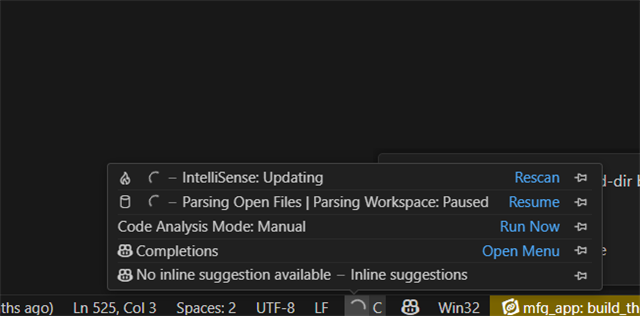
After a recent update, I'm frequently finding the VS Code UI unresponsive due to intelliscan re-indexing.

About my setup.  I have a complex environment with 4 different applications, each application supporting multiple builds for different board build targets and all of the builds are sysbuild based with NCS 2.8.

During a build I select the sysbuild outer context and use the actions UI interface to trigger a west build.

Recently I'm finding that the selected target changes from the one I selected to the first sysbuild app within the first board configuration of the current app I'm building.  This triggers a re-index which for takes 1-3 minutes.  Then we I noticed the change, I switch back to the intended board build context, which again causes an re-scan and index.

During the intelliscan indexing I'm unable to perform basic code cursor navigation, eg up and down arrows or searching for text.

I'm finding I have to go back to using a a basic text editor outside of VS Code just to get work done, since I'm so often left waiting for the VS code to get unstuck.

Parents
  • I'm noticing the problem seems to occur when switching form a file with protobuf language type to a file with C language type.

  • Hello,

    This triggers a re-index which for takes 1-3 minutes.  Then we I noticed the change, I switch back to the intended board build context, which again causes an re-scan and index.

    Can you please share a screenshot of the popup saying it is re-indexing?

    Recently I'm finding that the selected target changes from the one I selected to the first sysbuild app

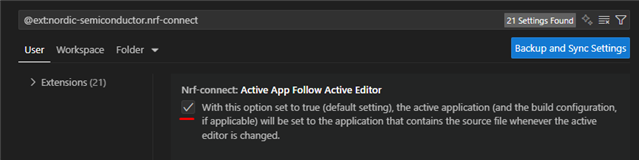
    There is an option to disable the auto-switching of the selected project. 

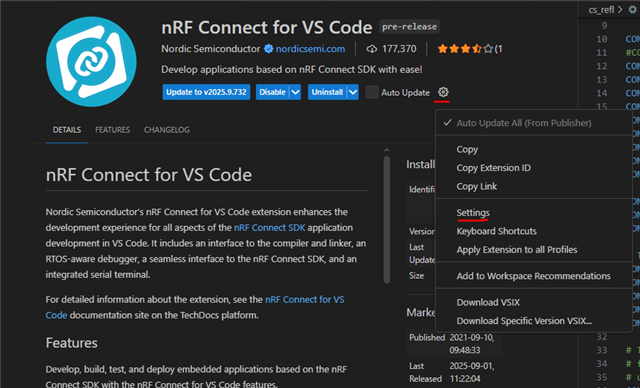
    If you enter the nRF Connect for VS Code extension settings:

    And disable "Active App Follow Active Editor":

    Then it will not keep changing the active build, unless you actively click another build in the "Applications" menu.

    Best regards,

    Edvin

Reply
  • Hello,

    This triggers a re-index which for takes 1-3 minutes.  Then we I noticed the change, I switch back to the intended board build context, which again causes an re-scan and index.

    Can you please share a screenshot of the popup saying it is re-indexing?

    Recently I'm finding that the selected target changes from the one I selected to the first sysbuild app

    There is an option to disable the auto-switching of the selected project. 

    If you enter the nRF Connect for VS Code extension settings:

    And disable "Active App Follow Active Editor":

    Then it will not keep changing the active build, unless you actively click another build in the "Applications" menu.

    Best regards,

    Edvin

Children
Related