nRF Connect for VS Code changes selected application context which triggers re-indexing

After a recent update, I'm frequently finding the VS Code UI unresponsive due to intelliscan re-indexing.

About my setup.  I have a complex environment with 4 different applications, each application supporting multiple builds for different board build targets and all of the builds are sysbuild based with NCS 2.8.

During a build I select the sysbuild outer context and use the actions UI interface to trigger a west build.

Recently I'm finding that the selected target changes from the one I selected to the first sysbuild app within the first board configuration of the current app I'm building.  This triggers a re-index which for takes 1-3 minutes.  Then we I noticed the change, I switch back to the intended board build context, which again causes an re-scan and index.

During the intelliscan indexing I'm unable to perform basic code cursor navigation, eg up and down arrows or searching for text.

I'm finding I have to go back to using a a basic text editor outside of VS Code just to get work done, since I'm so often left waiting for the VS code to get unstuck.

Parents
  • I'm noticing the problem seems to occur when switching form a file with protobuf language type to a file with C language type.

  • Hello,

    This triggers a re-index which for takes 1-3 minutes.  Then we I noticed the change, I switch back to the intended board build context, which again causes an re-scan and index.

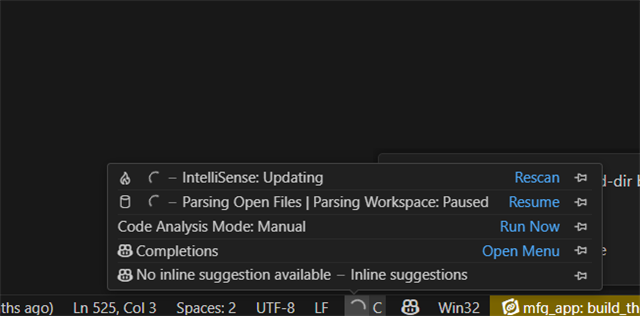
    Can you please share a screenshot of the popup saying it is re-indexing?

    Recently I'm finding that the selected target changes from the one I selected to the first sysbuild app

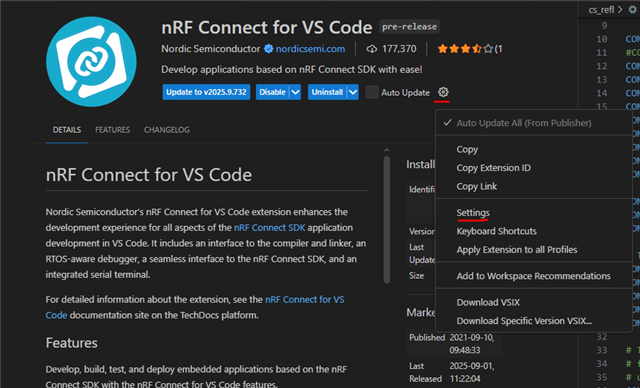
    There is an option to disable the auto-switching of the selected project. 

    If you enter the nRF Connect for VS Code extension settings:

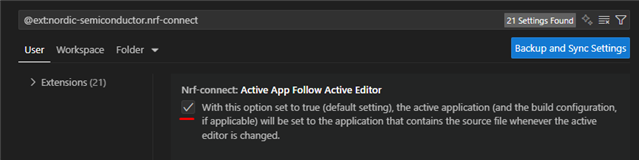
    And disable "Active App Follow Active Editor":

    Then it will not keep changing the active build, unless you actively click another build in the "Applications" menu.

    Best regards,

    Edvin

  • So I take it from this that open files have an associated project.   90% of my files apply to all projects so this really doesn't make sense to me.  How does it decide which project is associated with a editor?  How do I see which project is associated and how do I change that?

    I think your suggestion of disabling this feature will help.

  • I can agree that in many cases, this causes more confusion. I would assume it is common to look at other samples to implement your own application. And either way, if you don't do that, and only work on one application, then automatic switching isn't really necessary either.

    Disabling it should at least stop it from changing the active build on it's own.

    That being said, I don't see the issue you are seeing with intellisense scanning taking long. Usually, I am not able to click the icon when the context is switched before it is done scanning. Could be difference in HW, low diskspace (VS code likes to generate a lot of data to make it perform better e.g. when searching). 

    Best regards,

    Edvin

Reply
  • I can agree that in many cases, this causes more confusion. I would assume it is common to look at other samples to implement your own application. And either way, if you don't do that, and only work on one application, then automatic switching isn't really necessary either.

    Disabling it should at least stop it from changing the active build on it's own.

    That being said, I don't see the issue you are seeing with intellisense scanning taking long. Usually, I am not able to click the icon when the context is switched before it is done scanning. Could be difference in HW, low diskspace (VS code likes to generate a lot of data to make it perform better e.g. when searching). 

    Best regards,

    Edvin

Children
No Data
Related