How to assign UART to different pins

If I understand correctly, you can pretty much assign any pin to any peripheral. I've been using a modded central uart project on a dev board but on this other board I'm using, I don't have access to the same pins. I think the pins are assigned in the dtsi file as follows:

&pinctrl {
uart0_default: uart0_default {
group1 {
psels = <NRF_PSEL(UART_TX, 0, 6)>,
<NRF_PSEL(UART_RTS, 0, 5)>;
};
group2 {
psels = <NRF_PSEL(UART_RX, 0, 8)>,
<NRF_PSEL(UART_CTS, 0, 7)>;
bias-pull-up;
};
};
Looks right as I am connected to P0.06 and P0.08 for the UART.
On the one hand you'd think, yeah, just mod this, but this is in
the ncs/zephyr directory so I'm assuming you don't want to mod this.
Again as far as I understand (but might not be right) you need to have some sort of other overlay file?
Is that right? If so (well, even if not), how exactly do you do this
and what exactly what I put in whatever place I need it? What if I needed to us, say P0.09
and P0.10?
Thanks.
  • Hi,

    OK, that does work, thank, you, but what on earth is that all about? I have used underscore in C for decades and never come across an issue with it before. Why can you not use underscores here? 

    The other thing that makes no sense here is that grn-led-pin  isn't actually used anywhere, so that is that all about? What is the point of the alias? 

  • I agree that this is a bit confusing. The DeviceTree language is different from C. You can read about the syntax documentation here, and it is also discussed on DevAcademy.

    And yes, it is confusing that you can't use underscore there, but when you translate it into C, to reference it, all "-" are translated to "_". 

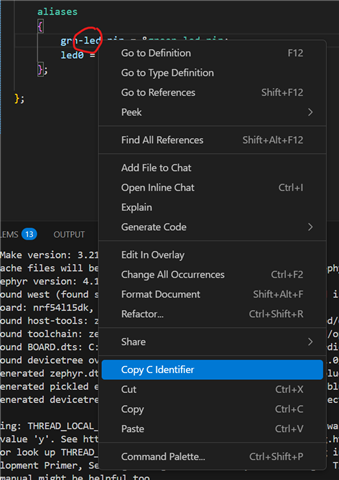
    One neat trick is, if you are using the nRF Connect for VS Code extension, you can right click elements in the devicetree files (.dts/.dtsi/.overlay), and select "Copy C Identifier". 

    It is a bit sensitive to what you right click, but e.g. if I copy the grn-led-pin:

    This is what is copied into the clipboard:

    DT_PROP(DT_PATH(aliases), grn_led_pin)

    which you can use in your C-files.

    Best regards,

    Edvin

  • OK, next question, what about input pins. I've spent another day trying to get this working. 

    I've added this to the overlay file.

    buttons
    {
    compatible = "gpio-keys";
    sel_sw_pin: sel_sw_pin
    {
    gpios = <&gpio0 29 (GPIO_PULL_UP | GPIO_ACTIVE_LOW)>;
    label = "sel_sw_pin";
    };
    };

    This is now the alias section

    aliases
    {
    grn-led-pin = &green_led_pin;
    led0 = &led0;

    blue-led-pin = &blue_led_pin;
    led1 = &led1;

    red-led-pin = &red_led_pin;
    led2 = &led2;

    sel-sw-pin = &sel_sw_pin;

    };

    But I get an error on the second line below:

    #define SWITCH_NODE DT_ALIAS(sel_sw_pin)
    static const struct gpio_dt_spec user_switch = GPIO_DT_SPEC_GET(SWITCH_NODE, gpios);

    With this familiar friend:

    message": "identifier \"__device_dts_ord_DT_N_ALIAS_sel_sw_pin_P_gpios_IDX_0_PH_ORD\" is undefined",

    It clearly is defined. :-(


    Also, I've tried adding this to the overlay:

    &uicr
    {
    nfct-pins-as-gpios;
    };

    And I get these errors:

    CMake Error at cmake/modules/sysbuild_extensions.cmake:514 (message):
      CMake configure failed for Zephyr project: central_uart

      Location: /home/robertw/Software/Nordic/custom_service/central_uart
    Call Stack (most recent call first):
      cmake/modules/sysbuild_images.cmake:20 (ExternalZephyrProject_Cmake)
      cmake/modules/sysbuild_default.cmake:20 (include)
      /home/robertw/ncs/v2.8.0/zephyr/share/zephyr-package/cmake/ZephyrConfig.cmake:75 (include)
      /home/robertw/ncs/v2.8.0/zephyr/share/zephyr-package/cmake/ZephyrConfig.cmake:92 (include_boilerplate)
      /home/robertw/ncs/v2.8.0/zephyr/share/sysbuild-package/cmake/SysbuildConfig.cmake:8 (include)
      template/CMakeLists.txt:10 (find_package)

    If I remove that and add this:

    &pinctrl {
    uart0_default: uart0_default {
    group1 {
    psels = <NRF_PSEL(UART_TX, 0, 10)>,
    <NRF_PSEL(UART_RTS, 0, 13)>;
    };
    group2 {
    psels = <NRF_PSEL(UART_RX, 0, 09)>,
    <NRF_PSEL(UART_CTS, 0, 15)>;
    bias-pull-up;
    };
    };
    };
    I get these errors:

      Location: /home/robertw/Software/Nordic/custom_service/central_uart
    Call Stack (most recent call first):
      cmake/modules/sysbuild_images.cmake:20 (ExternalZephyrProject_Cmake)
      cmake/modules/sysbuild_default.cmake:20 (include)
      /home/robertw/ncs/v2.8.0/zephyr/share/zephyr-package/cmake/ZephyrConfig.cmake:75 (include)
      /home/robertw/ncs/v2.8.0/zephyr/share/zephyr-package/cmake/ZephyrConfig.cmake:92 (include_boilerplate)
      /home/robertw/ncs/v2.8.0/zephyr/share/sysbuild-package/cmake/SysbuildConfig.cmake:8 (include)
      template/CMakeLists.txt:10 (find_package)

    It tells me look at CMakeOutput.log

    But that has the hilariously unhelpful:

    The system is: Linux - 6.6.105-desktop-1.mga9 - x86_64

    Line and nothing else in it. :-(


  • Can you please upload your application, and state clearly what pins you want to use, and I can try to have a look?

    Also, when you are pasting code snippets, it is easier to read (indentation is much better) if you use "insert"->"Code" here in DevZone.

    BR,
    Edvin

  • central_uart_11_11.zip

    File attached.
    I have a switch on Port 0 29.
    UART Out is on P 0 10,
    UART in is on P0 09

    RTS 0 13
    CTS 0 15

    Although I am pretty sure we won't use those last two flow control pins and do NOT want to use them to start with.

    Point taken on the formatting

Related