Connectivity issue with nRF9160 in some locations

We are seeing network issues in some particular locations. In these areas, the device is unable to connect to the cloud.

  • Hardware: nRF9160-based board

  • Modem firmware: mfw_nrf9160_1.3.6.zip

  • nRF Connect SDK version: v2.7.0
  • Zephyr version: 3.6.99

The same hardware works properly when tested in other locations. In the problematic areas, the device shows 3–4 signal bars, but still fails to connect.

We use below modem project configurations in our code

# Cellular
CONFIG_MODEM_KEY_MGMT=y
CONFIG_NRF_MODEM_LIB=y
CONFIG_LTE_LINK_CONTROL=y
CONFIG_LTE_NETWORK_MODE_LTE_M_NBIOT=y
CONFIG_LTE_MODE_PREFERENCE_AUTO=y
CONFIG_LTE_NEIGHBOR_CELLS_MAX=17
CONFIG_LTE_EDRX_REQ=n
CONFIG_LTE_PSM_REQ=n
CONFIG_PDN=y
CONFIG_AT_MONITOR_HEAP_SIZE=512
CONFIG_MODEM_INFO=y
CONFIG_MODEM_INFO_ADD_NETWORK=y
CONFIG_MODEM_INFO_ADD_DEVICE=y
CONFIG_MODEM_INFO_ADD_SIM=y
CONFIG_MODEM_INFO_ADD_SIM_ICCID=y
CONFIG_MODEM_INFO_ADD_SIM_IMSI=y
Here are the AT command response that I received when I had connectivity issue

AT event handler:
%CESQ: 45,2,22,3


AT event handler:
+CEREG: 2,"2D82","00B03C0A",9


[00:02:38.133,941] <dbg> cloud_azure: cloud_azure_clear_cloud_connection: Clear the cloud connection
AT event handler:
+CSCON: 1


AT event handler:
+CEREG: 2,"2D82","00B03C0A",9,0,15


AT event handler:
+CSCON: 0


AT event handler:
%CESQ: 255,0,255,0


AT event handler:
+CEREG: 2


AT event handler:
%CESQ: 46,2,22,3

Parents Reply Children
  • Hi Dejan,

    Thank you for the suggestion. I will try to capture the information using AT+CEREG=5 and AT+CNEC=16 in the location where I am seeing the problem.

    In the meantime, I am also testing with the nRF9160 DK to check if the same issue occurs. Could you please guide me on which sample application is best suited to reproduce and root cause this?

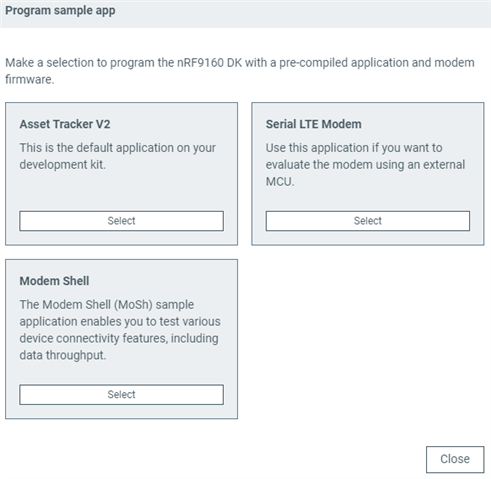
    I am also trying to use the Cellular Monitor application, but it seems to hang indefinitely. Is there a recommended or compatible application that I should load on the DK for Cellular Monitor to work? I assume the application should enable CONFIG_NRF_MODEM_LIB_TRACE=y, but I’m not sure which sample does this out of the box.

    If Cellular Monitor is not suitable, could you suggest any other way to capture modem traces?

    Thanks

    Purush

  • Hi Purush,

    purush123 said:
    In the meantime, I am also testing with the nRF9160 DK to check if the same issue occurs. Could you please guide me on which sample application is best suited to reproduce and root cause this?

    It is still not quite clear what the root cause is in your case. You can start with your own application to see if you can reproduce the problem using nRF9160-dk. Having modem trace could be useful.

    purush123 said:
    I am also trying to use the Cellular Monitor application, but it seems to hang indefinitely. Is there a recommended or compatible application that I should load on the DK for Cellular Monitor to work? I assume the application should enable CONFIG_NRF_MODEM_LIB_TRACE=y, but I’m not sure which sample does this out of the box.

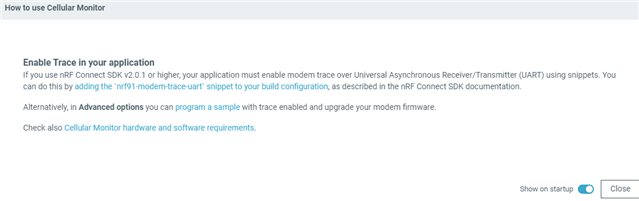
    It is unexpected that Cellular Monitor just hangs. Can you provide some details about this? You should be able to open Cellular Monitor and connect to your board regardless of the firmware that is running on your board. 
    Regarding modem trace, here are some links for your reference
    Cellular Monitor overview
    Cellular Monitor requirements
    nRF modem tracing using snippets
    capturing modem trace

    Here is information from Cellular Monitor itself

    and here is what is available from Cellular Monitor's Advanced Options


    Best regards,
    Dejan

  • I'm sorry for the delayed response , We found that this is not modem issue, its sim vendor issue. we have changed the SIM vendor and we don't see the connectivity issues, But the information that you provided is very useful to check the signal strength and other modem debug info.

  • Hi,

    Thank you for the update.

    Best regards,
    Dejan

Related