LTE rejection

Hi all,

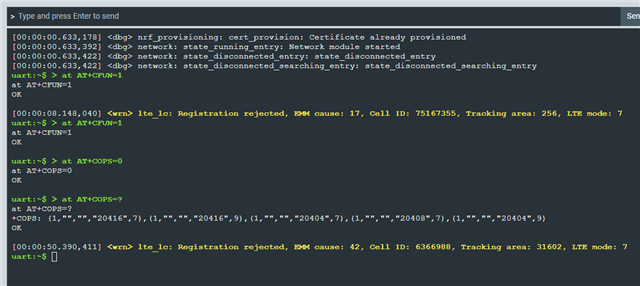
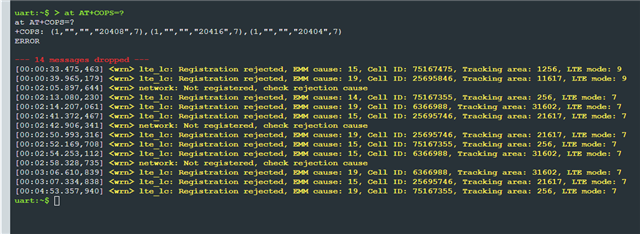
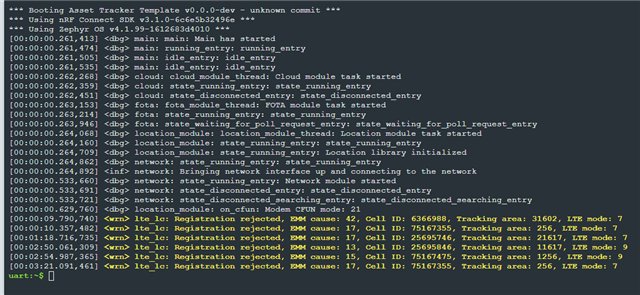
I was busy extending the asset tracker project and all of a sudden I got this lte rejection.
First I thought maybe it the data limit has reached on the conexa sim, but when I place a new omondo sim in it, I get similar EMM Causes.

What could be the issue here?
I moved the DK closer to the window and also tried to connect an antenna to it, but still no luck.
Parents
  • Hello, 

    Are you able to provide a modem trace from your device using both the Conex SIM and Onomondo SIM? Make sure to reset board after starting modem trace in the Cellular Monitor app and leave it running for minimum 20 minutes.

    I was busy extending the asset tracker project and all of a sudden I got this lte rejection.

    Could you elaborate more on what you were adding/changing in the Asset Tracker template? Just to confirm, are you building with the NCS 3.1.0 branch? What modem FW is your device running?

    From the provided logs the device is rejected on both LTE-M and NB-IoT. 

    Cause #42 – Severe network failure

    This EMM cause is sent to the UE when the network has determined that the requested procedure cannot be completed successfully due to network failure. The failure is not expected to be temporary and repeated request is not likely to succeed in near future.

    Cause #17 – Network failure

    This EMM cause is sent to the UE if the MME cannot service an UE generated request because of PLMN failures.

    Cause #13 – Roaming not allowed in this tracking area

    This EMM cause is sent to an UE which requests service, or if the network initiates a detach request, in a tracking area of a PLMN which by subscription offers roaming to that UE but not in that tracking area.

    Cause #15 – No suitable cells in tracking area

    This EMM cause is sent to the UE if it requests service, or if the network initiates a detach request, in a tracking area where the UE, by subscription, is not allowed to operate, but when it should find another allowed tracking area or location area in the same PLMN or an equivalent PLMN.

    NOTE 3:  Cause #15 and cause #12 differ in the fact that cause #12 does not trigger the UE to search for another allowed tracking area on the same PLMN.

    Let's start with modem traces using both SIMs to evaluate what is going on.

    Kind regards,
    Øyvind

  • Thanks for providing this information. I'm currently out traveling but have forwarded this information today.

  • Hello again! Here is the response I got from Onomondo

    I have reviewed SIM ID 002598284. Please see my findings below.

    • This SIM has no network logs.

    • This SIM is activated.

    • The signaling logs show an authentication loop.

    Signaling authentication loops like this indicate that either:

    1. The device is in a bad state and should be reset.

    2. The local network is rejecting the device (e.g. for load balancing, or due to a lack of available cells) and the problem might resolve itself with time.

    I assume that you have tried resetting the device?

    Kind regards,
    Øyvind

  • Yes, I tried many things.
    Resetting, clean builds, cleaning entire SIP

Reply Children
Related