Unable to connect to bootloader for DFU

Hi,

Our devices are running on NRF52833 with soft device version s140. We are facing an issue to do DFU in one particular device. Details mentioned below:

  1. We are able to properly do DFU from NRFConnect app on all other devices except one. All devices have same hardware and soft device version.
  2. The device where DFU is failing is in working condition. 
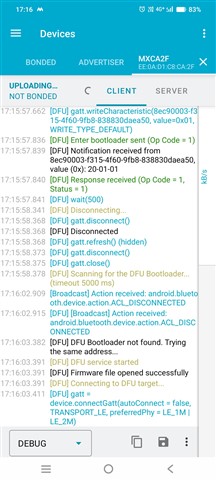
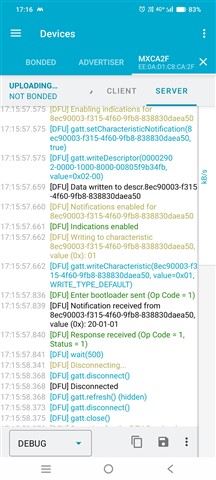
  3. While DFU from NRFConnect app is triggered, the Enter bootloader command is sent. "Enter bootloader sent (Op Code = 1)".
  4. Response received from device is "Response received (Op Code = 1, Status = 1)".
  5. But later in the NRF logs it shows "DFU Bootloader not found. trying the same address..".
  6. When we try to connect to bootloader directly when it advertises in DFU mode, the connection attempt is failing every time and Error Code for disconnection is 255(0xFF).

Since we are unable to collect the bootloader logs so we are unable to find the root cause. What can be the possible root cause for the issue?

  • Hi,

    I have some questions in order to better understand the situation:

    1. Did you test with nRF Connect on both iOS and Android? And does it fail in both cases? (This can be interesting as they use different approaches to connect back to the device in bootlaoder mode, as the iOS stack does not provide Bluetooth address information to the apps)
    2. Based on the log snippet "DFU Bootloader not found. trying the same address.." I assume you are using DFU without bonds(?) In that case, the nRF should increment the LSB of the address by 1 in order to make the device appear as a new device when it advertises in bootloader mode.
    3. Can you sniff the communication when:
      1. entering DFU mode
      2. attempting to connect in DFU mode 
      3. subsequent attempt to connect to the devices when it is advertising in DFU mode
    4. Does this device have the same bootloader and application firmware as well as S140 version as the other working devices, or could there be differences there?
    5. Are there any other differences between this version and other failing versions?
    6. Wher exactly is it you get the 0xFF error when attempting to connect? (it is not an error code I would expect)
  • Hi,

    Thanks for the response. I did not give more clarity earlier so I will address it here:

    1. I tested from the android phone. I have not tested with IOS phone since almost all of our clients will be using android phone with this product.

    2. NRF does increment the address value by 1 and I am able to see the bootloader application advertising in NRF connect app after the DFU process is triggered. But the application fails to connect to bootloader during this DFU process. Also, when tried to connect directly to the bootloader app since it is advertising, the connection event again fails. Another observation is that the bootloader app does not advertise frequently. Sometimes it advertises and then stops advertising for some time and starts again.

    3. While entering bootloader mode during DFU, the NRF logs I received are pasted:

    4. Yes, the bootloader, application firmware and softdevice device versions are same as other working devices.

    5. I get the 0xFF error code when I try to connect to the bootloader app separately since it starts advertising after DFU is triggered.

  • Hi,

    inderveer said:
    Another observation is that the bootloader app does not advertise frequently. Sometimes it advertises and then stops advertising for some time and starts again.

    Is that seen from the phone you are testing with only? Can you share a sniffer trace of the attempts (see point 3 in my previous post for details)? If you do not have a sniffer, but has a nRF52 DK or dongle you can use that with nRF Sniffer for Bluetooth LE.

    inderveer said:
    5. I get the 0xFF error code when I try to connect to the bootloader app separately since it starts advertising after DFU is triggered.

    Where exactly do you see this 0xFF error? To hopefully make some sense of it, it would be usefull to now where exactly it is shown in which context to understand what it represents.

Related