High Current on P0.17 When Used as ADC Input

I am using the nRF9151-DK with the standard (from code examples) firmware . When configuring both P0.13 and P0.17 as ADC inputs, I notice that the current consumption on P0.17 is significantly higher than on P0.13.

Could you please clarify why this happens and whether there are any settings or configurations needed to make P0.17 behave like a regular low-power ADC input?

Parents
  • Hi, I did a few tests on my end and it didn't seem like there are any meaningful differences in consumption between the two pins.
    Can you provide more details? what numbers are you seeing? What is your set up to measure these currents? and the sample that you are using.

    Thank you

  • I apply a very precise reference voltage of 1.5 volts from a laboratory power supply to the analog input.

    When I connect it to pin 13, I see a current of several microamps.

    When I connect it to pin 17, I see a current of about 3 mA.

    What is also strange is that the consumed current depends on the voltage setting for the GPIO configured with the board configurator. If this voltage is set to 1.5 or 2 volts, the current is about 3 mA. If the voltage is set to 3 V, the current rises to 6 mA.

    An additional test I perform is connecting a voltage divider made of two identical resistors to the 3V pin on the development board.
    When I connect the midpoint of the divider to pin 13, I see exactly half the voltage, that is 1.5 V. I observe this both in the value read by the controller during conversion and when measuring with an oscilloscope.

    However, when I connect the midpoint to pin 17, I see a significantly lower voltage, around 0.7 V, both in the controller’s reading and when measuring with the OSCILLOSCOPE, In my opinion, this indicates that there is a pull-down on this input.

  • Sorry for the late reply.
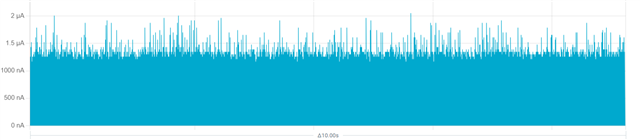
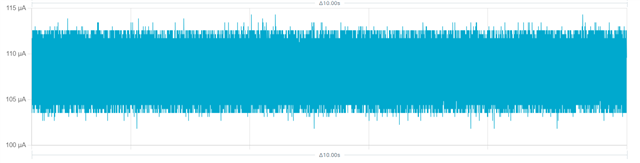
    On the P0.17 I see about 100uA and on the P0.13 I see about a few uA.
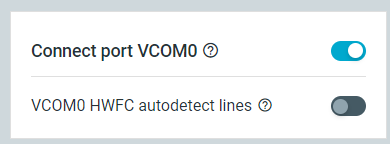
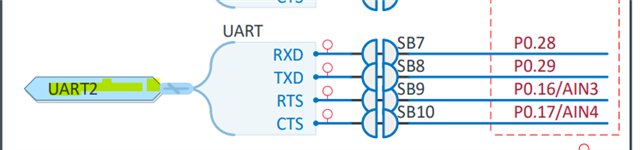
    This is because P0.17 is also the CTS pin for uart1. This can be fixed by turning off VCOM0 HWFC autodetect lines in your board configurator.

    I was not able to see the 3 mA current consumption that you stated. If this doesn't fix the issue, can you also provide the code/sample that you are using and attach it here?


    On my end:

    Current draw on P0.17 with HWFC


    Without HWFC


    Turn off HWFC here

  • Thank you for your advice. Indeed, after changing the VCOM0 HWFC, the current consumption returned to normal

    This raises two questions:

    • How can I perform the same operation in code, so that I am not dependent on the Configuration Tool or current board configuration? (In other words, even if the configuration tool specifies using VCOM0 HWFC, the code will override it after startup)

    • A more important question: in which official document or specification could I find information that P0.17 (and P0.16) are used for this purpose? Additionally, is it possible to obtain the complete schematic of the DK board? The available documentation only shows partial schematics, but I haven’t found the full board diagram
  • Hi, if you want to make the debugger stop controlling the HWFC pins, then that needs to be done either by the board configurator or using nrf-util. The nRF9151 itself doesn't have any control over the debugger.

    However, on your custom board/final product, this wouldn't be an issue because it will not have a debugger connected with UART and HWFC in the first place.

    Nevertheless, if you intend to have the DK in your final product or if you need to do this to multiple boards, you can use nrf-util to automate the process.

    You just need to create a json file with the configs like this 

    {
        "operations": [
            {
                "operation":{
                    "type": "smp",
                    "operation":2,
                    "group_id":64,
                    "command_id":0,
                    "sequence_number":0,
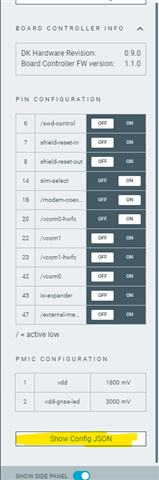
                    "data": [[6,false,7,false,8,false,14,true,18,true,20,true,22,false,23,false,42,false,45,false,47,false],[1,1800,2,3000]]
                },
                "operationId":"1"
            }
        ]
    }

    Using the board configurator app and then click on Show Config JSON, you can copy the output and put it in the data field above.


    Then run nrfutil device x-execute-batch --traits boardController --batch-path "PATH TO YOUR JSON"


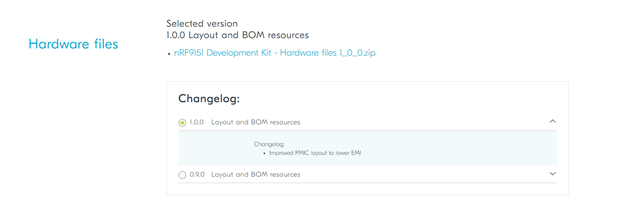
    As for the hardware files, you can download it here
    nRF9151 DK - Downloads - nordicsemi.com


    In the schematic included in that zip file, you can see that P0.17 is also connected to CTS

Reply
  • Hi, if you want to make the debugger stop controlling the HWFC pins, then that needs to be done either by the board configurator or using nrf-util. The nRF9151 itself doesn't have any control over the debugger.

    However, on your custom board/final product, this wouldn't be an issue because it will not have a debugger connected with UART and HWFC in the first place.

    Nevertheless, if you intend to have the DK in your final product or if you need to do this to multiple boards, you can use nrf-util to automate the process.

    You just need to create a json file with the configs like this 

    {
        "operations": [
            {
                "operation":{
                    "type": "smp",
                    "operation":2,
                    "group_id":64,
                    "command_id":0,
                    "sequence_number":0,
                    "data": [[6,false,7,false,8,false,14,true,18,true,20,true,22,false,23,false,42,false,45,false,47,false],[1,1800,2,3000]]
                },
                "operationId":"1"
            }
        ]
    }

    Using the board configurator app and then click on Show Config JSON, you can copy the output and put it in the data field above.


    Then run nrfutil device x-execute-batch --traits boardController --batch-path "PATH TO YOUR JSON"


    As for the hardware files, you can download it here
    nRF9151 DK - Downloads - nordicsemi.com


    In the schematic included in that zip file, you can see that P0.17 is also connected to CTS

Children
No Data
Related