nrf54l10 zigbee R23 sleepy end device behavior

Dear all 

I am developing a product using the nRF54L10 with the Zigbee add-on v1.2.0.
I have a question regarding sleep behavior.

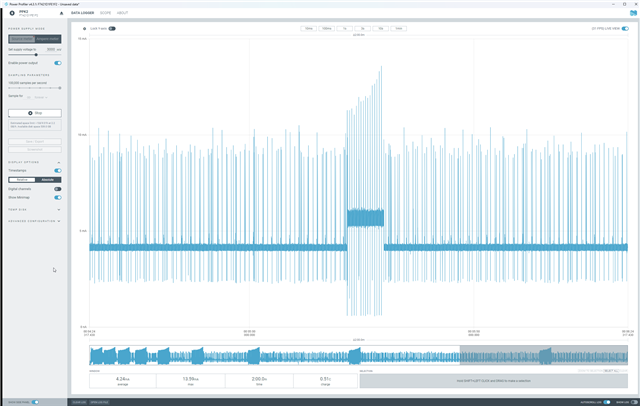
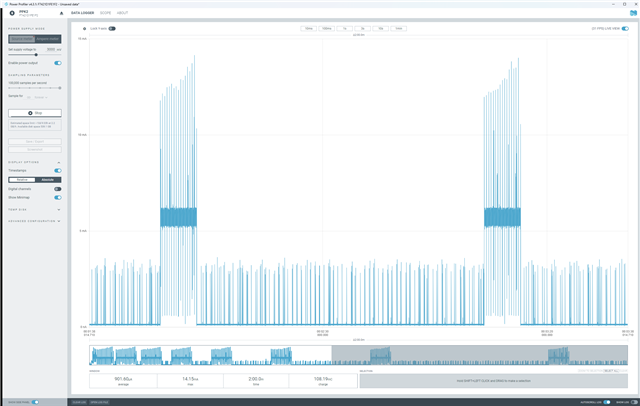
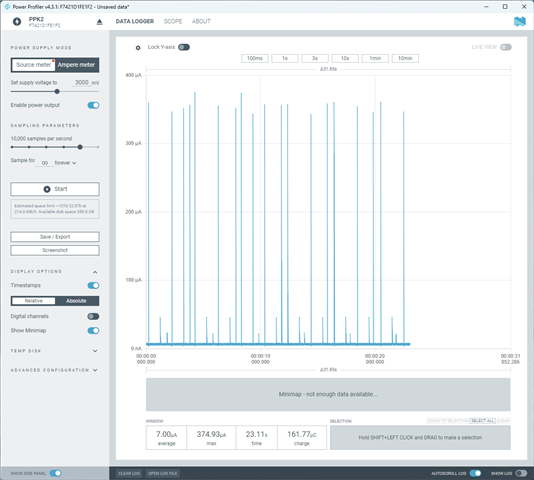
The current measurements below show the power consumption of the actual device
when start_network_rejoin() is not started at the time of ZB_BDB_SIGNAL_DEVICE_FIRST_START after boot.
The average current consumption is about 7 µA.
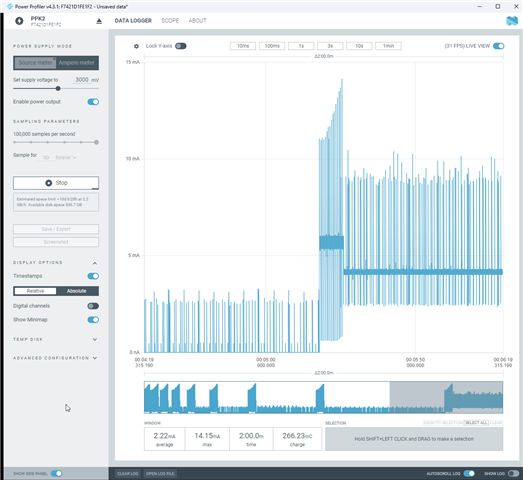
However, when the device is booted and start_network_rejoin() is initiated at ZB_BDB_SIGNAL_DEVICE_FIRST_START,
and there is no network available, stop_network_rejoin() is called after 200 seconds.
What I am wondering is whether the device does not enter sleep mode after this point, because the current consumption does not drop.
My code is below 

void ws_zigbee_init(void)
{
	ws_zigbee_print_information();

	test_aes();

	set_tx_power();
	zigbee_erase_persistent_storage(false);

	zb_set_ed_timeout(ED_AGING_TIMEOUT_8MIN);
	zb_set_keepalive_timeout(ZB_MILLISECONDS_TO_BEACON_INTERVAL(120*1000));

	zigbee_configure_sleepy_behavior(true);

	app_clusters_attr_init();
	ias_zigbee_fota_init(ota_evt_handler);

	ZB_AF_REGISTER_DEVICE_CTX(&ias_zone_ctx);

	ZB_ZCL_REGISTER_DEVICE_CB(zcl_device_cb);
	ZB_AF_SET_IDENTIFY_NOTIFICATION_HANDLER(ZB_HA_IAS_ZONE_ENDPOINT, identify_cb);
	zb_zcl_ias_zone_register_cb(ZB_HA_IAS_ZONE_ENDPOINT, NULL, ias_zone_general_cb);

	LOG_INF("IAS Zone windows sensor Start");

	/* Power off unused sections of RAM to lower device power consumption. */
	if (IS_ENABLED(CONFIG_RAM_POWER_DOWN_LIBRARY)) {
		power_down_unused_ram();
	}

	zigbee_enable();
}


I have no experience with Zigbee. I am not sure whether this behavior is normal or not.
If it is not, I would like some guidance on how to reduce the current consumption.

Parents Reply
  • Is my question incorrect?
    I clearly mentioned that the device is not connected to a network.
    I am asking why the current consumption remains high after a commissioning failure, and
    how to reduce the current in that situation.

    The same issue occurs with the nRF54L10 DK board using the sample code.
    In other words, after a network join failure, the current does not drop,
    and I am asking how to reduce it.

Children
  • Ah sorry about the misunderstanding there. I figured the focus of the question was demonstrating the device infact going to sleep, or simply make the current measurements low enough. I am familiar with the device going to sleep after finding a network, and that it would typically need a network to do so. So to first demonstrate that something default worked on your side first, I figured we could try a DK and get it to find a network. To me, getting a commissioning failure first wouldn't be the easiest way to show that. Though if doing it with a commissioning failure is what you need that changes things.

    I'll ask the relevant R&D team, and get back to you.

    Regards,

    Elfving

  • Hi, and I am so sorry about the wait, 

    The R&D team was finally able to reproduce this. And have gotten a workaround:

    at the end of ZB_BDB_SIGNAL_STEERING case on the signal handler, add:

    ZB_TRANSCEIVER_SET_RX_ON_OFF(zb_get_rx_on_when_idle());

    Could you try this?

    Regards,

    Elfving

  • Hi Elfving 

    As you suggested, I added the code, but the issue remains the same

    The image below shows the behavior for the R22 version, not the add-on.
    As you can see, when the channel is not found, the current drops close to sleep mode levels.

    This is the behavior I want.
    Currently, the R23 add-on does not operate this way.

  • void zboss_signal_handler(zb_bufid_t bufid)
    {
        zb_zdo_app_signal_hdr_t *sig_hndler = NULL;
        zb_zdo_app_signal_type_t sig = zb_get_app_signal(bufid, &sig_hndler);
    #ifdef CONFIG_WINDOWS_ITP
        zb_ret_t status = ZB_GET_APP_SIGNAL_STATUS(bufid);
    #endif

    #ifdef CONFIG_ZIGBEE_FOTA
        /* Pass signal to the OTA client implementation. */
        ias_zigbee_fota_signal_handler(bufid);
    #endif /* CONFIG_ZIGBEE_FOTA */

        if(sig != 22) {
            LOG_INF("zboss_signal_handler sig : %d", sig);
        }

        switch (sig) {
            case ZB_BDB_SIGNAL_DEVICE_REBOOT:
                __fallthrough;
            case ZB_BDB_SIGNAL_STEERING:
                ZB_ERROR_CHECK(zigbee_default_signal_handler(bufid));
                ZB_TRANSCEIVER_SET_RX_ON_OFF(zb_get_rx_on_when_idle());
            break;
    Ultimately, if the connection fails, the current still does not drop.

  • Hmm. Making this change should be enough for it to work with eg. ncs-zigbee\samples\light_switch\ sample.

    ...
        case ZB_BDB_SIGNAL_STEERING:
            /* Call default signal handler. */
            ZB_ERROR_CHECK(zigbee_default_signal_handler(bufid));
            if (status == RET_OK) {
                /* Check the light device address. */
                if (bulb_ctx.short_addr == 0xFFFF) {
                    k_timer_start(&bulb_ctx.find_alarm,
                              MATCH_DESC_REQ_START_DELAY,
                              MATCH_DESC_REQ_TIMEOUT);
                }
            }
            ZB_TRANSCEIVER_SET_RX_ON_OFF(zb_get_rx_on_when_idle());
            break;
    ...

    it can be added to the zigbee_default_signal_handler as well, but both should work. Could you try adding it there though and see if it makes a difference on your side?

    However the call is meaningless for non-ZED devices (zb_get_rx_on_when_idle() is always true), so having it in the specific sample for ZED is enough or it can be added to the default signal handler within

    #if defined CONFIG_ZIGBEE_ROLE_END_DEVICE

    Regards,

    Elfving

Related