How to configure SPI pins on nRF54L15

Hello,

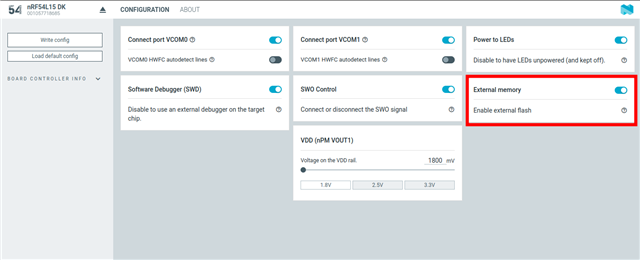
I'm trying to connect an SPI device on the nRF54L15-DK kit. The Nordic support page says it needs to be configured using the board configurator, as seen in the screenshot below
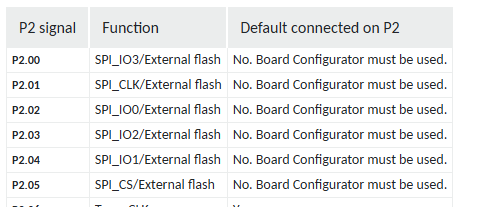
However, in the board configurator, I see no such option (its up to date as well)
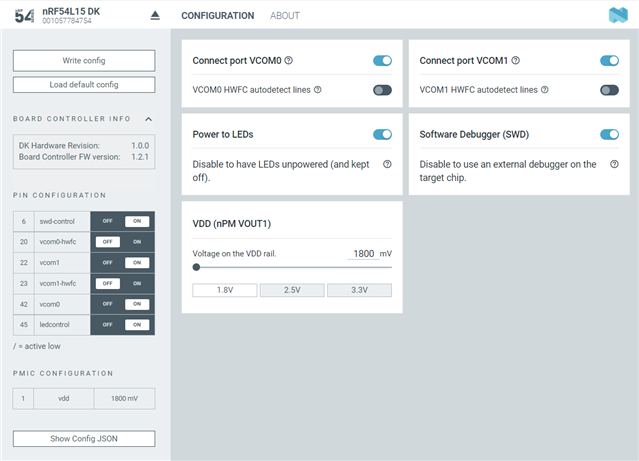
Not sure if I'm missing something, but any assistance would be of great help. 

Side note: The previous nRF54DK boards required soldering solder bridges and cutting a track to get SPI working. I was glad that the new ones didn't require that, only to come across this conundrum

Parents
  • Hello,

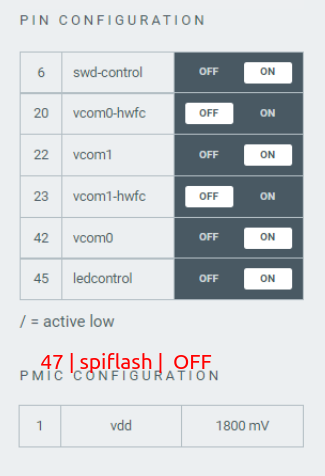
    The board configurator app has not been updated yet to support rerouting of the SPI lines, but it is possible to apply this configuration using nrfutil for now. The nrfutil command is:

    nrfutil device x-execute-batch --traits boardController --batch-path nrf54l15dk_reroute_spi_flash_pins.json

    And the json (I tried to match it to the configuration from your screenshot):

    {
        "operations": [
            {
                "operation":{
                    "type": "smp",
                    "operation":2,
                    "group_id":64,
                    "command_id":0,
                    "sequence_number":0,
                    "data": [[6, true, 9, true, 20, false, 22, true, 23, false, 42, true, 45, true, 47, false],[1,1800]]
                },
                "operationId":"1"
            }
        ]
    }
    

    This sets pin 47 high which is the control signal for the SPI flash lines

    Best regards,

    Vidar

    Update:

    This configuration is now supported in the app as well:

  • Thank you. Seems to work! Have to add --batch-path flag before pointing the json file, though


    I'm having another issue with the data coming through the SPI. It doesnt seem to work on the 4 nRF54 boards I have, but works on the 5th one. But anyway, thanks for the command

Reply Children
Related