Comprehensive Nordic Thingy:53 Hardware Issue Report
Device Information
- Product: Nordic Thingy:53
- Serial Number: EADCC50F61DAF406
- Operating System: Windows 11
- Development Environment: VS Code with nRF Connect Extension
- SDK: nRF Connect SDK v3.1.0
- Toolchain: nRF Connect SDK Toolchain v3.1.0
Problem Summary
The Thingy:53 device consistently becomes unresponsive immediately after successful firmware programming, regardless of firmware type (custom applications or official Nordic releases). Programming succeeds 100%, but the device disappears from system detection and requires hardware recovery to return to bootloader mode.
Initial Setup and Testing
Original Exercise Attempt
Goal: Complete Nordic Academy Lesson 6 Exercise 2 - I2C sensor reading with serial output Expected outcome: Read BH1749 light sensor data and display via UART/PuTTY
Build Configuration Issues Encountered
Issue 1: Wrong Board Target
Initial configuration:
- Board target:
thingy91/nrf9160/ns(incorrect) - This caused immediate application crashes after programming
Solution:
- Corrected to:
thingy53/nrf5340/cpuapp - This is the proper target for Thingy:53 application core
Issue 2: Missing Serial Configuration
Initial prj.conf:
CONFIG_I2C=y
CONFIG_CBPRINTF_FP_SUPPORT=y
CONFIG_BOOTLOADER_MCUBOOT=yProblem: No serial/UART configuration resulted in no console output
Final working prj.conf:
# I2C and application configs
CONFIG_I2C=y
CONFIG_CBPRINTF_FP_SUPPORT=y
CONFIG_BOOTLOADER_MCUBOOT=y

# Serial and logging configuration
CONFIG_SERIAL=y
CONFIG_CONSOLE=y
CONFIG_UART_CONSOLE=y
CONFIG_LOG=y
CONFIG_PRINTK=y

# Additional configurations
CONFIG_UART_ASYNC_API=y
CONFIG_UART_INTERRUPT_DRIVEN=y
CONFIG_HEAP_MEM_POOL_SIZE=4096
CONFIG_NEWLIB_LIBC=y
Application Code Development
Original I2C Sensor Code (main.c)
#include <zephyr/kernel.h>
#include <zephyr/device.h>
#include <zephyr/devicetree.h>
#include <zephyr/drivers/i2c.h>
#include <zephyr/sys/printk.h>

#define SLEEP_TIME_MS 1000
#define BH1749_SYSTEM_CONTROL                           0x40
#define BH1749_MODE_CONTROL1                            0x41
#define BH1749_MODE_CONTROL2                            0x42
#define BH1749_RED_DATA_LSB                             0x50
#define BH1749_MODE_CONTROL2_RGB_EN_ENABLE              BIT(4)
#define BH1749_MODE_CONTROL1_DEFAULTS                   0x2A
#define I2C_NODE DT_NODELABEL(bh1749)

int main(void)
{
    int ret;
    static const struct i2c_dt_spec dev_i2c = I2C_DT_SPEC_GET(I2C_NODE);

    if (!device_is_ready(dev_i2c.bus)) {
        printk("I2C bus %s is not ready!\n\r",dev_i2c.bus->name);
        return -1;
    }

    char buff1[] = {BH1749_MODE_CONTROL1,BH1749_MODE_CONTROL1_DEFAULTS};
    ret = i2c_write_dt(&dev_i2c,buff1,sizeof(buff1));
    if(ret != 0){
        printk("Failed to write to I2C device address 0x%c at Reg. 0x%c\n",dev_i2c.addr,BH1749_MODE_CONTROL1);
    }

    char buff2[] = {BH1749_MODE_CONTROL2,BH1749_MODE_CONTROL2_RGB_EN_ENABLE};
    ret = i2c_write_dt(&dev_i2c,buff2,sizeof(buff2));
    if(ret != 0){
        printk("Failed to write to I2C device address 0x%c at Reg. 0x%c\n",dev_i2c.addr,BH1749_MODE_CONTROL2);
    }

    while (1) {
        uint8_t rgb_value[6]= {0};
        ret = i2c_burst_read_dt(&dev_i2c, BH1749_RED_DATA_LSB,rgb_value,sizeof(rgb_value));
        if(ret != 0){
            printk("Failed to read to I2C device address 0x%c at Reg. 0x%c\n",dev_i2c.addr,BH1749_RED_DATA_LSB);
        }

        printk("_______________________________\n");
        printk("Red Value:\t %d\n", (rgb_value[0] | rgb_value[1] << 8));
        printk("Green Value:\t %d\n", (rgb_value[2] | rgb_value[3] << 8));
        printk("Blue Value:\t %d\n", (rgb_value[4] | rgb_value[5] << 8));

        k_msleep(SLEEP_TIME_MS);
    }
}
UART Test Application Code
When I2C approach failed, we developed a simpler UART test:
// Simplified UART example for Thingy53
#include <zephyr/kernel.h>
#include <zephyr/device.h>
#include <zephyr/drivers/uart.h>
#include <zephyr/sys/printk.h>
#include <string.h>

static const struct device *uart_dev;
#define RECEIVE_BUFF_SIZE 64
static char rx_buffer[RECEIVE_BUFF_SIZE];
static int rx_index = 0;

static void uart_cb(const struct device *dev, struct uart_event *evt, void *user_data)
{
    switch (evt->type) {
    case UART_TX_DONE:
        printk("TX done\n");
        break;

    case UART_RX_RDY:
        if (rx_index + evt->data.rx.len < RECEIVE_BUFF_SIZE - 1) {
            memcpy(&rx_buffer[rx_index], evt->data.rx.buf, evt->data.rx.len);
            rx_index += evt->data.rx.len;
            rx_buffer[rx_index] = '\0';

            printk("RX: %.*s", evt->data.rx.len, evt->data.rx.buf);

            if (strchr(evt->data.rx.buf, '\n') || strchr(evt->data.rx.buf, '\r')) {
                printk("Complete: %s\n", rx_buffer);

                uart_tx(uart_dev, "Echo: ", 6, SYS_FOREVER_MS);
                uart_tx(uart_dev, rx_buffer, strlen(rx_buffer), SYS_FOREVER_MS);
                uart_tx(uart_dev, "\n", 1, SYS_FOREVER_MS);

                rx_index = 0;
                memset(rx_buffer, 0, sizeof(rx_buffer));
            }
        }
        break;

    default:
        break;
    }
}

int main(void)
{
    int ret;
    static char rx_buf[64];

    printk("Thingy:53 Simple UART Test\n");

    uart_dev = DEVICE_DT_GET(DT_CHOSEN(zephyr_console));
    if (!device_is_ready(uart_dev)) {
        printk("UART not ready\n");
        return -1;
    }

    ret = uart_callback_set(uart_dev, uart_cb, NULL);
    if (ret) {
        printk("Callback failed: %d\n", ret);
        return -1;
    }

    ret = uart_rx_enable(uart_dev, rx_buf, sizeof(rx_buf), 100);
    if (ret) {
        printk("RX enable failed: %d\n", ret);
        return -1;
    }

    printk("UART ready! Type something...\n");
    uart_tx(uart_dev, "Hello from Thingy:53!\n", 23, SYS_FOREVER_MS);

    int count = 0;
    while (1) {
        k_sleep(K_SECONDS(5));
        count++;

        printk("Loop: %d\n", count);
        uart_tx(uart_dev, "Ping!\n", 6, SYS_FOREVER_MS);
    }

    return 0;
}
Programming Tool Issues
nRF Connect Programmer Failure
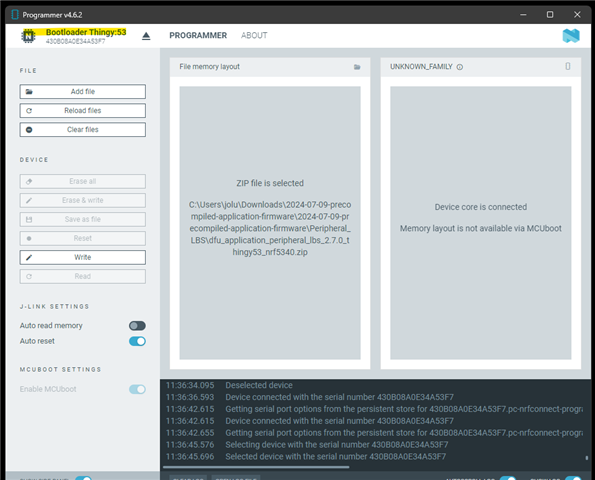
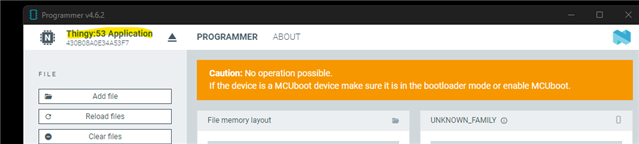
Issue: nRF Connect for Desktop Programmer app produced error -1073741819 when attempting to write firmware Error location: MCUboot DFU window after pressing "Write" Resolution: Switched to command-line nrfutil tool
nrfutil Command Line Usage
Working commands:
# Device detection
nrfutil device list

# Device detailed information
nrfutil device list --json

# Programming firmware
nrfutil device program --firmware [file.zip] --serial-number EADCC50F61DAF406

# Device recovery (failed in our case)
nrfutil device recover --serial-number EADCC50F61DAF406
Firmware Testing Results
Test 1: Custom I2C Sensor Firmware
Build: Successful Programming: Successful (100% completion) Result: Device becomes unresponsive immediately after programming Recovery: Hardware reset required
Test 2: Official Nordic Edge Impulse Firmware
Source: Nordic official downloads (2024-07-09-precompiled-application-firmware.zip) File: dfu_application_edge_impulse_thingy53_nrf5340.zip Programming: Successful (100% completion) Result: Device becomes unresponsive immediately after programming Recovery: Hardware reset required
Test 3: Custom UART Test Firmware
Build: Successful Build output:
Memory region         Used Size  Region Size  %age Used
           FLASH:       62956 B     916992 B      6.87%
RAM: 23312 B 440 KB 5.17%Programming: Successful (100% completion) Result: Device becomes unresponsive immediately after programming Recovery: Hardware reset required
Detailed Symptom Analysis
Consistent Pattern Observed
- Programming Phase: Always succeeds with 100% completion message
- Boot Phase: Device attempts to start application
- Failure Point: Application fails to run properly
- System Response: Complete loss of USB communication
- Detection:
nrfutil device listshows "Supported devices found: 0" - COM Port: COM9 disappears from system
- Recovery: Only possible through hardware reset methods
Hardware Recovery Methods
Method 1: Button hold during USB reconnection
- Unplug USB cable
- Hold user button (if present) while reconnecting
- Device returns to bootloader mode
Method 2: Rapid reconnection cycles
- Unplug USB cable
- Wait 10 seconds
- Rapidly unplug/replug USB 3-4 times
- Device returns to bootloader mode
Device Information in Working State (Bootloader Mode)
{
  "serialNumber": "EADCC50F61DAF406",
  "product": "Bootloader Thingy:53",
  "traits": {
    "mcuBoot": true,
    "nordicUsb": true,
    "serialPorts": true,
    "usb": true
  },
  "serialPorts": [{
    "comName": "COM9",
    "vendorId": "1915",
    "productId": "5300"
  }],
  "usb": {
    "manufacturer": "Nordic Semiconductor ASA",
    "product": "Bootloader Thingy:53",
    "bcdDevice": 519
  }
}
Troubleshooting Attempts
Software Recovery Attempts
# Failed recovery attempt
nrfutil device recover --serial-number EADCC50F61DAF406
# Error: The operation you tried to run is not available for the selected device

# Programming with additional options
nrfutil device program --options chip_erase_mode=ERASE_ALL,verify=VERIFY_READ --firmware [file] --serial-number EADCC50F61DAF406
# Result: Same failure pattern
Build System Verification
- Board target: Confirmed correct (
thingy53/nrf5340/cpuapp) - SDK version: nRF Connect SDK v3.1.0
- Configuration: All required serial/UART configs enabled
- Build success: All builds completed without errors
- DFU packages: Generated successfully by build system
Hardware Analysis
Bootloader Information
- Product ID: 5300 (Thingy:53 bootloader mode)
- Vendor ID: 1915 (Nordic Semiconductor)
- bcdDevice: 519 (potentially indicating bootloader/hardware revision)
- MCUboot: Present and functional
- Version details: Not exposed through available interfaces
USB Communication Analysis
- Bootloader mode: USB communication works perfectly
- Programming phase: USB communication stable throughout
- Application phase: Complete USB communication failure
- Recovery: Hardware reset restores USB functionality
Conclusion
Root Cause Assessment
The evidence strongly indicates a hardware defect in this specific Thingy:53 unit:
- Programming system functions correctly: Bootloader, USB communication, and DFU process work
- Multiple firmware types fail: Both custom applications and official Nordic firmware exhibit identical behavior
- Correct configuration confirmed: Board targets, serial settings, and build processes are verified correct
- Consistent failure pattern: Applications never successfully start regardless of complexity or source
- Hardware-level recovery required: Only physical reset methods can restore functionality
Hardware vs. Software Evidence
Hardware failure indicators:
- Any application firmware causes immediate system failure
- Complete loss of USB communication after programming
- COM port disappears from system
- Only bootloader remains functional
- Recovery requires hardware reset
Software issues ruled out:
- Multiple build configurations tested
- Official Nordic firmware tested
- Correct board targets used
- Proper serial/UART configuration verified
- Build processes complete successfully
Recommendations
- Contact Nordic Support for RMA/warranty replacement
- Provide serial number: EADCC50F61DAF406
- Document hardware defect: Application processor or power management failure
- Request replacement unit for continued development work
This Thingy:53 unit exhibits clear signs of internal hardware failure preventing normal application execution, despite having a functional bootloader and programming interface.