How to automate the entrance in bootloader mode on nRF52840 USB dongle?

Dear DEVZONE,

We are working on Nordic nRF58480 USB dongle for Thread activities.

We are using one testbench on which we need to automate with Python scripts reprogramming of the USB dongle with a new firmware.

To this end, we need to reflash the USB dongle; but nRF52480 requires a pression on a small button to enter into bootloader mode, and this is incompatible with automation.

We may find an HW fix to solve this limitation but we are rather wondering whether you have another solution you could propose?


We found a DFU trigger library (USB) thread but we did not succeed in exploiting it.

nRF5 SDK v17.0.2: DFU Trigger Library (USB)


Similarly, we found this document specifying the Device Firmware Upgrade over USB.

DFU_1.1.doc


Could you please support or advise us?

Warm regards

Cedric

  • Hi PJ,

    Thanks again for your detailed explanation — it really helped me understand the two approaches better.

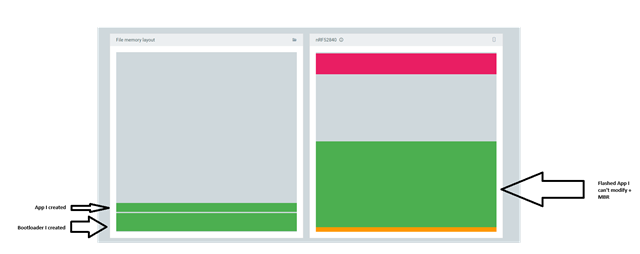
    With your advices I succeed to create my own bootloader. Thanks for that !

    I’d like to clarify my specific situation:

    • I cannot modify the application itself, as it’s provided to me in a precompiled .zip format (standardized across projects).
    • My goal is to replace the factory bootloader on the nRF52840 USB Dongle with a custom one that:
      • Stays in DFU mode for a short period after reset, waiting for a potential firmware update.
      • Then jumps to the existing application if no update is received.

    So I’m only looking to compile and flash the bootloader, without touching or rebuilding the application. This would allow me to update the app via DFU when needed, without requiring any changes to the app itself.

    From my perspective, it seems that Path B (MCUboot) might be closer to what I’m trying to achieve — assuming I can configure it to enter DFU mode temporarily after reset, even without cooperation from the application.


    Is there a way to overwrite the factory bootloader by a custom bootloader ?


    Tom.

  • Hi there,

    SO i'm not in way left field :grin:

    you want to use the Dongle with custom Bootloader and Firmware App.

    The Bootloader presently is immutable(can't be update, by code). You would need to erase the device completely. Program/SWD and Add your bootloader (MCUboot)maybe and recommended.

    When it's in DFU mode. give it your app and cross your fingers is what I see? , Now perhaps there is a software method in your Bootloader to Reboot and PAUSE ?(allows app update ONLY) , X-seconds and continues to app installed...

    Feels very Generic and Vanilla to me. 

    LMK ?

    And others will comment...

    HTH

    GL :-) PJ V

  • Hi Cedric and Tom, 

    Could you please let me know which SDK your application on the dongle is built on ? 
    If your application is on the legacy nRF5 SDK I don't think adding MCUBoot would be the best option as it involve nRF Connect SDK. 

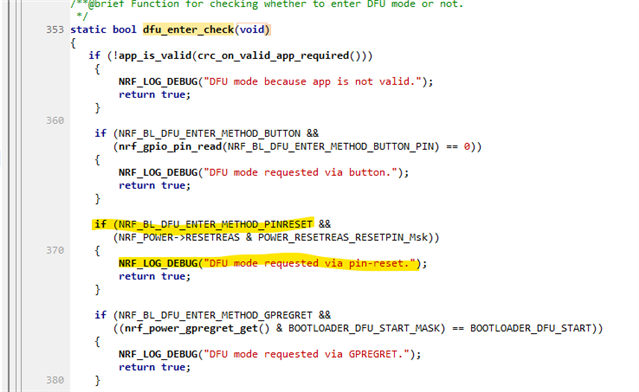
    Putting the nRF52840 dongle to DFU mode is quite simple. During booting up, the bootloader will check for the reset reason and if it's s a pin reset it will enter DFU mode. You can find this code in the bootloader (nrf_bootloader.c):


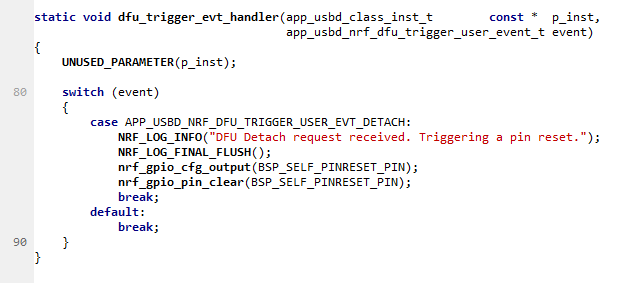
    So the task for the application is to toggle a GPIO pin that connect externally to the reset pin to trigger a pin reset from the software. This is exactly what the DFU trigger library does. 
    You can find many of our application for the dongle already support this, for example you can switch between the firmware for the NRF52840 dongle for nRF Connect for Desktop -> Bluetooth Low Energy application and nRF Connect for Desktop -> RSSI viewer application without having to press any button. The firmware automatically switch to bootloader mode without any intervention to press any button. 

    We will need to see how you implemented the DFU trigger library and what error you have. You can take a look at the \examples\connectivity\ble_connectivity\pca10059 to see how it's implemented. 

    Or you can simply try a simple test to set BSP_SELF_PINRESET_PIN to 0 in your application code to see if the dongle switch to DFU mode or not (The LED breaths red). This code in nrf_dfu_trigger_usb.c put the chip to DFU mode: 

  • Hi again, 
    I got noticed about the constrain Robin mentioned: 

    Robin D. said:
    without making any modification to the firmware we are flashing on the dongle (we use the firmware provided with the Thread Test Harness so we can't modify it).

    Could you explain a little bit more on this ? Is the firmware a precompiled hex file ? Any chance to recompile this ? 

  • Hi,

    Thank you for your response.

    Unfortunately, I am unable to recompile the application, as it is a precompiled app (.zip) that was provided to me. This means I have no visibility into the app’s internals, except for what I can access through the serial connection and any printed output.

Related