Issue with west ncs-provision upload during DFU provisioning on nRF54L15DK

I'm following the Lesson 9, Exercise 2: DFU over USB - Adding External Flash from the Nordic Academy: Tutorial Link

SoC: nrf54l15

SDK version: 3.0.2

Toolchain version: 3.0.2

Problem:

I am able to follow the tutorial properly up untill the KMU provisioning step. 

But for the provisioniing command:

west ncs-provision upload -s nrf54l15 -k private_key.pem

I am getting: 

nrfutil device x-provision-keys --key-file C:\Users\Admin\AppData\Local\Temp\nrfutil_jf766dmw\keyfile.json --traits jlink
Traceback (most recent call last):
  File "<frozen runpy>", line 198, in _run_module_as_main
  File "<frozen runpy>", line 88, in _run_code
  File "C:\Users\Admin\AppData\Local\Programs\Python\Python312\Scripts\nrfutil.exe\__main__.py", line 4, in <module>
  File "C:\Users\Admin\AppData\Local\Programs\Python\Python312\Lib\site-packages\nordicsemi\__main__.py", line 53, in <module>
    from nordicsemi.dfu.dfu_transport_serial import DfuTransportSerial
  File "C:\Users\Admin\AppData\Local\Programs\Python\Python312\Lib\site-packages\nordicsemi\dfu\dfu_transport_serial.py", line 52, in <module>
    from nordicsemi.lister.device_lister import DeviceLister
  File "C:\Users\Admin\AppData\Local\Programs\Python\Python312\Lib\site-packages\nordicsemi\lister\device_lister.py", line 39, in <module>
    from nordicsemi.lister.windows.lister_win32 import Win32Lister
  File "C:\Users\Admin\AppData\Local\Programs\Python\Python312\Lib\site-packages\nordicsemi\lister\windows\lister_win32.py", line 43, in <module>
    from constants import DIGCF_PRESENT, DEVPKEY, DIGCF_DEVICEINTERFACE
ModuleNotFoundError: No module named 'constants'

Uploading failed!

What I’ve Tried:

  • I downgraded protobuf to 3.20.x as previously suggested in other threads.

  • Verified that nrfutil and west are both from the NCS v3.x toolchain.

  • Verified my key file is valid and present.

  • I'm running this on Python 3.12

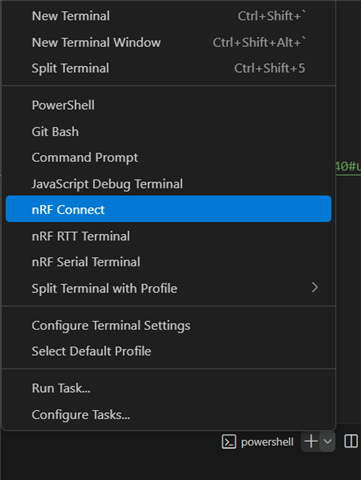
  • Hi, where are you running the command from? If you are using VSCode, go to NRF Connect, open the terminal and run the command there.
    if this doesn't work, run "Get-Command nrfutil | Select-Object Path" (in the VSCode terminal) or "where nrfutil" in CMD

    or 

    "which nrfutil
    type -a nrfutil" if Mac or Linux

    The path should be something similar to this "C:\ncs\toolchains\b8b84efebd\nrfutil\bin\nrfutil.exe". If it's not, set it to the correct nrfutil.exe

  • i added the nrfutil exe file to the location as mentioned - "C:\ncs\toolchains\b8b84efebd\nrfutil\bin\nrfutil.exe" and verified using "Get-Command nrfutil | Select-Object Path" which outputs the same path.
    now the "west ncs-provision upload -s nrf54l15 -k private_key.pem" commands works with output as - 

    west ncs-provision upload -s nrf54l15 -k private_key.pem
    nrfutil device x-provision-keys --key-file C:\Users\Admin\AppData\Local\Temp\nrfutil_lq2m1dbw\keyfile.json --traits jlink
    Uploaded!

    And on flashing the code, the device is getting stuck into bootlooder itself in the "FIH_PANIC;" of the main.c in bootloader.

  • Sorry for the late response. I was travelling.

    That behaviour suggests that there is a key inconsistency.
    1/ Can you double check if SB_CONFIG_BOOT_SIGNATURE_KEY_FILE is pointing to the right key file?
    2/ Ensure the private key used to sign your application image is the same as the one you provisioned to the device
    3/ Confirm that the application image is being signed during the build process and that no errors occur during signing

    If you are still having trouble please send over the terminal/error log.

  • Thank you for your support, we re-executed the procedure properly with appropriate binaries and environment paths and it worked as intended. 
    But now we are trying to execute west commands from the windows terminal (cmd/powershell) which is not happening and we are getting the following error -: 

    west flash
    Traceback (most recent call last):
      File "<frozen runpy>", line 198, in _run_module_as_main
      File "<frozen runpy>", line 88, in _run_code
      File "C:\ncs\toolchains\0b393f9e1b\opt\bin\Scripts\west.exe\__main__.py", line 4, in <module>
    ModuleNotFoundError: No module named 'west'

    we have tried executing the command from appropirate ncs base locations as well as from the west.exe source.

    How can we execute west related commands from the powershell terminal in windows?

  • Hi, you can use nRF Connect for VS Code and choose the "nRF Connect" profile


    or you can run "nrfutil sdk-manager toolchain launch --ncs-version v3.1.0 --terminal" (or whatever ncs version that you are using if it's newer than 3.0)

    The error that you are seeing is most likely because the environment is not properly set up for west

    Run these is you still run into errors for me to see what's wrong.

    where west
    west --version

Related