Matter Cluster Editor not saving struct definitions and cannot create array arguments

I am working on a custom Cluster Definition Using Matter Cluster Editor  0.1.0

I have created a couple of structures on the structure tab and they are not being saved to the output xml file

it does load them if i add manually, but not save them if i save again 


secondly 

i cannot set command arguments as arrays, though i can by manually editing xml file and it is recognized if i reload 


thx


Parents
  • Additionally It does not appear to save Device Type

    e.g Open editor

    fill in entries on device page


    and save, get no errors, and all get in file is 

    <?xml version="1.0" encoding="UTF-8" standalone="yes"?>
    <configurator>
      <deviceType/>
    </configurator>


  • Hello, 

    Thank you for reporting this. We are still in early days of the Matter Cluster Editor, so we appreciate that you are using the tool and reporting issues you come across. 

    I have created a couple of structures on the structure tab and they are not being saved to the output xml file

    it does load them if i add manually, but not save them if i save again 

    This is a known issue which will be fixed in the next release of the tool. Keep an eye out for updates!

    i cannot set command arguments as arrays, though i can by manually editing xml file and it is recognized if i reload 
    ctyerman said:

    Additionally It does not appear to save Device Type

    e.g Open editor

    fill in entries on device page


    and save, get no errors, and all get in file is 

    I will try to confim these issues and report it internally if I successfully reproduce them. 

    Best regards,

    Maria

  • Hi again, 

    ctyerman said:

    Additionally It does not appear to save Device Type

    e.g Open editor

    fill in entries on device page


    and save, get no errors, and all get in file is 

    I was able to reproduce this. It is the expected outcome when you don't load a .xml cluster file to base your editing on. Make sure to select a file with "Load from file" before adding to or editing the cluster. 

    i cannot set command arguments as arrays, though i can by manually editing xml file and it is recognized if i reload 

    I was not able to reproduce this. That is, selecting array as the argument type was successfully added to the generated .xml: 

    Could you please share some more details? I.e. are you not able to choose array from the type menu, or are you expecting there to be an "array" toggle for your argument? As far as I can tell there are no way to implement the array toggle feature in the current version of the Matter Cluster Editor. 

    Best regards,

    Maria

  • I was able to reproduce this. It is the expected outcome when you don't load a .xml cluster file to base your editing on. Make sure to select a file with "Load from file" before adding to or editing the cluster. 

    I was trying to create a new cluster & device type how would you use this in that situation?

    https://docs.nordicsemi.com/bundle/nrf-connect-matter-cluster-editor/page/creating_new_cluster.html

    https://docs.nordicsemi.com/bundle/nrf-connect-matter-cluster-editor/page/creating_device_type.html

    Last step of second Page

    "6. Click the Save extension to file or Save cluster type to file button depending on the purpose of the file."

    "Save cluster type to file" button doesn't seem to exist, typo?, and the "Save cluster to File" doesn't save the device type

    I was not able to reproduce this. That is, selecting array as the argument type was successfully added to the generated .xml: 

    Could you please share some more details? I.e. are you not able to choose array from the type menu, or are you expecting there to be an "array" toggle for your argument? As far as I can tell there are no way to implement the array toggle feature in the current version of the Matter Cluster Editor. 


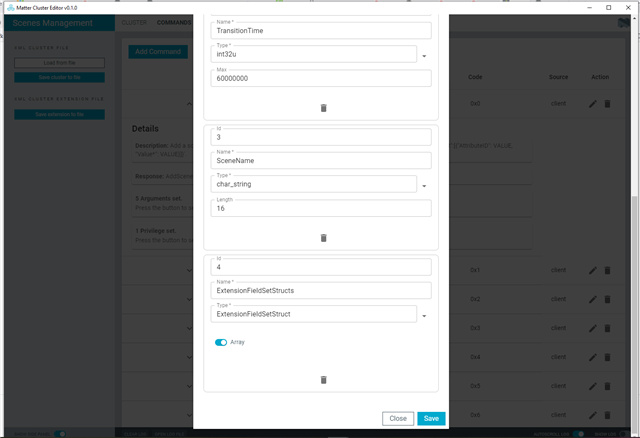
    to be more clear I am talking about arrays of struct

    I know these are possible as they are used in the spec

    e.g Scenes Management Cluster(external/modules/lib/matter/src/app/zap-templates/zcl/data-model/chip/scene.xml)

        <command source="client" code="0x00" name="AddScene" response="AddSceneResponse" isFabricScoped="true" optional="false" cli="chip scenes add">
          <description>Add a scene to the scene table. Extension field sets are input as '{"ClusterID": VALUE, "AttributeValueList":[{"AttributeID": VALUE, "Value*": VALUE}]}'.</description>
          <arg id="0" name="GroupID" type="group_id"/>
          <arg id="1" name="SceneID" type="int8u" max="254"/>
          <arg id="2" name="TransitionTime" type="int32u" max="60000000"/>
          <arg id="3" name="SceneName" type="char_string" length="16"/>
          <arg id="4" name="ExtensionFieldSetStructs" type="ExtensionFieldSetStruct" array="true"/>
          <access op="invoke" role="manage"/>
        </command>


    if i load this cluster into Matter Cluster Editor  0.1.0  it is shown  


    however there is currently no way to set this for a new argument that i can find, other than manually editing the xml file

  • Hello,

    ctyerman said:
    I was trying to create a new cluster & device type how would you use this in that situation?

    I see. You should be able to populate everything you need in the GUI to generate a functioning .xml. I did a trial with the Scenes Management Cluster and the .xml was populated nicely. It could be that you have some fields with an unsupported format. Take the hints into account when you populate the fields with the details for your new cluster and device type, and let me know if there is something unclear about the hints. 

    ctyerman said:
    "Save cluster type to file" button doesn't seem to exist, typo?, and the "Save cluster to File" doesn't save the device type

    "Save cluster type to file" is a typo, yes. It should be "Save cluster to file". 

    Regarding the device type not saving: Make sure that you are using the correct format in each field (like I also mentioned above). For example, I am able to consistently reproduce that the device type does not save when there is a space in the Name field for the device type. 

    ctyerman said:
    however there is currently no way to set this for a new argument that i can find, other than manually editing the xml file

    This is not supported by the Matter Cluster Editor v0.1.0. You will need to manually add this to the .xml file. Apologies for the inconvenience. 

    Best regards,

    Maria

Reply
  • Hello,

    ctyerman said:
    I was trying to create a new cluster & device type how would you use this in that situation?

    I see. You should be able to populate everything you need in the GUI to generate a functioning .xml. I did a trial with the Scenes Management Cluster and the .xml was populated nicely. It could be that you have some fields with an unsupported format. Take the hints into account when you populate the fields with the details for your new cluster and device type, and let me know if there is something unclear about the hints. 

    ctyerman said:
    "Save cluster type to file" button doesn't seem to exist, typo?, and the "Save cluster to File" doesn't save the device type

    "Save cluster type to file" is a typo, yes. It should be "Save cluster to file". 

    Regarding the device type not saving: Make sure that you are using the correct format in each field (like I also mentioned above). For example, I am able to consistently reproduce that the device type does not save when there is a space in the Name field for the device type. 

    ctyerman said:
    however there is currently no way to set this for a new argument that i can find, other than manually editing the xml file

    This is not supported by the Matter Cluster Editor v0.1.0. You will need to manually add this to the .xml file. Apologies for the inconvenience. 

    Best regards,

    Maria

Children
  • Regarding the device type not saving: Make sure that you are using the correct format in each field (like I also mentioned above). For example, I am able to consistently reproduce that the device type does not save when there is a space in the Name field for the device type. 

    ok I have isolated one problem with saving device type, it appears not to save if you specify a cluster name not present in the editor, I assume this should be possible as different clusters are defined in separate files
    and you many need a device with more than one cluster

    e.g
    MA-control-bridge (deviceId 0x0840)

    in matter-devices.xml

    This example wont save 

    <?xml version="1.0" encoding="UTF-8" standalone="yes"?>
    <configurator>
      <cluster>
        <domain>Lighting</domain>
        <name>Test Cluster</name>
        <code>0xff1fc00</code>
        <define>test_cluster</define>
    
      </cluster>
        <deviceType>
            <name>test</name>
            <domain>Lighting</domain>
            <typeName>Test</typeName>
            <profileId editable="false">0x0104</profileId>
            <deviceId editable="false">0xFFF100F1</deviceId>
            <clusters lockOthers="false">
                <include cluster="Test Cluster" client="false" server="true" clientLocked="false" serverLocked="false"/>
                <include cluster="Test Cluster2" client="false" server="true" clientLocked="false" serverLocked="false"/>
            </clusters>
        </deviceType>
    </configurator>


    If you load this it will load but removes the Device type on save, but if you remove the second cluster it will save

  • Hello, 

    I did some testing on this as well, and I found that when loading your test .xml into the Matter Cluster Editor and directly saving to file, the device type was not saved (like you describe). However, when I selected edit and save (without editing anyting) on one of the assigned clusters, saving to file included the device type. Still, I have reported this saving issue internally so the behaviour can be improved. I hope that the workaround to "edit" one assigned cluster works for you in the mean time. 

    Thanks again for reporting your issues with the tool, we appreciate your feedback! 

    Please also let me know if there is an issue which I haven't adressed properly yet. 

    Best regards,

    Maria

  • Hello again, 

    The device type saving issue will also be fixed in the next release of the Matter Cluster Editor. 

    Best regards,

    Maria

  • thanks, i think I've worked around everything i need to, I'll look at next version when its released

Related