- nRF connection Desktop v5.2.0
- Toolchain Manager v1.6.0
- nRF connect SDK v2.9.2
- Visual studio code
- Windows 11 pro Platform
https://drive.google.com/file/d/1H2-U1TbJMtUYYoJxIF3my1jbIpdYBWpn/view?usp=sharing
Thanks & Regards,
Naveen P
https://drive.google.com/file/d/1H2-U1TbJMtUYYoJxIF3my1jbIpdYBWpn/view?usp=sharing
Thanks & Regards,
Naveen P
Hi,
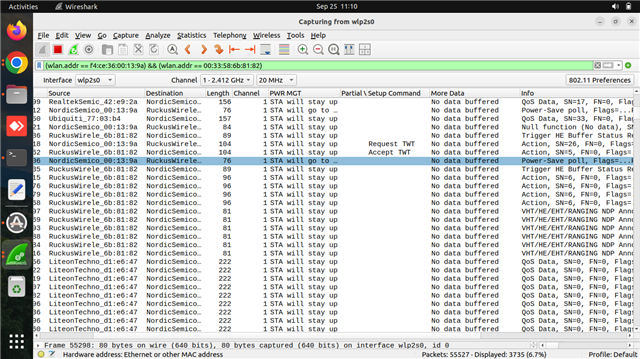
TWT connection established is with flow type announced and no Trigger enabled.
Nordic STA sends PS poll for every wake up to inform AP since TWT connection is announced with trigger disabled.
This is expected behaviour after every warm boot.
Are you sure DK is not entering in to sleep? You can take a look at this course: https://academy.nordicsemi.com/courses/wi-fi-fundamentals/lessons/lesson-2-wifi-fundamentals/topic/lesson-2-exercise-1-2/
-Amanda H.
Hi,
TWT connection established is with flow type announced and no Trigger enabled.
Nordic STA sends PS poll for every wake up to inform AP since TWT connection is announced with trigger disabled.
This is expected behaviour after every warm boot.
Are you sure DK is not entering in to sleep? You can take a look at this course: https://academy.nordicsemi.com/courses/wi-fi-fundamentals/lessons/lesson-2-wifi-fundamentals/topic/lesson-2-exercise-1-2/
-Amanda H.
Hi Amsnda,
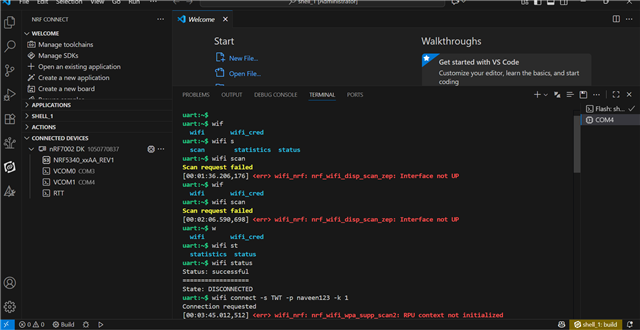
As you advised, we followed this guide (https://academy.nordicsemi.com/courses/wi-fi-fundamentals/lessons/lesson-2-wifi-fundamentals/topic/lesson-2-exercise-1-2/), but we are facing the issue 'Wi-Fi interface not up'.
Please find the attached screenshot for your reference.

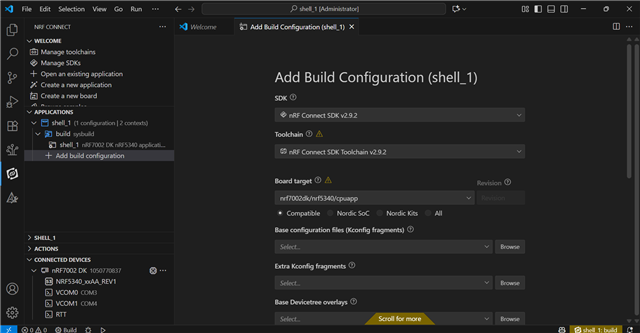
While adding the build configuration, it is asking for some options. Could you please suggest which options we need to provide?
Please find the attached screenshot for your reference.

Thanks & Regards,
Naveen P
Hi,
Just found that this case is a duplicate of this one The client does not enter sleep mode as expected, and my colleague is working on your case. Please continue the discussion in that case, and don't duplicate support cases for the same issue.
Regards,
Amanda H.